Dhs 1179a 2025

Get Form
dhs 1179a Preview on Page 1

Here's how it works

01. Edit your form online
Type text, add images, blackout confidential details, add comments, highlights and more.
02. Sign it in a few clicks
Draw your signature, type it, upload its image, or use your mobile device as a signature pad.
03. Share your form with others
Send it via email, link, or fax. You can also download it, export it or print it out.

How to use or fill out dhs 1179a with our platform

Form edit decoration
9.5
Ease of Setup
DocHub User Ratings on G2
9.0
Ease of Use
DocHub User Ratings on G2
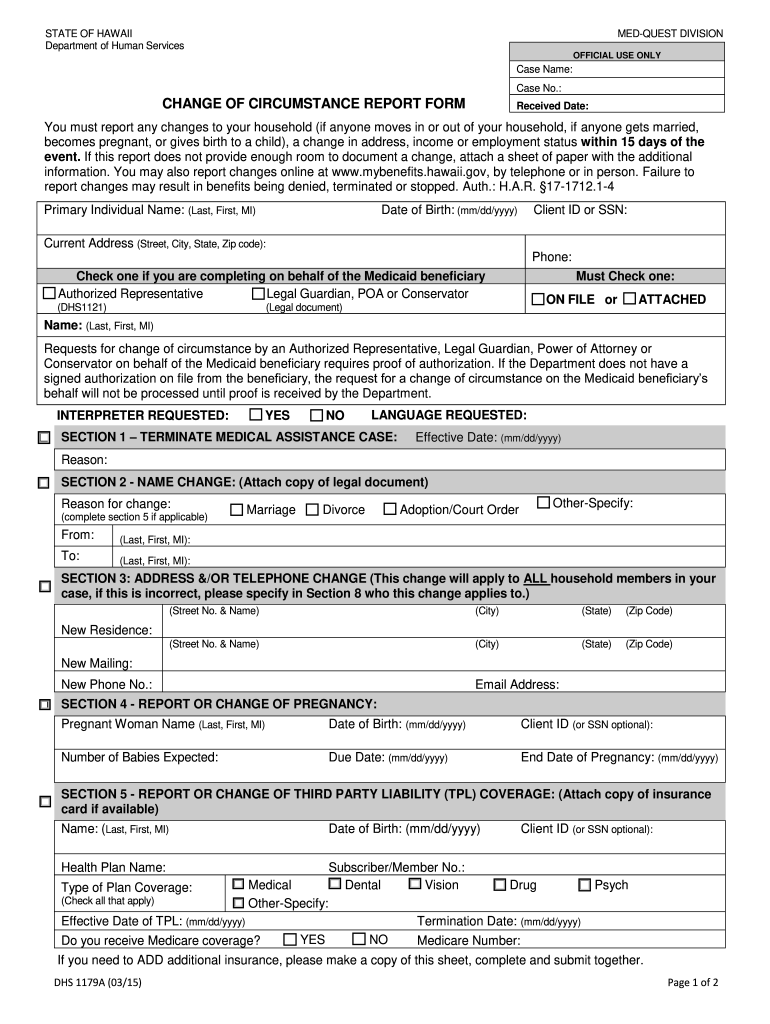
  1. Click ‘Get Form’ to open the dhs 1179a in the editor.
  2. Begin by filling in the 'Primary Individual Name' and 'Date of Birth' fields. Ensure accuracy as this information is crucial for identification.
  3. In Section 1, indicate if you are terminating medical assistance by providing the effective date and reason for termination.
  4. For name changes in Section 2, complete both 'From' and 'To' fields, attaching any necessary legal documents.
  5. Update your address and phone number in Section 3. Remember that these changes apply to all household members unless specified otherwise.
  6. If applicable, report pregnancy details in Section 4, including expected due date and number of babies.
  7. In Section 5, provide information about any third-party liability coverage, attaching a copy of your insurance card if available.
  8. Complete Sections 6 through 8 as needed, ensuring all relevant changes are documented accurately before submitting.

Start using our platform today to fill out your dhs 1179a form easily and for free!

See more dhs 1179a versions

We've got more versions of the dhs 1179a form. Select the right dhs 1179a version from the list and start editing it straight away!
Versions Form popularity Fillable & printable
2015 4.8 Satisfied (41 Votes)
be ready to get more

Complete this form in 5 minutes or less

Get form

Got questions?

We have answers to the most popular questions from our customers. If you can't find an answer to your question, please contact us.
Contact us

Based on eSignature regulations, documents approved electronically have the same validity as those approved with pen and paper. You can eSign almost any business and private documentation. Four types of documents still call for handwritten signatures only - wills and testamentary trusts, court orders and other court forms, state statutes regulating divorce, adoption, or other family law, and notice of cancellation of utility services. If you follow the regulations and use a secure and compliant software solution, like DocHub, you can eSign your dhs 1179a without printing it.

You can find the latest and most relevant version of the dhs 1179a in our DocHub forms library. Search it by categories or utilize the search field to get the exact template that suits your situation. You can open this form for editing after you find it.

DEPARTMENT OF HUMAN SERVICES. .
Call the DHS Customer Service Helpline for assistance at: (800) 843-6154 voice/(866) 324-5553 TTY, Monday through Friday, 8:00 a.m. to 5:30 p.m., except state holidays.
Contact Information for DHS Headquarters Operator Number: 202-282-8000. Comment Line: 202-282-8495. TTY: Use the Federal Relay Service for either number above. DHS Mailing Address.

Security and compliance

At DocHub, your data security is our priority. We follow HIPAA, SOC2, GDPR, and other standards, so you can work on your documents with confidence.

Learn more

People also ask

Medicaid eligibility is based on where you live, how much money you make each year and the number of people in your household. Its worth applying even if you dont think you qualify. Whether you have children, are pregnant or have a disability are all taken into consideration.

Related links