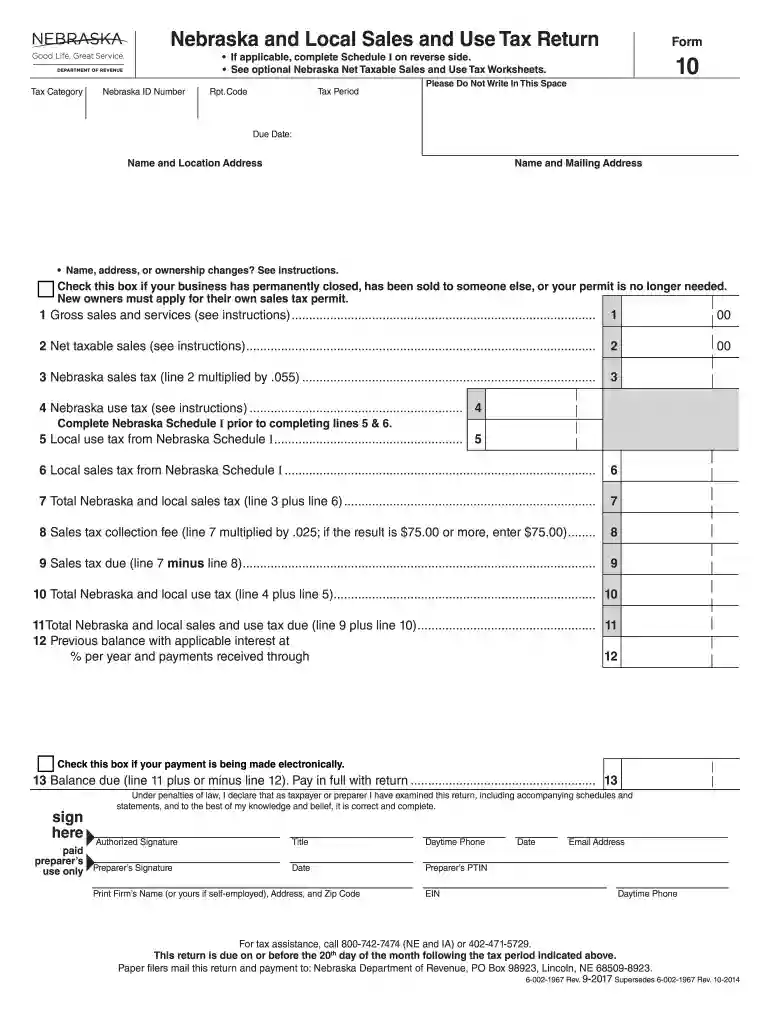
Nebraska form 10 2026

Get Form
form 10 nebraska Preview on Page 1

Here's how it works

01. Edit your form 10 nebraska online
Type text, add images, blackout confidential details, add comments, highlights and more.

02. Sign it in a few clicks
Draw your signature, type it, upload its image, or use your mobile device as a signature pad.

03. Share your form with others
Send nebraska sales and use tax form 10 via email, link, or fax. You can also download it, export it or print it out.

How to use or fill out Nebraska Form 10 with our platform

Form edit decoration
9.5
Ease of Setup
DocHub User Ratings on G2
9.0
Ease of Use
DocHub User Ratings on G2
  1. Click ‘Get Form’ to open Nebraska Form 10 in the editor.
  2. Begin by entering your Nebraska ID Number and the tax period at the top of the form. Ensure that all information is accurate to avoid delays.
  3. Fill in your business name and mailing address. If there are any changes, mark through the old information and write the new details clearly.
  4. Complete lines 1 through 11 by entering your gross sales, net taxable sales, and applicable taxes as instructed. Use the optional worksheets for assistance if needed.
  5. If applicable, complete Schedule I on the reverse side for local sales and use tax details. Make sure to total these amounts correctly.
  6. Sign and date the form at the bottom. If you are using a preparer, ensure they sign as well.

Start filling out your Nebraska Form 10 today for free using our platform!

See more nebraska form 10 versions

We've got more versions of the nebraska form 10 form. Select the right nebraska form 10 version from the list and start editing it straight away!
Versions Form popularity Fillable & printable
2022 4.3 Satisfied (45 Votes)
2022 4.6 Satisfied (50 Votes)
2021 4.8 Satisfied (91 Votes)
2020 4.4 Satisfied (102 Votes)
2019 4.2 Satisfied (51 Votes)
2017 4.3 Satisfied (87 Votes)
2011 4.4 Satisfied (336 Votes)
2005 4.2 Satisfied (66 Votes)
be ready to get more

Complete this form in 5 minutes or less

Get form

Got questions?

We have answers to the most popular questions from our customers. If you can't find an answer to your question, please contact us.
Contact us
Step 1: Go to the e-Filing portal and click login. Step 2: On Login Page enter your user ID and password. Step 3: On your Dashboard, Go to e- File menu Income Tax Forms File Income Tax Forms. Step 4: On the page- File Income Tax Forms -Persons with Business/Professional Income -select the option-Form-10IEA.
SEC Form 10 is a filing with the Securities and Exchange Commission (SEC), also known as the General Form for Registration of Securities. It is used to register a class of securities for potential trading on U.S. exchanges.
To obtain a Nebraska sales tax exemption certificate, you must complete Form 13, Nebraska Resale or Exempt Sale Certificate. The form and instructions are available on the Nebraska Department of Revenue website.
Documents you may need to provide Proof of the workers death; Birth certificate or other proof of birth; Proof of U.S. citizenship or lawful alien status if you were not born in the United States [More Info]; U.S. military discharge paper(s) if you had military service before 1968;
You have three options for filing and paying your Nebraska sales tax: File online File Form 10 online at the Nebraska Department of Revenue. You can also remit your payment through Nebraska E-Pay. File by mail You can use Form 10 and file and pay through the mail.

People also ask

For an exempt sale certificate to be fully completed, it must include: (1) identification of purchaser and seller; (2) a statement that the certificate is for a single purchase or is a blanket certificate covering future sales; (3) a statement of the basis for exemption, including the type of activity engaged in by the
The SEC requires a company to file SEC Form 10 when it has more than $10 million in total assets and more than 500 shareholders. A company with fewer shareholders or assets may voluntarily make this SEC filing, but it is not required.

Related links