Group Oral Presentation Rubric 2026

Get Form
rubrics for group activity Preview on Page 1

Here's how it works

01. Edit your rubrics for group activity online
Type text, add images, blackout confidential details, add comments, highlights and more.
02. Sign it in a few clicks
Draw your signature, type it, upload its image, or use your mobile device as a signature pad.
03. Share your form with others
Send group presentation rubric via email, link, or fax. You can also download it, export it or print it out.

How to use or fill out Group Oral Presentation Rubric with DocHub

Form edit decoration
9.5
Ease of Setup
DocHub User Ratings on G2
9.0
Ease of Use
DocHub User Ratings on G2
  1. Click ‘Get Form’ to open the Group Oral Presentation Rubric in our editor.
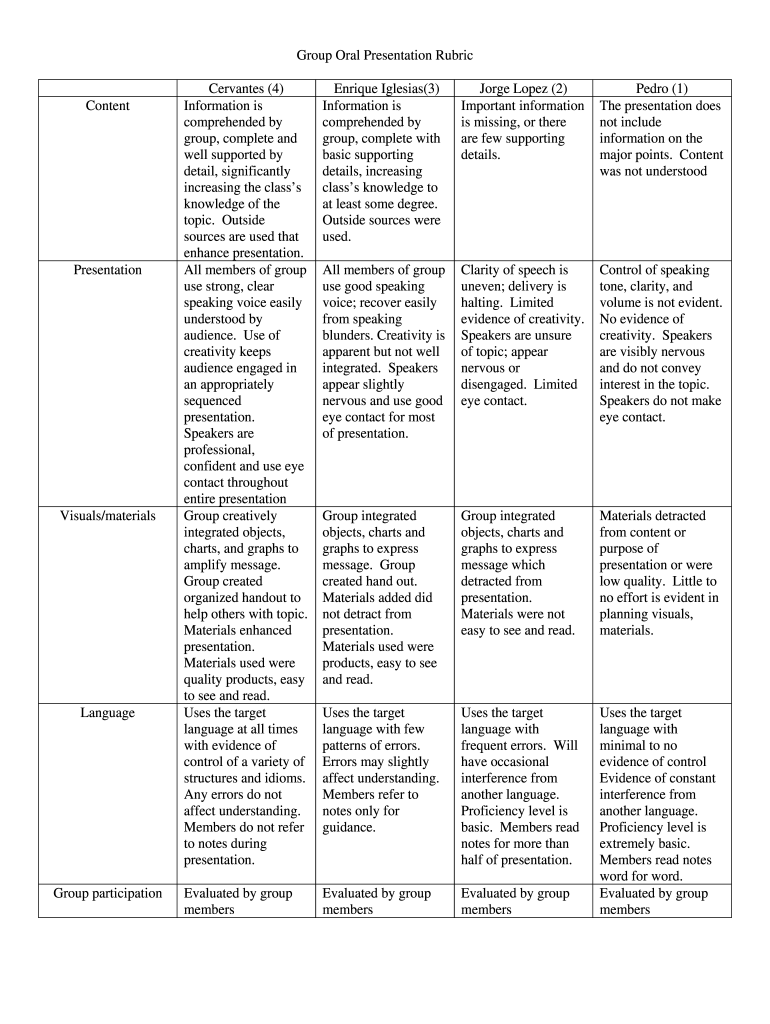
  2. Begin by reviewing the 'Presentation' section. Here, assess how well your group comprehended the topic and supported it with details. Use the scoring system from 1 to 4 to evaluate each member's contribution.
  3. Next, move to the 'Visuals/materials' section. Evaluate how effectively your group integrated visuals like charts and graphs. Ensure that materials used were clear and enhanced the presentation.
  4. In the 'Language' section, consider how well each member used the target language during their presentation. Score based on clarity and control of language structures.
  5. Finally, complete the 'Group Evaluation' section by recording each member’s name, score, and rationale for their evaluation. This will help provide constructive feedback.

Start using our platform today to streamline your document editing and enhance your group presentations for free!

be ready to get more

Complete this form in 5 minutes or less

Get form

Got questions?

We have answers to the most popular questions from our customers. If you can't find an answer to your question, please contact us.
Contact us

With DocHub, it’s pretty simple. The platform offers users an add-on called DocHub for Gmail, which you can locate in the Google Workspace Marketplace without being charged. Set it up and grant it access to your Google account. Open your email with your rubric for group presentation attached and click on the add-on button in the right-side panel. Sign in to your DocHub account, and import the form to our editor, where you can complete it and sign.

If you edit your group project presentation rubric with DocHub, you only need a stable web connection and virtually any browser installed on your device. No need to set up any third-party software or study tutorials. Just open a tab with DocHub, drag and drop your file, and edit it on the spot.

Heidi Goodrich Andrade, a rubrics expert, defines a rubric as "a scoring tool that lists the criteria for a piece of work or 'what counts. ' " For example, a rubric for an essay might tell students that their work will be judged on purpose, organization, details, voice, and mechanics.
To score a presentation, the teacher will assess each criterion below as Poor, Good, or Excellent. Then the teacher will assign each Poor rating 0 points, each Good 1 point, and each Excellent 2 points. Well Organized. Site's structure makes sense and it is easily navigated.
The 5Ps of presentation \u2013 planning, preparation, practice, performance, and passion \u2013 are a guide for a successful presentation.

Security and compliance

At DocHub, your data security is our priority. We follow HIPAA, SOC2, GDPR, and other standards, so you can work on your documents with confidence.

Learn more
ccpa2
pci-dss
gdpr-compliance
hipaa
soc-compliance
be ready to get more

Complete this form in 5 minutes or less

Get form

People also ask

All types of presentations consist of three basic parts: the introduction, the body, and the conclusion.
Be yourself, relax, and practice some deep breathing techniques; \u2022 Sound conversational and enthusiastic; \u2022 Use key phrases in your notes so you do not have to read them; \u2022 Try to use your slides more than your notes; \u2022 Vary volume; \u2022 Don't be afraid of some silence and do not use fillers such as \u201cum\u201d; \u2022 Nervousness is ...
A rubric is a scoring guide used to evaluate performance, a product, or a project. It has three parts: 1) performance criteria; 2) rating scale; and 3) indicators. For you and your students, the rubric defines what is expected and what will be assessed.
organised in a logical way. appropriate use of body language. direct eye contact with the audience. spoken clearly making use of props where relevant.
The purpose of the group presentation is to seek out and report information concerning a text that will be valuable to our class discussions. The presentations will provide an introduction to the work, and help others in the class identify what is interesting/controversial/artistic about the text.

rubrics for reporting in class