




Here's how it works

01. Edit your form online
Type text, add images, blackout confidential details, add comments, highlights and more.

02. Sign it in a few clicks
Draw your signature, type it, upload its image, or use your mobile device as a signature pad.

03. Share your form with others
Send it via email, link, or fax. You can also download it, export it or print it out.
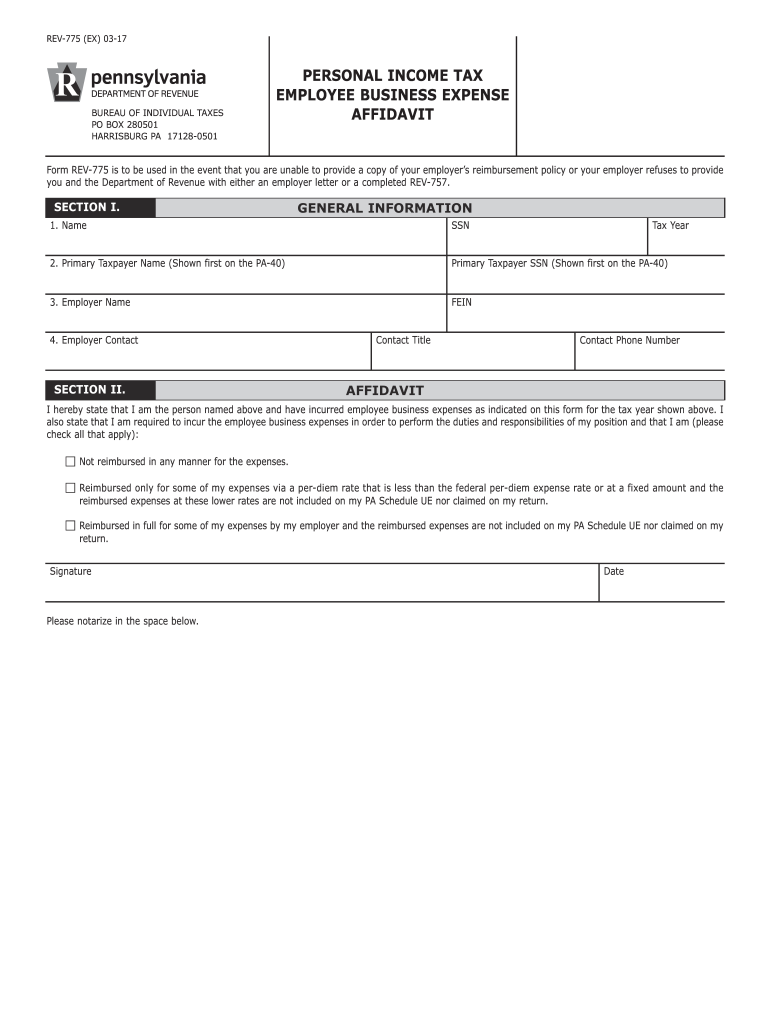
How to use or fill out HARRISBURG PA 17128-0501 with our platform

- Click ‘Get Form’ to open the HARRISBURG PA 17128-0501 document in the editor.
- Begin with SECTION I. Fill in your name, Social Security Number (SSN), and tax year at the top of the form. Ensure accuracy as this information is crucial for processing.
- Continue by entering the Primary Taxpayer Name and SSN, followed by your Employer Name and Federal Employer Identification Number (FEIN). This section establishes your identity and employment details.
- In SECTION II, provide your employer's contact information including their title and phone number. This helps verify your employment status.
- Complete the Affidavit section by confirming that you have incurred employee business expenses. Check all applicable boxes regarding reimbursement status.
- Sign and date the form where indicated. Remember to print it out for signing as electronic signatures are not accepted here.
- Lastly, move to SECTION III to summarize your expenses. List each claimed expense along with its description and amount, ensuring you attach photocopied receipts for verification.
Start using our platform today to easily fill out and manage your HARRISBURG PA 17128-0501 form online for free!
Fill out HARRISBURG PA 17128-0501 online
It's free
It's free
See more HARRISBURG PA 17128-0501 versions
We've got more versions of the HARRISBURG PA 17128-0501 form. Select the right HARRISBURG PA 17128-0501 version from the list and start editing it straight away!
Security and compliance
At DocHub, your data security is our priority. We follow HIPAA, SOC2, GDPR, and other standards, so you can work on your documents with confidence.
Learn more


