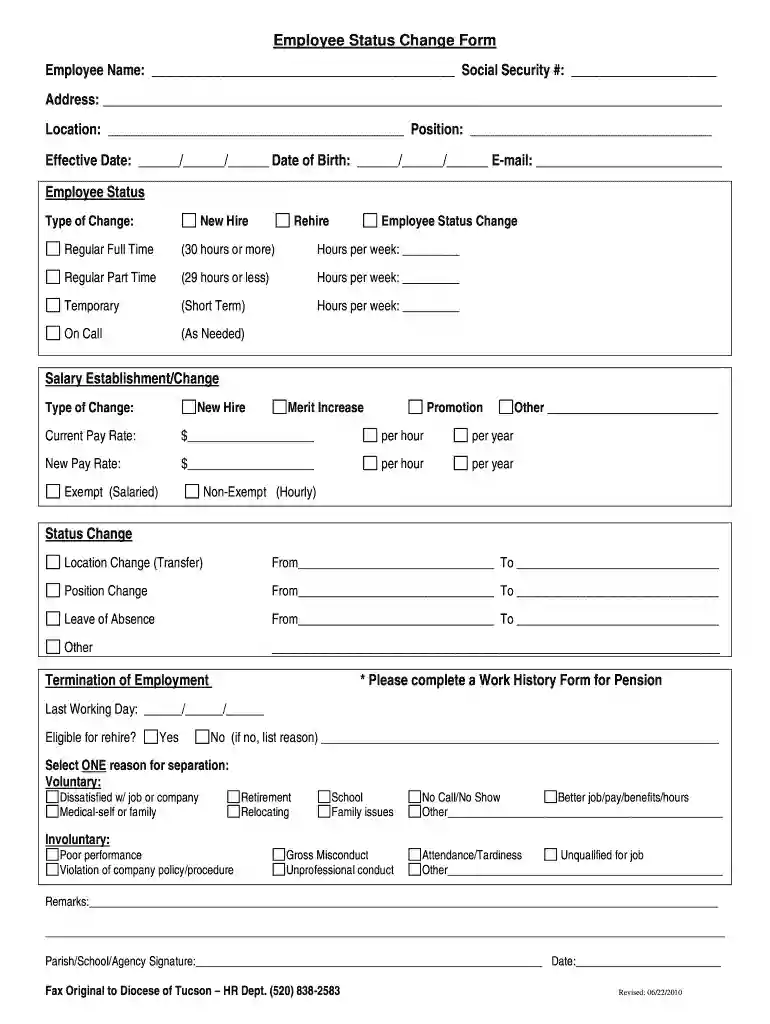
Employee Status Change Form Employee Name - Diocese of Tucson - diocesetucson 2025

Get Form
status change form template Preview on Page 1

Here's how it works

01. Edit your status change form template online
Type text, add images, blackout confidential details, add comments, highlights and more.

02. Sign it in a few clicks
Draw your signature, type it, upload its image, or use your mobile device as a signature pad.

03. Share your form with others
Send employee status change form via email, link, or fax. You can also download it, export it or print it out.

How to use or fill out Employee Status Change Form Employee Name - Diocese of Tucson - diocesetucson with DocHub

Form edit decoration
9.5
Ease of Setup
DocHub User Ratings on G2
9.0
Ease of Use
DocHub User Ratings on G2
  1. Click ‘Get Form’ to open it in the editor.
  2. Begin by entering the employee's name and Social Security number in the designated fields at the top of the form.
  3. Fill in the address, location, position, effective date, date of birth, and email address as required.
  4. Select the type of employee status change from options such as New Hire, Rehire, or Employee Status Change. Specify hours per week if applicable.
  5. Indicate any salary establishment or change by filling out current and new pay rates along with their respective classifications (hourly/salaried).
  6. If there is a location or position change, provide details in the respective sections.
  7. Complete the termination section if applicable, including last working day and eligibility for rehire.
  8. Finally, ensure that a parish/school/agency signature is provided along with the date before submitting.

Start using our platform today to streamline your document editing and completion process for free!

See more Employee Status Change Form Employee Name - Diocese of Tucson - diocesetucson versions

We've got more versions of the Employee Status Change Form Employee Name - Diocese of Tucson - diocesetucson form. Select the right Employee Status Change Form Employee Name - Diocese of Tucson - diocesetucson version from the list and start editing it straight away!
Versions Form popularity Fillable & printable
2015 4.8 Satisfied (64 Votes)
2010 4 Satisfied (52 Votes)
be ready to get more

Complete this form in 5 minutes or less

Get form

Got questions?

We have answers to the most popular questions from our customers. If you can't find an answer to your question, please contact us.
Contact us

Of course, you’ll find numerous applications for this on the web. However, if you need to eSign your diocese tucson without installing additional software, DocHub is the optimum choice you can make. This powerful editor works on mobile devices just like on desktops. Open our editor in your preferred internet browser, register or log in to your account, and start managing your paperwork.

If you are using Chrome, there are two straightforward ways to edit your employee change form template online. First, go to the DocHub site, add your file, and edit it utilizing our toolbar. You may also install our Chrome extension and edit any document by dragging and dropping it in your web browser window.

Changing an employees employment status often means altering their benefit eligibility, work hours, or classification. This can impact both the employee and the organization, affecting costs, productivity, and compliance requirements.
Employers often require a marriage certificate to verify a legal name change for payroll updates, as it is an official government-issued document. While a drivers license and Social Security card showing the new name help, some employers insist on the original marriage certificate to confirm the change.
This Employee Change Form contains form fields that ask about the employees profile, current employment details, and updated employment details. This includes the current and new job position, department, supervisor name, and current salary.

People also ask

Managing employee updates is easy with this simple change of status form. Use it to record job changes, department transfers, or any other updates, all in one place.
In some states, including California, the Employee Change of Status Form is required by law. The Employee Change of Status Form is an excellent communication tool for the employer, employee, payroll, supervisor, or senior management. It can be used online or on paper.
Employee status change form is a document used by human resources department of the company or employer to make changes in employees status. Employee status is changed due to many reasons and one of them is job promotion.

employee status change form pdf