Type text, add images, blackout confidential details, add comments, highlights and more.
02. Sign it in a few clicks
Draw your signature, type it, upload its image, or use your mobile device as a signature pad.
03. Share your form with others
Send it via email, link, or fax. You can also download it, export it or print it out.
How to use or fill out kenilworth registration form with our platform
Ease of Setup
DocHub User Ratings on G2
Ease of Use
DocHub User Ratings on G2
Click ‘Get Form’ to open the kenilworth registration form in the editor.
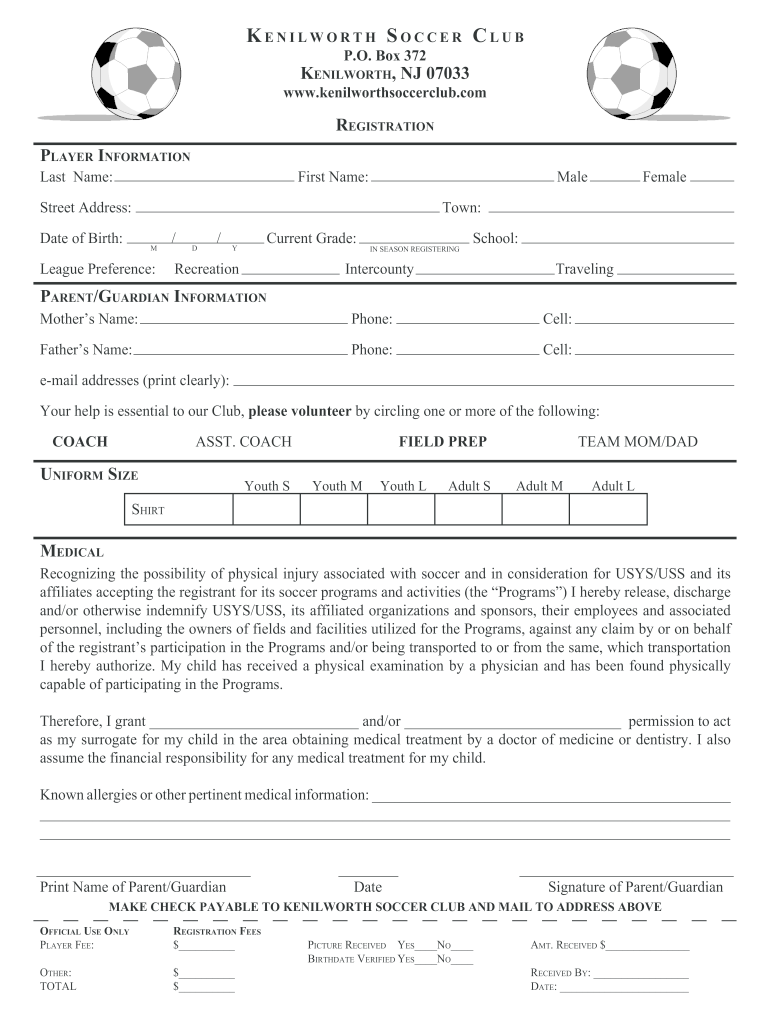
Begin by filling out the Player Information section. Enter the Last Name, First Name, and select the gender by checking either Male or Female. Provide your Street Address, Date of Birth, and Town.
Indicate your League Preference by selecting from Recreation, Intercounty, or Traveling. Also, specify the Current Grade of your child.
In the Parent/Guardian Information section, fill in both parents' names along with their phone numbers and email addresses clearly.
Select a volunteer role by circling one or more options such as Coach or Team Mom/Dad. Choose the appropriate Uniform Size for your child.
Complete the Medical section by acknowledging potential risks and providing any known allergies or pertinent medical information. Ensure to print your name and sign as a parent/guardian.
Finally, review all entries for accuracy before submitting. Make sure to mail your payment to the address provided on the form.
Start filling out your kenilworth registration form online for free today!
Fill out kenilworth registration form online It's free
Kenilworth registration form pdfKenilworth appKenilworth CalendarKenilworth Board of EducationPelican educational foundation kenilworth scienceKenilworth staffKenilworth Science and Technology AcademyKenilworth Elementary School
Security and compliance
At DocHub, your data security is our priority. We follow HIPAA, SOC2, GDPR, and other standards, so you can work on your documents with confidence.
Lotus and Water Lily Festival - Kenilworth Park Aquatic
Feb 5, 2026 Immerse yourself in three days of art, wellness, music, and cultural expression surrounded by the peak bloom of lotuses and water lilies.Read more
Cookie consent notice
This site uses cookies to enhance site navigation and personalize your experience.
By using this site you agree to our use of cookies as described in our Privacy Notice.
You can modify your selections by visiting our Cookie and Advertising Notice.