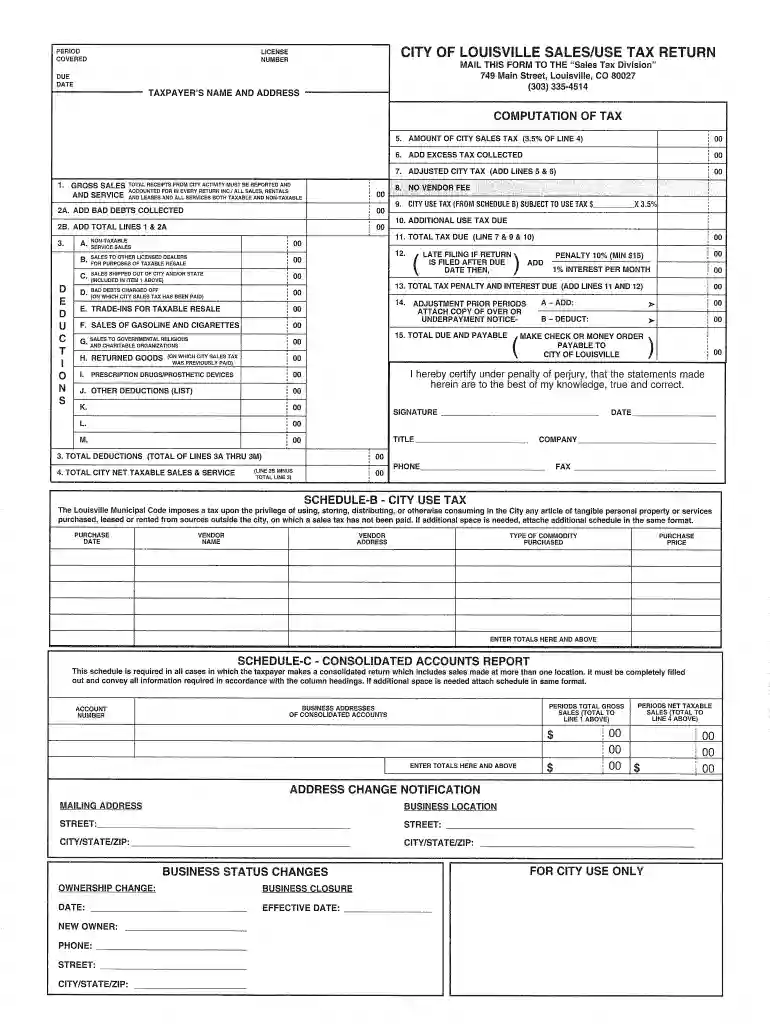
citi tax Preview on Page 1

City of louisville tax form 2026

Here's how it works

  • 01. Edit your citi tax online

    Type text, add images, blackout confidential details, add comments, highlights and more.

  • 02. Sign it in a few clicks

    Draw your signature, type it, upload its image, or use your mobile device as a signature pad.

  • 03. Share your form with others

    Send louisville city tax via email, link, or fax. You can also download it, export it or print it out.

How to use or fill out city of louisville tax form with DocHub

Form edit decoration
9.5
Ease of Setup
DocHub User Ratings on G2
9.0
Ease of Use
DocHub User Ratings on G2
  1. Click ‘Get Form’ to open the city of Louisville tax form in our platform's editor.
  2. Begin by entering your personal information in the designated fields, including your name, address, and Social Security number. Ensure accuracy as this information is crucial for processing your tax return.
  3. Next, navigate to the income section. Here, you will input your total income from various sources. Use the provided fields to break down your earnings clearly.
  4. Proceed to the deductions area. Fill in any applicable deductions that may apply to you, such as mortgage interest or charitable contributions. This can help reduce your taxable income.
  5. Finally, review all entered information for accuracy before submitting. Utilize our platform’s features to save a copy for your records and ensure everything is complete.

Start using our platform today for free and simplify your tax form completion!

be ready to get more

Complete this form in 5 minutes or less

Got questions?

We have answers to the most popular questions from our customers. If you can't find an answer to your question, please contact us.

To print your return or individual forms, you must have the TaxAct program and return file on your computer. If you no longer have the return file, contact the IRS at 1-800-829-1040 to request a copy.
If you mailed a tax return and havent heard from them, please check expected wait times for current IRS operations and services. Are tax forms available at my local Post Office? No, Post Offices do not have tax forms available for customers.
Form OL-3 is a tax form used by any entity with a business nexus in Louisville/Jefferson County to file and pay the Occupational Tax Rate of 2.2% (resident rate) or 1.45% (non-resident rate).
EMPLOYERS WITHHOLDING - QUARTERLY. NOTIFY INCOME TAX DEPARTMENT PROMPTLY OF ANY CHANGE IN OWNERSHIP OR NAME AND ADDRESS.
The IRS makes all current tax forms available for free on IRS.gov.

Security and compliance

At DocHub, your data security is our priority. We follow HIPAA, SOC2, GDPR, and other standards, so you can work on your documents with confidence.

People also ask

Get the current filing years forms, instructions, and publications for free from the IRS. Download them from IRS.gov. Order online and have them delivered by U.S. mail. Order by phone at 1-800-TAX-FORM (1-800-829-3676)
Picking up copies at an IRS Taxpayer Assistance Center. Going to the IRS Small Business and Self-Employed Tax Center page. Requesting copies by phone 800-TAX-FORM (800-829-3676). Hours of operation are 7 a.m. to 10 p.m., Monday-Friday, your local time except Alaska and Hawaii which are Pacific time.
The total sales tax rate in Louisville combines the state tax with no additional local taxes. Louisvilles sales tax consists only of the Kentucky state tax rate.

louisville ky local tax

City/County Tax Exemption form

ALL QUESTIONS SHOULD BE ADDRESSED TO THE PAYROLL SERVICES DEPARTMENT AT payroll@louisville.edu or (502) 852-2978. CERTIFICATION. I hereby DocHub that I willRead more

Learn more
III-A. Assessing Learner Needs in the Adult ESL Classroom

by T Guide Income tax forms. Bank statements. Bus and train schedules. Dictionaries. Labels on food. Labels in clothes. Medicine labels. Telephone/utility bills. Other.Read more

Learn more
If you believe that this page should be taken down, please follow our DMCA take down process here