Type text, add images, blackout confidential details, add comments, highlights and more.
02. Sign it in a few clicks
Draw your signature, type it, upload its image, or use your mobile device as a signature pad.
03. Share your form with others
Send horry county hospitality tax online via email, link, or fax. You can also download it, export it or print it out.
How to use or fill out Horry County Hospitality Tax with our platform
Ease of Setup
DocHub User Ratings on G2
Ease of Use
DocHub User Ratings on G2
Click ‘Get Form’ to open the Horry County Hospitality Tax form in the editor.
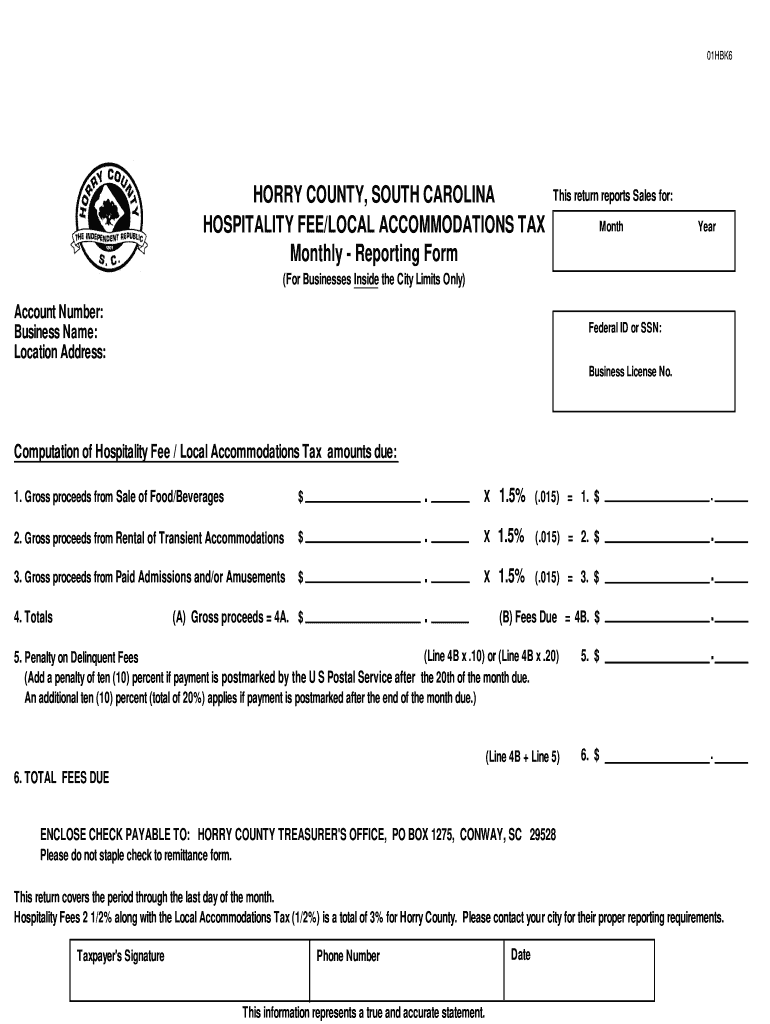
Begin by entering the reporting month and year at the top of the form. This is crucial for accurate record-keeping.
Fill in your Account Number, Business Name, and Location Address. Ensure that these details match your business registration.
Input your Federal ID or SSN and Business License Number in the designated fields to verify your business identity.
For each revenue category (Food/Beverages, Rental of Accommodations, Paid Admissions), enter the gross proceeds and calculate the tax due by multiplying by 1.5%.
Add any penalties for late payments if applicable, following the guidelines provided on the form.
Review all entries for accuracy before signing at the bottom of the form and providing your phone number and date.
Start filling out your Horry County Hospitality Tax form online for free today!
Fill out horry county hospitality tax online It's free
Horry county hospitality tax paymentHorry County Hospitality Tax OnlineCity of Myrtle Beach Hospitality TaxHorry County Business License OnlineNorth Myrtle Beach Hospitality TaxHorry County Business License applicationHorry county business license hospitality self serviceHorry County Business License renewal
Security and compliance
At DocHub, your data security is our priority. We follow HIPAA, SOC2, GDPR, and other standards, so you can work on your documents with confidence.
Chapter 1: Introduction and Overview of South Carolinas Property Tax System. 1. Chapter 2: Property Tax Assessment Practices in South Carolina.Read more
Businesses located inside city limits will calculate the fee at 1.5% of gross proceeds from the Sale of Food/Beverages, Rental of Transient Accommodation andRead more
Cookie consent notice
This site uses cookies to enhance site navigation and personalize your experience.
By using this site you agree to our use of cookies as described in our Privacy Notice.
You can modify your selections by visiting our Cookie and Advertising Notice.