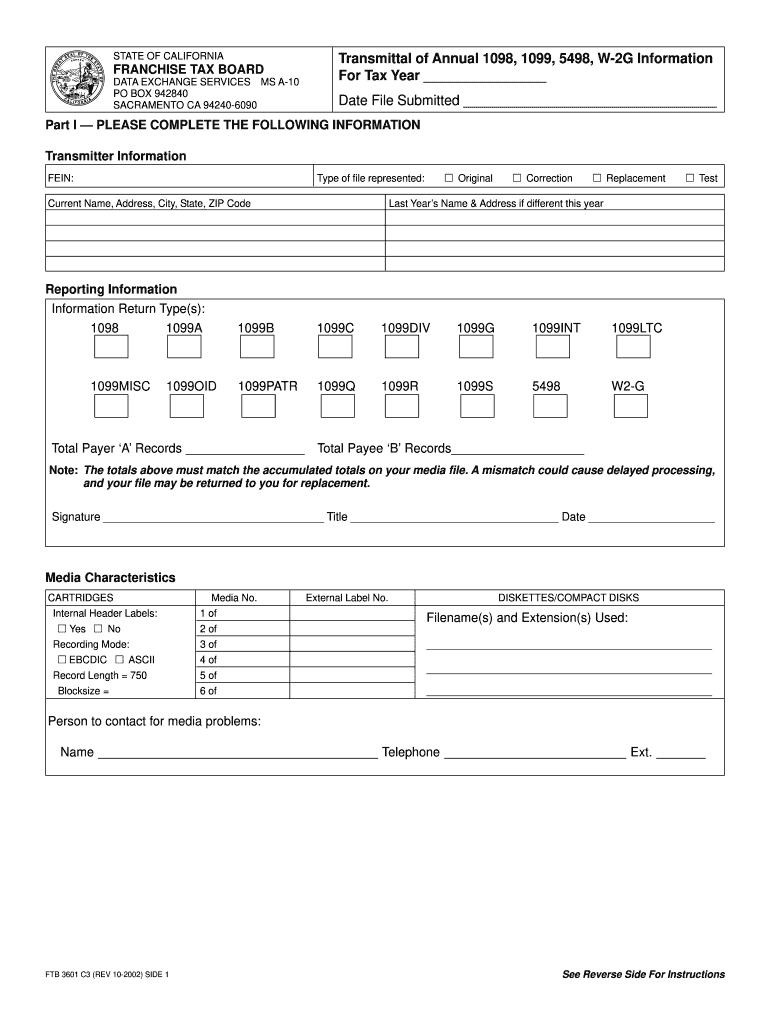
FTB 3601 - TRANSMITTAL OF ANNUAL 1098, 1099, 5498, W-2G INFORMATION FOR TAX YEAR-2026

Get Form
FTB 3601 - TRANSMITTAL OF ANNUAL 1098, 1099, 5498, W-2G INFORMATION FOR TAX YEAR Preview on Page 1

Here's how it works

01. Edit your form online
Type text, add images, blackout confidential details, add comments, highlights and more.
02. Sign it in a few clicks
Draw your signature, type it, upload its image, or use your mobile device as a signature pad.
03. Share your form with others
Send it via email, link, or fax. You can also download it, export it or print it out.

How to use or fill out FTB 3601 - TRANSMITTAL OF ANNUAL 1098, 1099, 5498, W-2G INFORMATION FOR TAX YEAR with our platform

Form edit decoration
9.5
Ease of Setup
DocHub User Ratings on G2
9.0
Ease of Use
DocHub User Ratings on G2
  1. Click ‘Get Form’ to open the FTB 3601 in the editor.
  2. In Part I, complete the Transmitter Information section. Enter your FEIN and select whether this is an Original or Correction file. Fill in your current name, address, city, state, and ZIP code.
  3. Next, indicate the Information Return Type(s) by checking the appropriate boxes for forms like 1098, 1099MISC, etc. Ensure you also specify if this is a Test file.
  4. Provide totals for Payer ‘A’ Records and Payee ‘B’ Records. Double-check that these totals match your media file to avoid processing delays.
  5. Sign and date the form at the bottom of Part I. Include your title for verification.
  6. Complete the Media Characteristics section by indicating if internal header labels are used and specifying recording mode details.
  7. Finally, provide contact information for any media problems in case assistance is needed.

Start using our platform today to streamline your document editing and submission process for free!

See more FTB 3601 - TRANSMITTAL OF ANNUAL 1098, 1099, 5498, W-2G INFORMATION FOR TAX YEAR versions

We've got more versions of the FTB 3601 - TRANSMITTAL OF ANNUAL 1098, 1099, 5498, W-2G INFORMATION FOR TAX YEAR form. Select the right FTB 3601 - TRANSMITTAL OF ANNUAL 1098, 1099, 5498, W-2G INFORMATION FOR TAX YEAR version from the list and start editing it straight away!
Versions Form popularity Fillable & printable
2008 4.8 Satisfied (225 Votes)
2002 4.4 Satisfied (328 Votes)
be ready to get more

Complete this form in 5 minutes or less

Get form

Got questions?

We have answers to the most popular questions from our customers. If you can't find an answer to your question, please contact us.
Contact us

Microsoft Word doesn’t have signing tools to generate valid electronic signatures and enforceable paperwork. Fortunately, DocHub is an online eSignature-compliant editor that works with different file formats, such as .doc files. Log in to your account and upload the Word version of your FTB 3601 - TRANSMITTAL OF ANNUAL 1098, 1099, 5498, W-2G INFORMATION FOR TAX YEAR from your device and cloud, or URL - our editor will automatically turn it into an editable PDF. Make all required modifications in your form and click Sign to generate your own legally-binding electronic signature. You will find four signing options from which to choose.

You may get and modify your FTB 3601 - TRANSMITTAL OF ANNUAL 1098, 1099, 5498, W-2G INFORMATION FOR TAX YEAR online with the help of DocHub. Its simple yet feature-rich design enables you to begin productive work immediately after you sign up your account. Create your account and add your file, then our user interface will guide you through our stress-free form completion experience.

As an employee, self-employed individual, independent contractor, or part of the gig economy, you may have a requirement to file federal and state income tax returns. The federal return is filed with the Internal Revenue Service (IRS), and the state return is filed with the Franchise Tax Board (FTB).
Franchise Tax Board, PO BOX 942840, Sacramento, CA 94240-6090. Note: After filing 1099s, a PDF for state corrections will be available in TaxBandits.
For both 1099-MISCs and 1099-NECs, you will need to file directly with the state. -If you have fewer than 51 forms across 1099s and W2s: Download your 1099s from the 1099 filings tax center (available no later than January 15) and mail directly to the state or file directly via the state portal.

People also ask

You need to file a 1099 in California if the recipient of the income is a California resident or part-year resident, or if the source of the income reported on the 1099 form was within California.
If you have opted to send these forms in the mail, read on to find out where to send them. Send your forms to: Internal Revenue Service, Austin, Submission Processing Center, P.O Box 149213, Austin, TX 78714. Send your forms to: Internal Revenue Service Center P.O. Box 219256 Kansas City, MO 64121-9256.
Federal Forms W-2, W-2G, and 1099, and California Forms 592-B and 593. Attach all the Forms W-2 and W‑2G you received to the lower front of your tax return. Also, attach any Forms 1099, 592-B, and 593 showing California income tax withheld.
Mail your Form 1099s to the following address. Franchise Tax Board, PO BOX 942840, Sacramento, CA 94240-6090.

Related links