Kansas for profit annual report 2026

Get Form
kansas llc annual report Preview on Page 1

Here's how it works

01. Edit your kansas llc annual report online
Type text, add images, blackout confidential details, add comments, highlights and more.
02. Sign it in a few clicks
Draw your signature, type it, upload its image, or use your mobile device as a signature pad.
03. Share your form with others
Send it via email, link, or fax. You can also download it, export it or print it out.

How to use or fill out kansas for profit annual report with our platform

Form edit decoration
9.5
Ease of Setup
DocHub User Ratings on G2
9.0
Ease of Use
DocHub User Ratings on G2
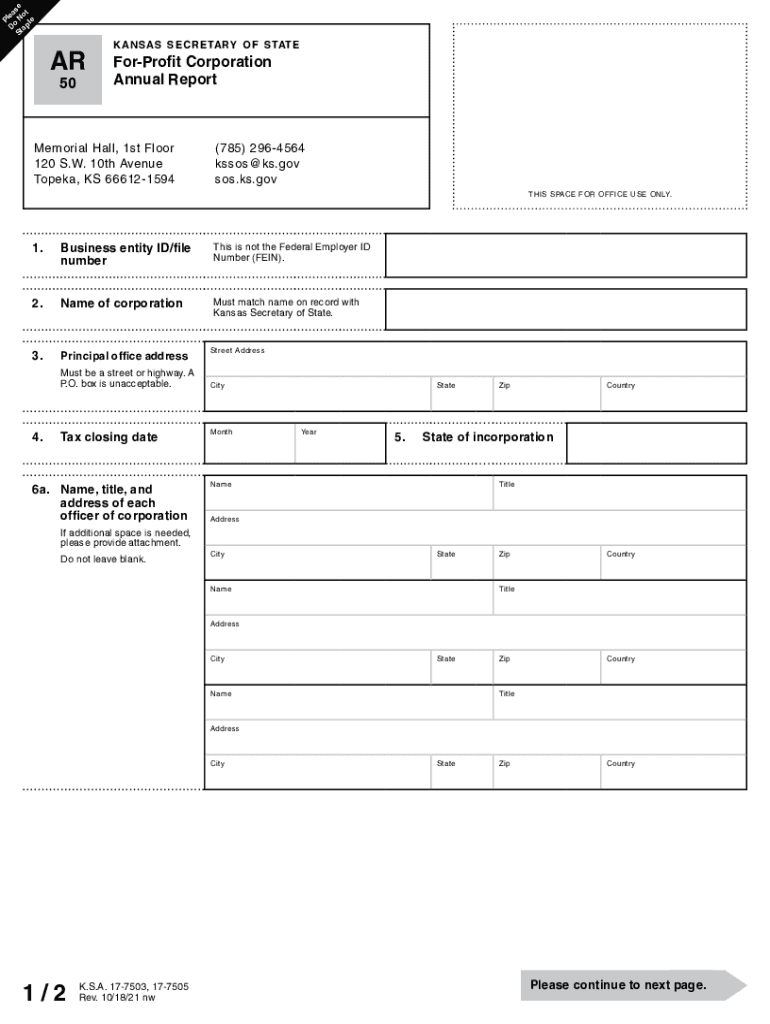
  1. Click ‘Get Form’ to open the Kansas For-Profit Corporation Annual Report in the editor.
  2. Begin by entering your Business Entity ID/file number, ensuring it is not the Federal Employer ID Number (FEIN).
  3. Fill in the Name of the corporation, making sure it matches the name on record with the Kansas Secretary of State.
  4. Provide the Principal Office Address. Remember, this must be a street address; P.O. boxes are not acceptable.
  5. Indicate your Tax Closing Date and State of Incorporation. Ensure all fields are completed accurately.
  6. List each officer's name, title, and address in Section 6a, and repeat for directors in Section 6b if they differ.
  7. Complete questions regarding shares of capital stock issued and nature of business engaged.
  8. If applicable, answer questions about equity ownership and land ownership or leasing in Kansas.
  9. Finally, declare under penalty of perjury by signing and providing your printed name and title before submitting.

Start using our platform today to streamline your Kansas For-Profit Annual Report filing process for free!

See more kansas for profit annual report versions

We've got more versions of the kansas for profit annual report form. Select the right kansas for profit annual report version from the list and start editing it straight away!
Versions Form popularity Fillable & printable
2021 4.8 Satisfied (190 Votes)
2018 4.3 Satisfied (58 Votes)
2015 4.4 Satisfied (561 Votes)
2011 4.2 Satisfied (50 Votes)
be ready to get more

Complete this form in 5 minutes or less

Get form

Got questions?

We have answers to the most popular questions from our customers. If you can't find an answer to your question, please contact us.
Contact us
All documents filed with the Secretary of States Office are publicly available and can be viewed and only be obtained online: File Stamp Copies: A non-certified copy of any document filed with the Kansas Secretary of State. File-stamped copies are available without a fee.
This form is provided for your convenience, but is not mandatory. Requests can be made by mail, email fax, and in person. Please be as specific and detailed as possible.
Simply visit the Secretary of States website for the relevant state and search their business registry. If online searches dont yield results, submitting a public information request can be an effective method. This involves requesting records from government offices that may have the information you need.
What to Include in Your Nonprofit Annual and Impact Reports Financial reports: Revenue, expenses, and fund allocation. Program achievements: Key milestones and completed projects. Donor recognition: Lists of major supporters and partners. Leadership updates: Board member bios and governance changes.
Kansas Limited Liability Company Annual Report Requirements: Agency:Kansas Secretary of State Form: Form ILC: Limited Liability Company Information Report Filing Method: Mail or online Agency Fee: $100 online or $110 by mail4 more rows

People also ask

Starting January 1, 2024, Kansas businesses will file information reports with the Kansas Secretary of State every two years instead of an annual report every year. The content of the report will not change. Transitioning from annual filling to biennial will reduce paperwork for Kansas business owners.
Kansas Secretary of State (BESS) | Business Entity Search Go To The Business Entity Search Station Page. ? Indicate The Basis For The Search To Be Conducted. Choose The Business Entity Name Option And Define The Search. Locate The Kansas Entitys Record. View the Kansas Entitys Record.

Related links