Dmv 2026

Get Form
dmv Preview on Page 1

Here's how it works

01. Edit your dmv online
Type text, add images, blackout confidential details, add comments, highlights and more.

02. Sign it in a few clicks
Draw your signature, type it, upload its image, or use your mobile device as a signature pad.

03. Share your form with others
Send title request via email, link, or fax. You can also download it, export it or print it out.

How to use or fill out DMV records request with our platform

Form edit decoration
9.5
Ease of Setup
DocHub User Ratings on G2
9.0
Ease of Use
DocHub User Ratings on G2
  1. Click ‘Get Form’ to open the DMV records request form in the editor.
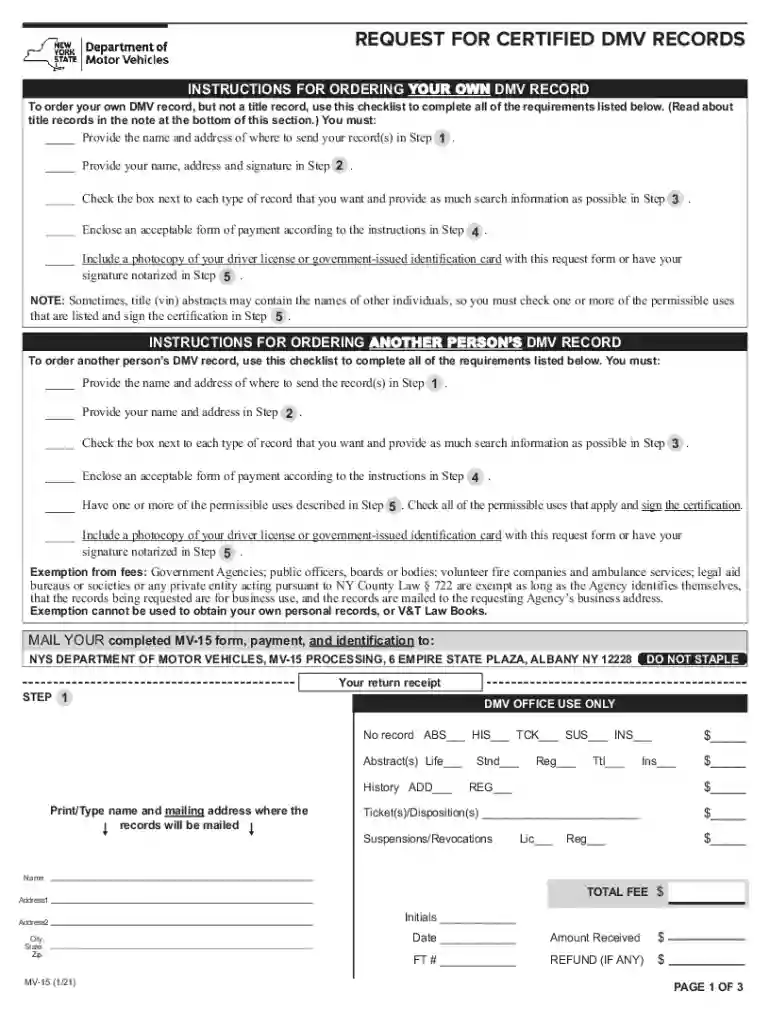
  2. In Step 1, enter the name and address where you want your records sent. Ensure this information is accurate for timely delivery.
  3. Proceed to Step 2, where you will provide your name, address, and signature. If your mailing address differs from your requestor's address, check the appropriate box.
  4. In Step 3, check the boxes next to each type of record you wish to request. Provide as much search information as possible, including names, dates of birth, and any relevant ticket numbers.
  5. For Step 4, select your payment method. Remember not to send cash; checks should be made payable to the 'Commissioner of Motor Vehicles.'
  6. Finally, in Step 5, review the permissible uses and sign the certification. Attach a copy of your ID as required.

Start using our platform today for free to streamline your DMV records request process!

See more dmv versions

We've got more versions of the dmv form. Select the right dmv version from the list and start editing it straight away!
Versions Form popularity Fillable & printable
2021 4.8 Satisfied (52 Votes)
2018 4.4 Satisfied (180 Votes)
2014 4.4 Satisfied (135 Votes)
2010 4 Satisfied (25 Votes)
2006 4.2 Satisfied (26 Votes)
be ready to get more

Complete this form in 5 minutes or less

Get form

Got questions?

We have answers to the most popular questions from our customers. If you can't find an answer to your question, please contact us.
Contact us

Based on eSignature regulations, documents signed digitally have the same validity as those approved with pen and paper. You can electronically sign almost any business and private paperwork. Four types of documents still call for wet signatures only - wills and testamentary trusts, court orders and other court forms, state statutes regulating divorce, adoption, or other family law, and notice of cancellation of utility services. If you adhere to the rules and use a trustworthy and compliant software solution, like DocHub, you can eSign your license record without printing it.

If you use Chrome, there are two simple methods to edit your dmv license new online. First, visit the DocHub site, add your document, and edit it utilizing our toolbar. You can also set up our Chrome extension and edit any document by dragging and dropping it in your browser tab.

DMV /dee-em-vee/ The Washington area, as abbreviated by hip-hoppers; from DC/Maryland/Virginia and adopted for thumb-based communications.
The DMVthe District of Columbia, Maryland and Virginiais home to broad, diverse communities and neighborhoods that offer history, good eats, parks and waterfrontsmuch of it a quick Metro ride away. Once a month during the academic year, GW Today will offer a glimpse of selected DMV neighborhoods.
DMV - DC/Maryland/Virginia Area. Consists of DC and surrounding suburbs. Sice / Siced - to hype or over exaggerate. Pressed - overly excited over something/someone.

People also ask

The DMVthe District of Columbia, Maryland and Virginiais home to broad, diverse communities and neighborhoods that offer history, good eats, parks and waterfrontsmuch of it a quick Metro ride away.
Department of motor vehicles, a government agency that administers motor vehicle registration and driver licensing.

dmv mv 15