01. Edit your schedule 1 designer information online
Type text, add images, blackout confidential details, add comments, highlights and more.

02. Sign it in a few clicks
Draw your signature, type it, upload its image, or use your mobile device as a signature pad.

03. Share your form with others
Send schedule 1 designer form via email, link, or fax. You can also download it, export it or print it out.

How to use or fill out schedule 1 writable print
Ease of Setup
DocHub User Ratings on G2
Ease of Use
DocHub User Ratings on G2
Click ‘Get Form’ to open it in the editor.
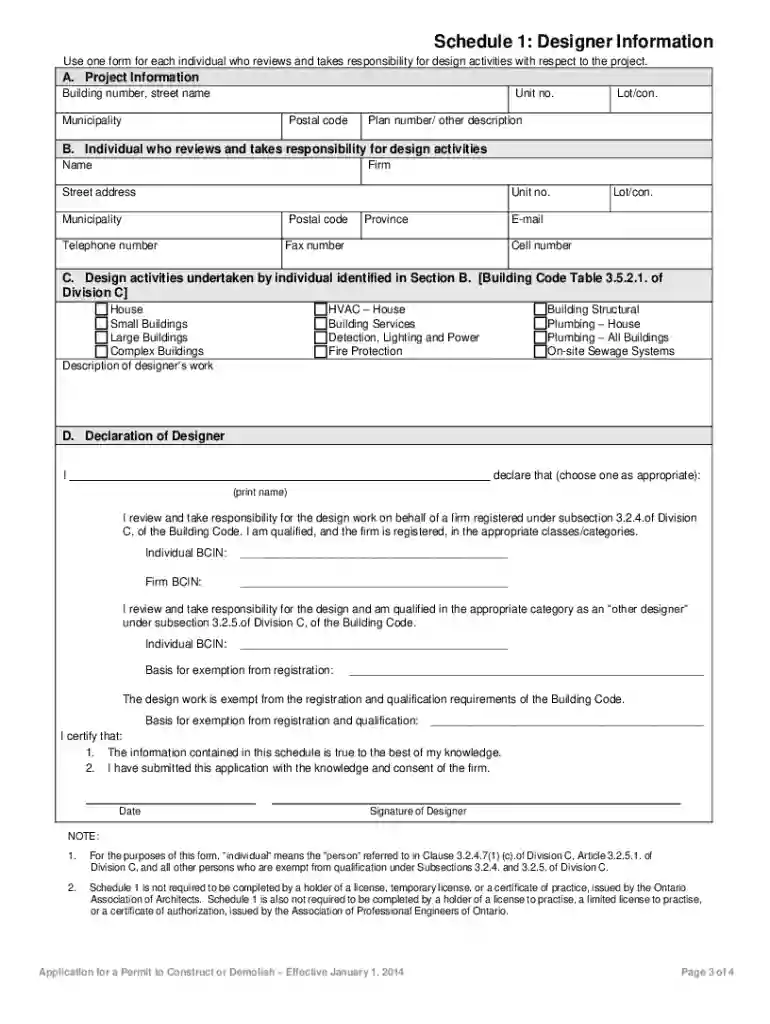
Begin with Section A: Project Information. Fill in the building number, street name, unit number, municipality, postal code, lot/con, and plan number or other description.
Move to Section B: Individual who reviews and takes responsibility for design activities. Enter the individual's name, firm, street address, unit number, municipality, postal code, telephone number, province, lot/con, email address, fax number, and cell number.
In Section C: Design activities undertaken by the individual identified in Section B. Check all applicable design activities such as HVAC – House or Plumbing – All Buildings and provide a description of the designer’s work.
Proceed to Section D: Declaration of Designer. Choose the appropriate declaration option and print your name. Fill in your individual BCIN and firm BCIN if applicable.
Complete any basis for exemption from registration if necessary and certify that the information is true by signing and dating the form.
Start using our platform today to fill out your Schedule 1 writable print for free!
Fill out schedule 1 writable print online It's free
We've got more versions of the schedule 1 writable print form. Select the right schedule 1 writable print version from the list and start editing it straight away!
Not everyone has to file a tax return with Schedule 1. Whether you need to file depends on your financial situation. Youll need Schedule 1 if you have: Unemployment compensation.
Can you get signs in Schedule 1?
This is how you use signs in schedule 1 to label everything! I use them to label my restocking shelves. Go to the boutique, buy the signs, and just place them on the walls anywhere. Enter any text for each sign to easily label your restocking shelves.
What is Schedule 1 on taxes?
Schedule 1 is used to report types of income that arent listed on the 1040, such as capital gains, alimony, unemployment payments, and gambling winnings.
What documentation do I need for Schedule 1?
Part I of Schedule 1 covers additional income sources beyond your regular wages on lines 1 to 9. Before listing specific amounts, gather all relevant documentation like 1099 forms, rental income records, and any other income statements.
How to obtain a schedule 1?
Call DEA Registration Service Center at 1-800-882-9539 (8:30 am-5:50 pm ET). Contact scientific staff for help with your schedule I controlled substances research application.
Form 1040 Schedule 1 allows you to claim additional sources of income that arent listed on Form 1040, including unemployment compensation, prize or award money, and gambling winnings. You can also use Schedule 1 to claim certain tax deductions.
How to fill out a schedule 1 form?
How To Complete Schedule 1 (Form 1040): A Step-by-Step Guide Step 1: Gather the necessary documents. Step 2: Fill out your personal information. Step 3: Report additional income. Step 4: Calculate adjustments to income. Step 5: Report other tax credits. Step 6: Calculate other payments and refundable credits.
2014 schedule 1
2022 Schedule 1 (Form 1040)
For Paperwork Reduction Act Notice, see your tax return instructions. Cat. No. 71479F. Schedule 1 (Form 1040) 2022. Page 2. Schedule 1 (Form 1040) 2022.
This guide is intended for network and system administrators responsible for setting up and maintaining Xerox printers with. Xerox FreeFlow Print Server
Cookie consent notice
This site uses cookies to enhance site navigation and personalize your experience.
By using this site you agree to our use of cookies as described in our Privacy Notice.
You can modify your selections by visiting our Cookie and Advertising Notice.