Type text, add images, blackout confidential details, add comments, highlights and more.

02. Sign it in a few clicks
Draw your signature, type it, upload its image, or use your mobile device as a signature pad.

03. Share your form with others
Send gst 190 via email, link, or fax. You can also download it, export it or print it out.

How to use or fill out gst 190 with our platform
Ease of Setup
DocHub User Ratings on G2
Ease of Use
DocHub User Ratings on G2
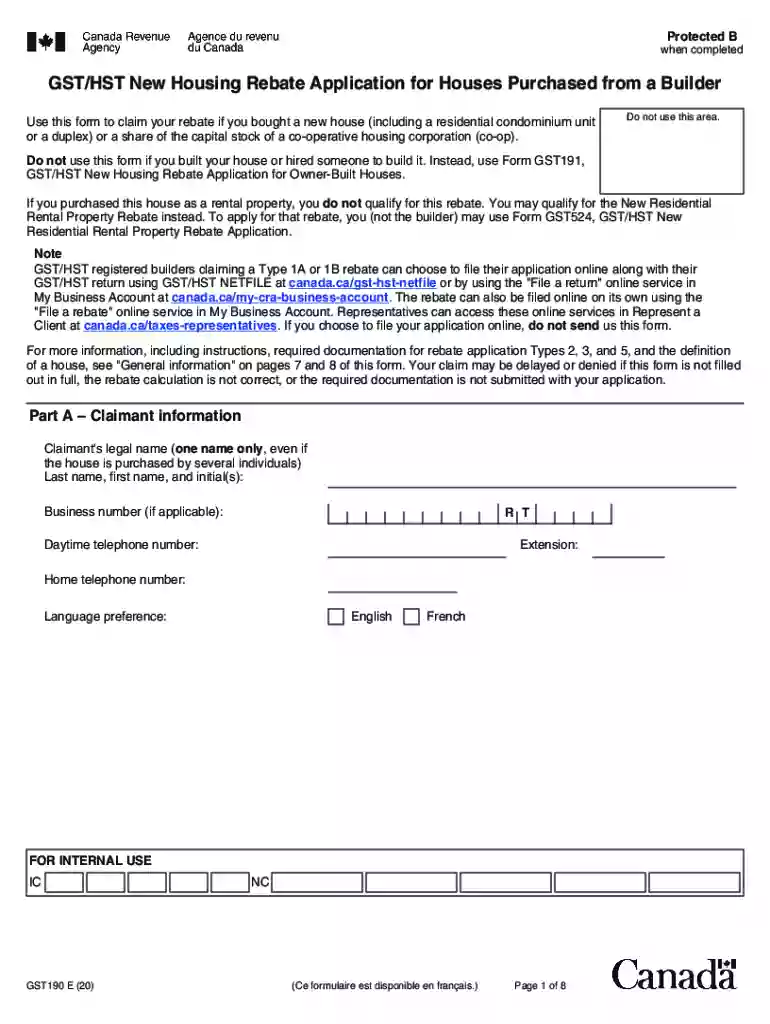
Click ‘Get Form’ to open the GST 190 in the editor.
Begin with Part A, where you will enter your legal name and contact information. Ensure that you provide accurate details as this section is crucial for identification.
In Part B, indicate whether the house is your primary residence and fill in the relevant dates regarding the purchase agreement and ownership transfer.
Proceed to Part C to select the type of housing and application type. Carefully read each option to ensure you choose the correct one based on your situation.
Complete Part D by providing builder or co-op information if applicable. This includes their legal name and business number.
In Part E, certify that all information provided is true by signing and dating the form.
Finally, fill out Part F for rebate calculation based on your application type. Use our platform's tools to assist with calculations if needed.
Start using our platform today for free to simplify your GST 190 form completion!
PD PP : GST : 190. March 08, 2018. Central Goods Services Tax Rules, 2017. Rule 23- Revocation of cancellation of registration. Disclaimer: ThisRead more
Cookie consent notice
This site uses cookies to enhance site navigation and personalize your experience.
By using this site you agree to our use of cookies as described in our Privacy Notice.
You can modify your selections by visiting our Cookie and Advertising Notice.