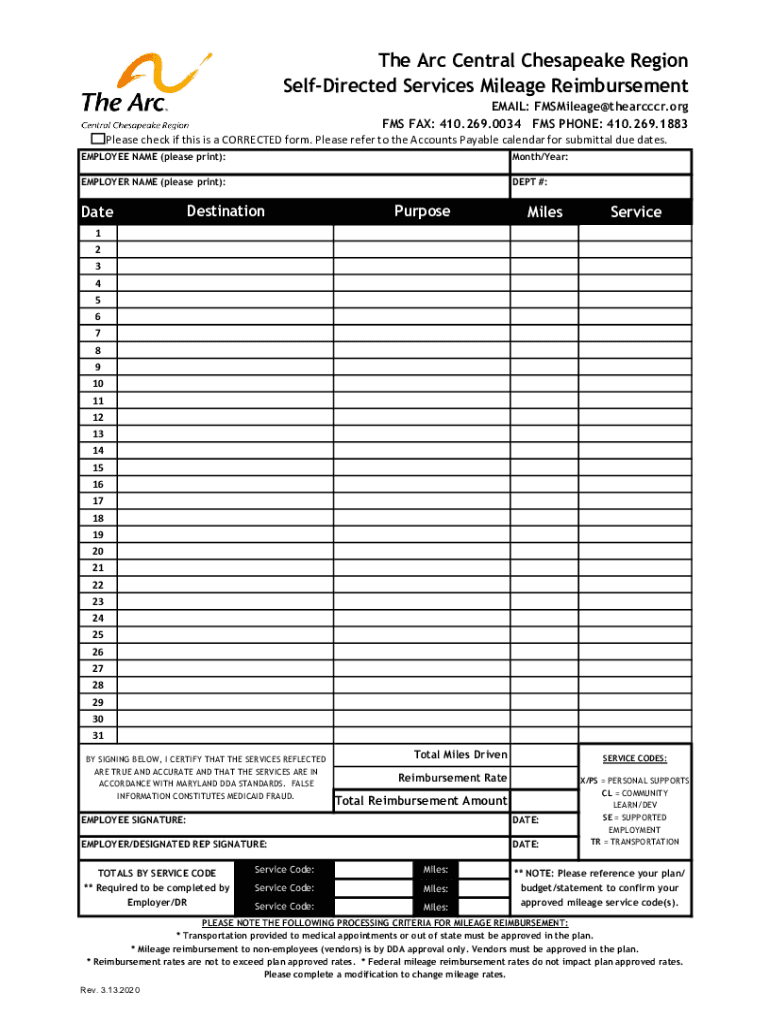
The Arc CCR Mileage Reimbursement Form 2.26.2020.xlsx-2026

Get Form
The Arc CCR Mileage Reimbursement Form 2.26.2020.xlsx Preview on Page 1

Here's how it works

01. Edit your form online
Type text, add images, blackout confidential details, add comments, highlights and more.
02. Sign it in a few clicks
Draw your signature, type it, upload its image, or use your mobile device as a signature pad.
03. Share your form with others
Send it via email, link, or fax. You can also download it, export it or print it out.

The best way to change The Arc CCR Mileage Reimbursement Form 2.26.2020.xlsx online

Form edit decoration
9.5
Ease of Setup
DocHub User Ratings on G2
9.0
Ease of Use
DocHub User Ratings on G2

With DocHub, making changes to your paperwork requires just a few simple clicks. Follow these quick steps to change the PDF The Arc CCR Mileage Reimbursement Form 2.26.2020.xlsx online free of charge:

  1. Register and log in to your account. Sign in to the editor with your credentials or click on Create free account to examine the tool’s capabilities.
  2. Add the The Arc CCR Mileage Reimbursement Form 2.26.2020.xlsx for editing. Click on the New Document option above, then drag and drop the file to the upload area, import it from the cloud, or via a link.
  3. Adjust your document. Make any changes needed: insert text and pictures to your The Arc CCR Mileage Reimbursement Form 2.26.2020.xlsx, underline information that matters, erase parts of content and substitute them with new ones, and insert symbols, checkmarks, and fields for filling out.
  4. Complete redacting the template. Save the modified document on your device, export it to the cloud, print it right from the editor, or share it with all the people involved.

Our editor is very easy to use and effective. Try it now!

See more The Arc CCR Mileage Reimbursement Form 2.26.2020.xlsx versions

We've got more versions of the The Arc CCR Mileage Reimbursement Form 2.26.2020.xlsx form. Select the right The Arc CCR Mileage Reimbursement Form 2.26.2020.xlsx version from the list and start editing it straight away!
Versions Form popularity Fillable & printable
2020 4.8 Satisfied (72 Votes)
be ready to get more

Complete this form in 5 minutes or less

Get form

Got questions?

We have answers to the most popular questions from our customers. If you can't find an answer to your question, please contact us.
Contact us
Essential components of a mileage reimbursement form Your full name and employee ID (if applicable) Vehicle information (make, model, year) Business purpose for each trip. Date and time of travel. Starting and ending odometer readings. Total miles driven. Any additional expenses like tolls or parking fees.
Mileage rates for all years (cents/mile) PeriodBusiness useMedical or military moving 2020 57.5 17 2019 58 20 2018 TCJA 54.5 18 2017 53.5 1713 more rows Jul 17, 2025
0:45 2:26 Dont forget to add any parking payments or totals. Once you have docHubed a total of over $25. YouMoreDont forget to add any parking payments or totals. Once you have docHubed a total of over $25. You can then submit your form copy your completed form. And send it to your adjuster.
How the IRS defines adequate records for your mileage log The mileage for each business use. The total mileage for the year. The time (date will do), place (your destination), and business purpose of each trip. Odometer readings at the start and end of the year.
Part IIVehicle Expenses If you have the option of using either the standard mileage rate or actual expense method, you should figure your expenses both ways to find the method most beneficial to you. But, when completing Form 2106, fill in only the sections that apply to the method you choose.

Security and compliance

At DocHub, your data security is our priority. We follow HIPAA, SOC2, GDPR, and other standards, so you can work on your documents with confidence.

Learn more
ccpa2
pci-dss
gdpr-compliance
hipaa
soc-compliance
be ready to get more

Complete this form in 5 minutes or less

Get form

People also ask

The tax documents you use to deduct mileage expenses vary based on your situation: For self-employed individuals (business): Report mileage as part of car and truck expenses on Schedule C (1040), Section IV. For charity mileage, use Schedule A (Form 1040) under the charitable deductions section.
The best evidence for claiming the deduction for business use of a vehicle is a written record kept during the time the business miles are driven. This can be a written log, spreadsheet, mileage tracking app, or something similar. The record should include miles traveled, destination, and business purpose.