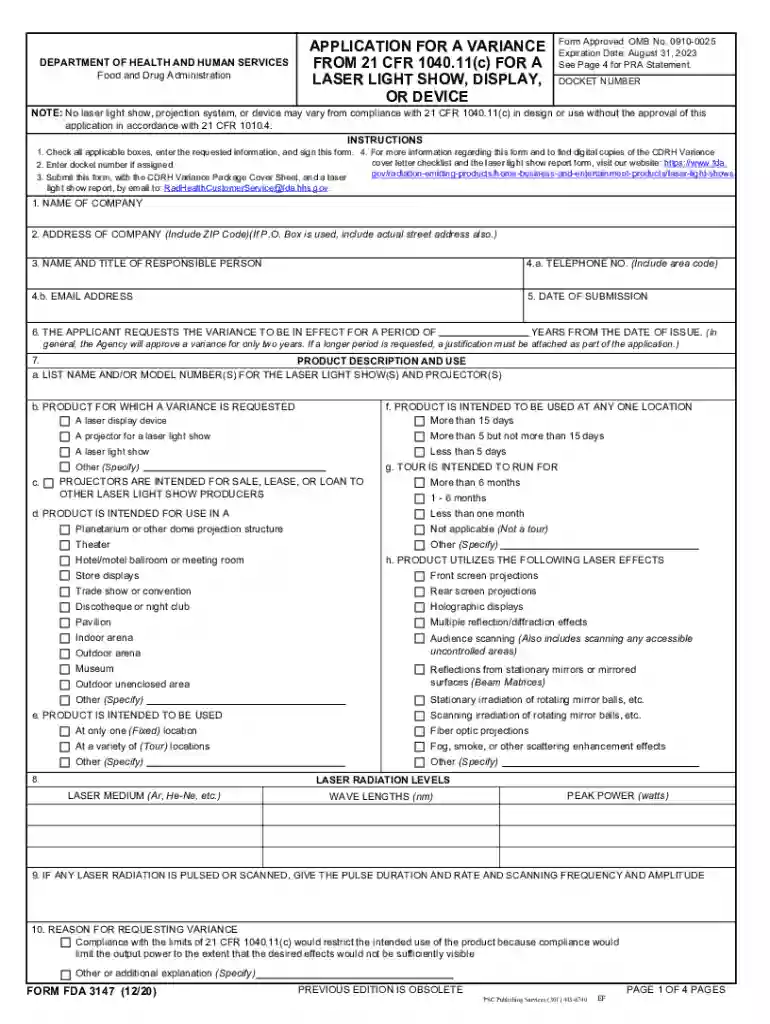
Fda variance form 2026

Get Form
compliance requirements Preview on Page 1

Here's how it works

01. Edit your compliance requirements online
Type text, add images, blackout confidential details, add comments, highlights and more.

02. Sign it in a few clicks
Draw your signature, type it, upload its image, or use your mobile device as a signature pad.

03. Share your form with others
Send application 1040 via email, link, or fax. You can also download it, export it or print it out.

How to use or fill out FDA Variance Form with DocHub

Form edit decoration
9.5
Ease of Setup
DocHub User Ratings on G2
9.0
Ease of Use
DocHub User Ratings on G2
  1. Click ‘Get Form’ to open the FDA variance form in our editor.
  2. Begin by entering the Docket Number if assigned. This is crucial for tracking your application.
  3. Fill in the company name and address, ensuring to include the ZIP code. If using a P.O. Box, also provide the actual street address.
  4. Complete the contact information for the responsible person, including their telephone number and email address.
  5. Specify the duration for which you request the variance, typically up to two years unless justified otherwise.
  6. Detail the product description and intended use, including model numbers and specific locations where it will be used.
  7. Provide information on laser radiation levels, including medium, wavelengths, and peak power.
  8. Clearly state your reasons for requesting a variance and how you plan to deviate from standard requirements.
  9. Review all entries for accuracy before signing and submitting your application via email as instructed.

Start filling out your FDA variance form today using our platform for free!

See more fda variance form versions

We've got more versions of the fda variance form form. Select the right fda variance form version from the list and start editing it straight away!
Versions Form popularity Fillable & printable
2020 4.8 Satisfied (101 Votes)
2017 4.3 Satisfied (212 Votes)
2010 4.1 Satisfied (39 Votes)
be ready to get more

Complete this form in 5 minutes or less

Get form

Got questions?

We have answers to the most popular questions from our customers. If you can't find an answer to your question, please contact us.
Contact us
Overview of MLS Laser Therapy Procedure Laser therapy is an FDA-approved method of therapy that works to reduce inflammation and decrease pain in targeted areas of the body, encouraging proper cell function.
Any laser demonstrations, displays or shows that use lasers above 5 milliwatts must have a variance from FDA. This document gives the variance holder permission to vary from the 5 milliwatt limit, by using more power.
Accession numbers are unique FDA identifiers for electronic product reports found in FDAs radiation-emitting electronic product database. FDA requires importers to provide the Accession Numbers on Form 2877. This is the one assigned by FDA to the manufacturers who made the imported electronic products.
The FDA issues an IR when application reviewers need additional information or clarification on your NDA or BLA. The review team can issue an IR at any point in the review cycle for any section of your drug or biologic application.
A Class 3R laser is considered safe if handled carefully, with restricted beam viewing. With a class 3R laser, the MPE can be exceeded, but with a low risk of injury. Visible continuous lasers in Class 3R are limited to 5 mW. For other wavelengths and for pulsed lasers, other limits apply.

Security and compliance

At DocHub, your data security is our priority. We follow HIPAA, SOC2, GDPR, and other standards, so you can work on your documents with confidence.

Learn more
ccpa2
pci-dss
gdpr-compliance
hipaa
soc-compliance

People also ask

Laser Hazard Classes The Food and Drug Administration (FDA) recognizes four major hazard classes (I to IV) of lasers, including three subclasses (IIa, IIIa, and IIIb). The higher the class, the more powerful the laser and the potential to pose serious danger if used improperly.
A. A variance application shall be filed whenever any deviation from the development standard provisions of the Zoning Code is proposed, including, but not limited to, those standards related to height, lot area, yards, open spaces, setbacks, lot dimensions, signs, and parking.

application device