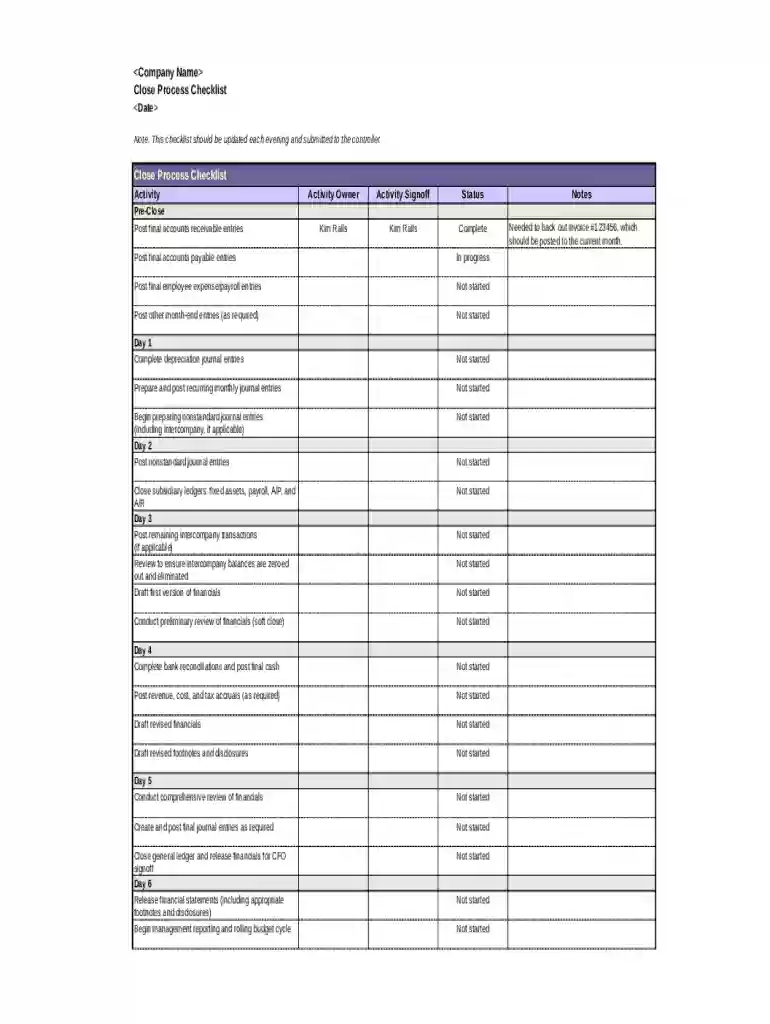
Close Process Checklist 2026

Get Form
process checklist template Preview on Page 1

Here's how it works

01. Edit your process checklist template online
Type text, add images, blackout confidential details, add comments, highlights and more.

02. Sign it in a few clicks
Draw your signature, type it, upload its image, or use your mobile device as a signature pad.

03. Share your form with others
Send procedure checklist template via email, link, or fax. You can also download it, export it or print it out.

How to use or fill out Close Process Checklist with DocHub

Form edit decoration
9.5
Ease of Setup
DocHub User Ratings on G2
9.0
Ease of Use
DocHub User Ratings on G2
  1. Click ‘Get Form’ to open the Close Process Checklist in our editor.
  2. Begin by filling in the date at the top of the checklist. This ensures that your document is current and reflects the appropriate time frame for your closing activities.
  3. Review each activity listed under 'Pre-Close' and enter the status for each task. Use options like 'Complete', 'In progress', or 'Not started' to accurately reflect the progress of each item.
  4. For each day outlined, follow through with the specific tasks. Mark off completed items and provide signoff from responsible individuals where necessary.
  5. Utilize the notes section at the bottom to document any important information or adjustments needed, such as backing out invoices or other relevant details.

Start using our platform today to streamline your Close Process Checklist and enhance your workflow!

be ready to get more

Complete this form in 5 minutes or less

Get form

Got questions?

We have answers to the most popular questions from our customers. If you can't find an answer to your question, please contact us.
Contact us
Check that all personnel have left the office, and ensure that the premises are empty. Close and lock all windows and doors, and ensure that they are secure. Turn off all lights, equipment, and systems, and ensure that they are properly shut down and unplugged. Set the security alarm, and ensure that it is activated.
Steps to take to close your business File a final return and related forms. Take care of your employees. Pay the tax you owe. Report payments to contract workers. Cancel your EIN and close your IRS business account. Keep your records.
A restaurant opening and closing checklist is a list of tasks that restaurant employees must complete at the start or end of the workday. These checklists are usually either printed on paper or made available and submitted digitally via a smartphone, tablet, or computer.
Interview questions and answers for Month-End Closing in Accounting: 1-What is the purpose of month-end closing? To ensure all financial transactions for the month are recorded, accurate, and ready for reporting. 2-What are the first steps in the month-end close?
A process checklist is a tool used to ensure that all necessary steps are completed in a particular process or task. It serves as a guide to ensure that nothing is missed or forgotten, helping to eliminate human error and increase efficiency.

Security and compliance

At DocHub, your data security is our priority. We follow HIPAA, SOC2, GDPR, and other standards, so you can work on your documents with confidence.

Learn more
ccpa2
pci-dss
gdpr-compliance
hipaa
soc-compliance
be ready to get more

Complete this form in 5 minutes or less

Get form

People also ask

Procedure Turn on lights. Turn on photocopier and printers. Turn on air-conditioner set to 21 degrees. Check front window display and make sure all property displays are turned the correct way and are clean and current. Sweep the front reception area if necessary and front footpath. Replace flowers and generally tidy up.

month end close checklist pdf