Type text, add images, blackout confidential details, add comments, highlights and more.
02. Sign it in a few clicks
Draw your signature, type it, upload its image, or use your mobile device as a signature pad.
03. Share your form with others
Send p form via email, link, or fax. You can also download it, export it or print it out.
How to use or fill out form p with our platform
Ease of Setup
DocHub User Ratings on G2
Ease of Use
DocHub User Ratings on G2
Click ‘Get Form’ to open it in the editor.
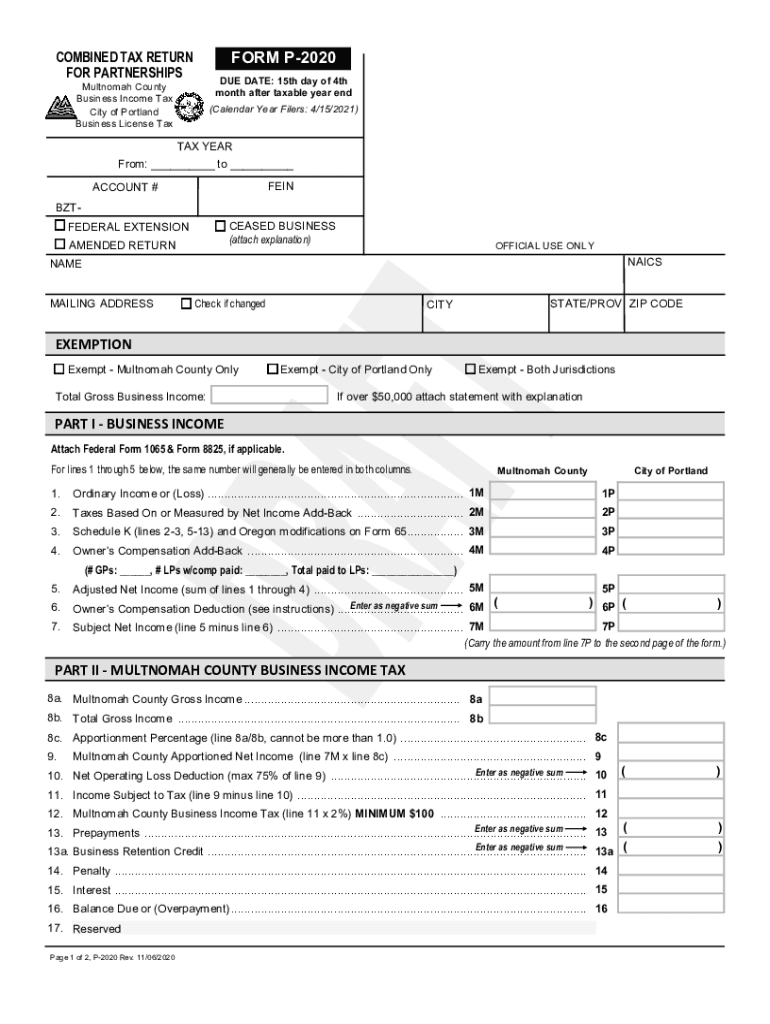
Begin by entering the tax year and account number at the top of the form. Ensure that you provide your FEIN and indicate if this is an amended return or if the business has ceased operations.
Fill in your name and mailing address, checking the box if there are any changes. Include your city, state/prov, and ZIP code.
In Part I, report your business income. Enter ordinary income or loss from federal Form 1065 on lines 1M and 1P, ensuring both columns match.
Continue filling out lines for taxes based on net income add-back, Schedule K modifications, and owner’s compensation add-back as instructed.
Complete Part II for Multnomah County Business Income Tax by calculating gross income and apportioned net income as per the guidelines provided.
Finally, sign and date the form in Part V before submitting it through our platform for a seamless filing experience.
Start using our platform today to simplify your form completion process!
About Form W-4P, Withholding Certificate for Periodic
Mar 30, 2026 Complete Form W-4P so your payer can withhold the correct amount of federal income tax from your periodic pension, annuity (including commercial annuities),Read more
Jun 16, 2014 AWCC Form P satisfies all requirements. Form P: 1. Is to be on display in a conspicuous place;. 2. Tells employers what to do when anRead more
Cookie consent notice
This site uses cookies to enhance site navigation and personalize your experience.
By using this site you agree to our use of cookies as described in our Privacy Notice.
You can modify your selections by visiting our Cookie and Advertising Notice.