Type text, add images, blackout confidential details, add comments, highlights and more.
02. Sign it in a few clicks
Draw your signature, type it, upload its image, or use your mobile device as a signature pad.
03. Share your form with others
Send ifta sticker renewal via email, link, or fax. You can also download it, export it or print it out.
How to use or fill out Ohio IFTA Renewal Form with DocHub
Ease of Setup
DocHub User Ratings on G2
Ease of Use
DocHub User Ratings on G2
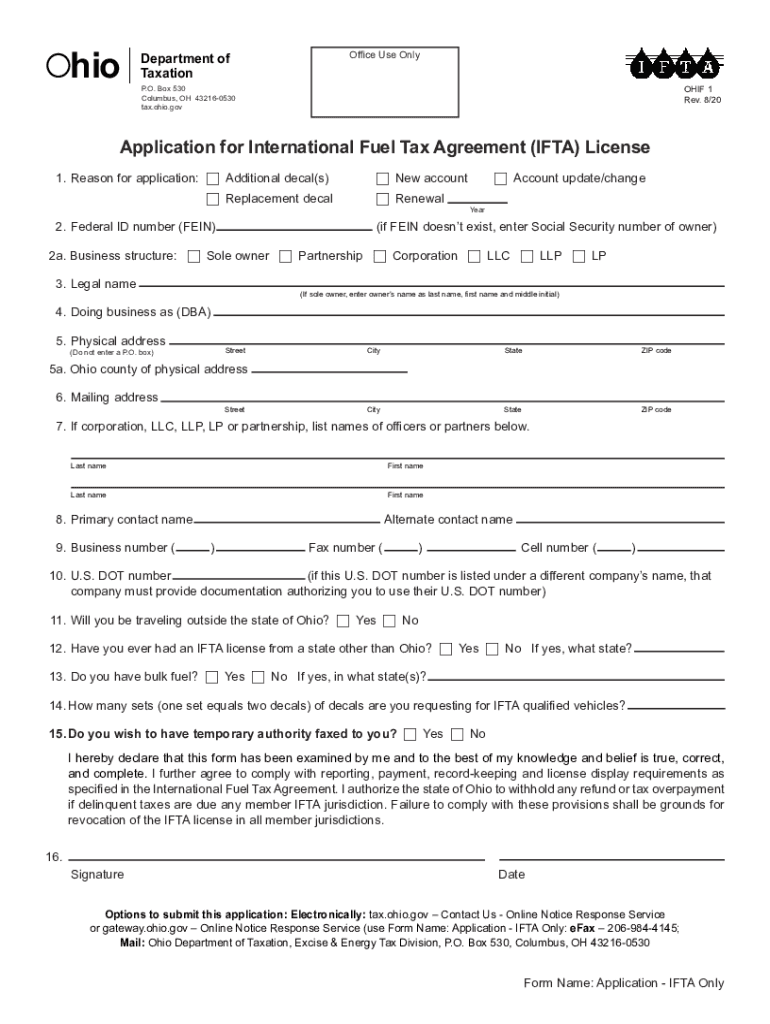
Click ‘Get Form’ to open the Ohio IFTA Renewal Form in our editor.
Begin by indicating the reason for your application. Check the appropriate box for additional decals, replacement decals, or if this is a new account or renewal.
Enter your Federal ID number (FEIN) or Social Security number if you are a sole owner. Select your business structure from the provided options.
Fill in your legal name and doing business as (DBA) name, followed by your physical address. Ensure that you do not use a P.O. Box for this section.
Complete the mailing address if it differs from your physical address. Then, list the names of any officers or partners if applicable.
Provide contact information including primary and alternate contact names along with their respective phone numbers.
Answer questions regarding travel outside Ohio, previous IFTA licenses, and bulk fuel ownership as applicable.
Indicate how many sets of decals you are requesting and whether you need temporary authority faxed to you.
Finally, sign and date the application to certify its accuracy before submitting it electronically or via fax.
Start using our platform today to streamline your Ohio IFTA renewal process for free!
We've got more versions of the ohio ifta renewal form form. Select the right ohio ifta renewal form version from the list and start editing it straight away!
Application for International Fuel Tax Agreement (IFTA)
Ohio. If you will not cross the Ohio border, mark No. 12. Mark Yes if you have had an IFTA license from a state other than Ohio and list the state(s).Read more
State International Fuel Tax Agreement (IFTA) Data
Generally, quarterly IFTA returns are filed for each IFTA license. One section of the IFTA return form is for fleet mileage and fuel consumption totals for all.Read more
Cookie consent notice
This site uses cookies to enhance site navigation and personalize your experience.
By using this site you agree to our use of cookies as described in our Privacy Notice.
You can modify your selections by visiting our Cookie and Advertising Notice.