Ct 706 nt fillable 2026

Get Form
ct 706 nt fillable Preview on Page 1

Here's how it works

01. Edit your form online
Type text, add images, blackout confidential details, add comments, highlights and more.
02. Sign it in a few clicks
Draw your signature, type it, upload its image, or use your mobile device as a signature pad.
03. Share your form with others
Send it via email, link, or fax. You can also download it, export it or print it out.

How to use or fill out ct 706 nt fillable with our platform

Form edit decoration
9.5
Ease of Setup
DocHub User Ratings on G2
9.0
Ease of Use
DocHub User Ratings on G2
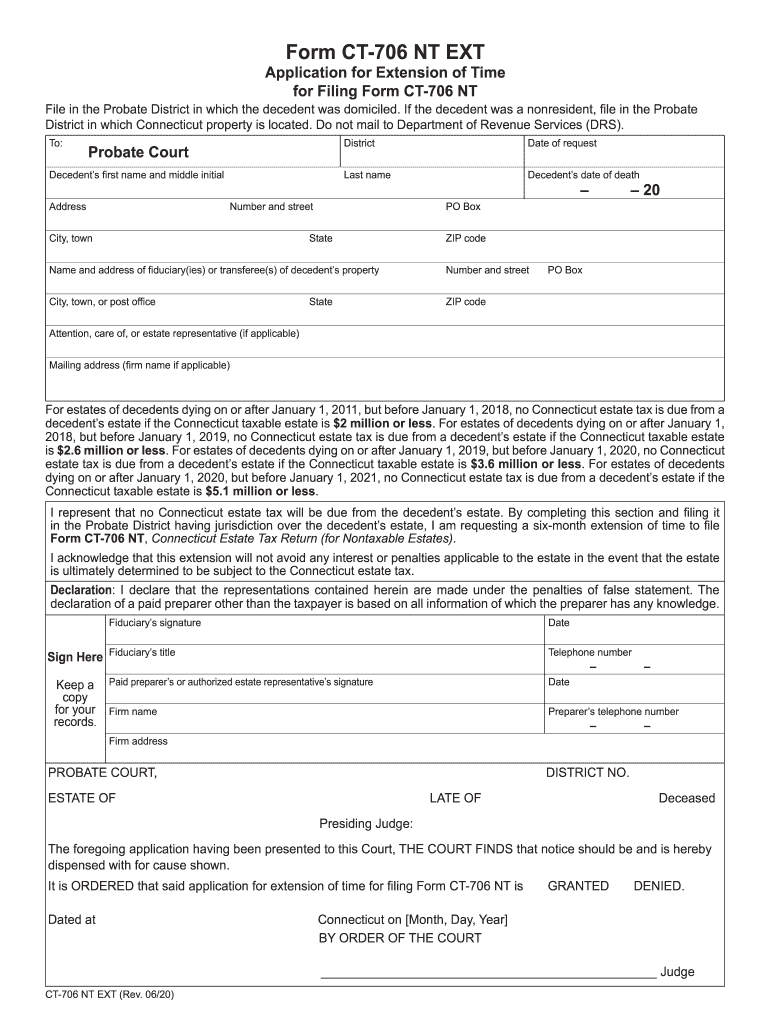
  1. Click ‘Get Form’ to open the ct 706 nt fillable in the editor.
  2. Begin by filling in the Probate Court district where the decedent was domiciled. This is crucial for proper submission.
  3. Enter the decedent’s full name, including first name, middle initial, and last name, along with their date of death.
  4. Provide the complete address of the decedent, including number, street, city or town, state, and ZIP code.
  5. Fill in the fiduciary's name and address. If there is no fiduciary, include details of the person in possession of the property.
  6. Complete any additional contact information for the fiduciary if applicable.
  7. Sign and date the form to validate your request for an extension before submitting it to the appropriate Probate Court.

Start using our platform today to easily fill out your ct 706 nt form online for free!

See more ct 706 nt fillable versions

We've got more versions of the ct 706 nt fillable form. Select the right ct 706 nt fillable version from the list and start editing it straight away!
Versions Form popularity Fillable & printable
2023 4.6 Satisfied (40 Votes)
2022 4.9 Satisfied (45 Votes)
2021 4.8 Satisfied (86 Votes)
2020 4.4 Satisfied (198 Votes)
2019 4.4 Satisfied (134 Votes)
2018 4.1 Satisfied (86 Votes)
2017 4.1 Satisfied (68 Votes)
2015 4.4 Satisfied (471 Votes)
2014 4 Satisfied (47 Votes)
2012 4 Satisfied (21 Votes)
2011 4 Satisfied (27 Votes)
be ready to get more

Complete this form in 5 minutes or less

Get form

Got questions?

We have answers to the most popular questions from our customers. If you can't find an answer to your question, please contact us.
Contact us
Our platform has a pre-loaded version of this form ready for you to fill out and download for your records. Form CT 1040 is issued by the Connecticut Department of Revenue Services.
Connecticut Estate Tax Return (for Nontaxable Estates) For estates of decedents dying during calendar year 2022 (Read instructions before completing this form.)
Form CT-706 NT EXT is used to request a six-month extension to file Form CT-706 NT (Connecticut Estate Tax Return for Nontaxable Estates) with the Probate Court.
To request this extension, you must file Form CT-1127, Application for Extension of Time for Payment of Income Tax, with your timely filed Connecticut income tax return or extension. Purpose: Use Form CT-1040 EXT to request a six-month extension to file your Connecticut income tax return for individuals.
Use Form 4768 to: Apply for an automatic 6-month extension of time to file Form 706, Form 706-A, Form 706-NA, or Form 706-QDT. Apply for a discretionary (additional) extension of time to file Form 706 (Part II of Form 4768).

Security and compliance

At DocHub, your data security is our priority. We follow HIPAA, SOC2, GDPR, and other standards, so you can work on your documents with confidence.

Learn more
ccpa2
pci-dss
gdpr-compliance
hipaa
soc-compliance
be ready to get more

Complete this form in 5 minutes or less

Get form

People also ask

The executor of a decedents estate uses Form 706 to figure the estate tax imposed by chapter 11 of the Internal Revenue Code. This tax is levied on the entire taxable estate and not just on the share received by a particular beneficiary.

Related links