Type text, add images, blackout confidential details, add comments, highlights and more.
02. Sign it in a few clicks
Draw your signature, type it, upload its image, or use your mobile device as a signature pad.
03. Share your form with others
Send exempt distribution via email, link, or fax. You can also download it, export it or print it out.
How to use or fill out fmf4irad with our platform
Ease of Setup
DocHub User Ratings on G2
Ease of Use
DocHub User Ratings on G2
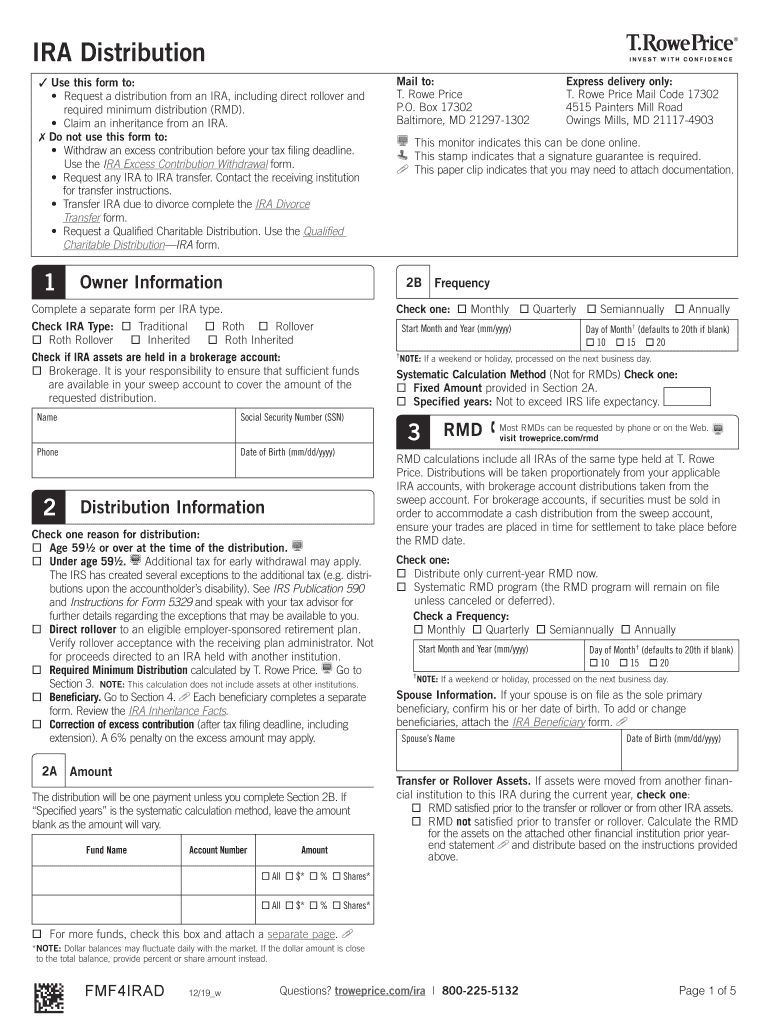
Click ‘Get Form’ to open the fmf4irad in the editor.
Begin by filling out your personal information in Section 1, including your name, Social Security Number, phone number, and date of birth.
In Section 2A, specify the amount you wish to distribute. If you are opting for a systematic calculation method, leave this blank.
Select the reason for your distribution in Section 2B. Options include age-related distributions or direct rollovers. Ensure you check the appropriate box.
Complete Section 3 if you are requesting a Required Minimum Distribution (RMD). Indicate your preferred frequency and start date.
If claiming an inheritance, fill out Section 4 with beneficiary information and select distribution options as needed.
Review all sections for accuracy before signing at the end of the form. Ensure any required documentation is attached.
Start using our platform today to easily complete your fmf4irad form online for free!
Fmf4irad fidelityFmf4irad withdrawalIRA distribution form SchwabT Rowe PriceT Rowe Price loginT Rowe Price direct depositRps troweprice distribution Center withdrawalT rowe Price IRA fees
Security and compliance
At DocHub, your data security is our priority. We follow HIPAA, SOC2, GDPR, and other standards, so you can work on your documents with confidence.
Cookie consent notice
This site uses cookies to enhance site navigation and personalize your experience.
By using this site you agree to our use of cookies as described in our Privacy Notice.
You can modify your selections by visiting our Cookie and Advertising Notice.