01. Edit your ct custody laws unmarried parents online
Type text, add images, blackout confidential details, add comments, highlights and more.
02. Sign it in a few clicks
Draw your signature, type it, upload its image, or use your mobile device as a signature pad.
03. Share your form with others
Send ct family court forms via email, link, or fax. You can also download it, export it or print it out.
How to use or fill out ct custody form with our platform
Ease of Setup
DocHub User Ratings on G2
Ease of Use
DocHub User Ratings on G2
Click ‘Get Form’ to open the ct custody form in the editor.
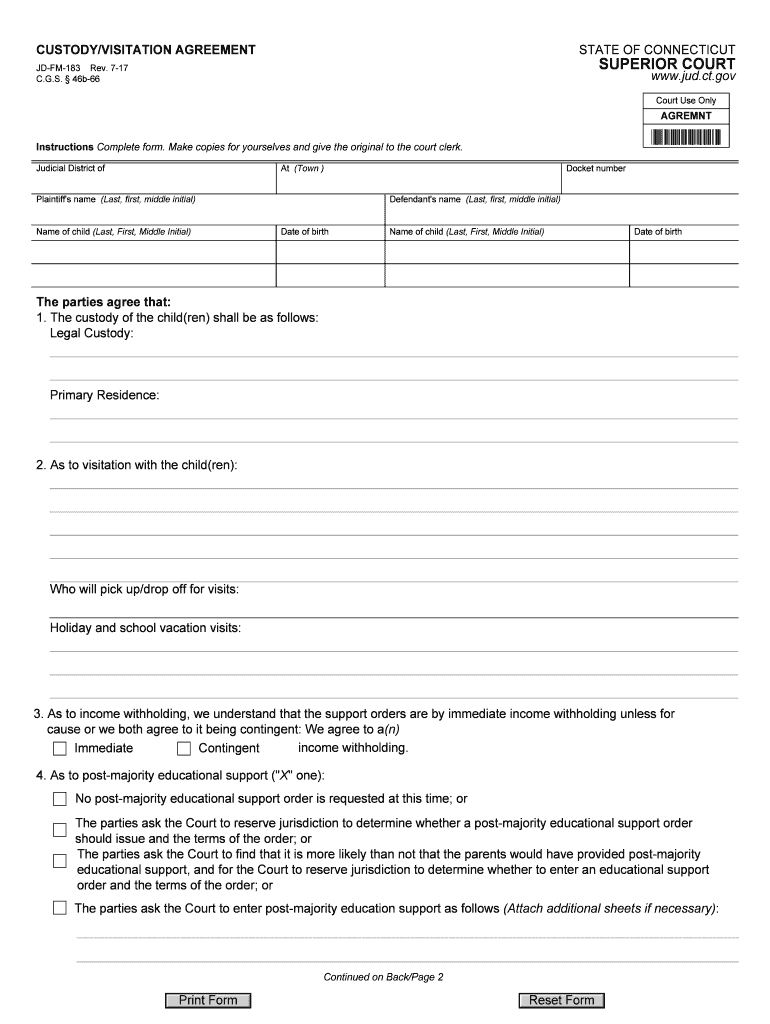
Begin by entering the Judicial District and Docket number at the top of the form. This information is crucial for court processing.
Fill in the names of both parties involved, including their last, first, and middle initials. Ensure accuracy as this will be used in legal proceedings.
Provide details about each child's name and date of birth. This section is essential for identifying the children covered under this agreement.
In the custody section, specify legal custody arrangements and primary residence. Clearly outline who will have decision-making authority and where the child will primarily live.
Detail visitation arrangements, including who will handle pick-up/drop-off and any special provisions for holidays or school vacations.
Address income withholding preferences by selecting either immediate or contingent options based on your agreement.
Complete sections regarding child support, health insurance, and childcare costs by indicating whether these amounts follow guidelines or deviate from them, providing reasons if necessary.
Finally, ensure all parties sign and date the document to validate the agreement before submitting it to the court clerk.
Start using our platform today to easily fill out your ct custody form online for free!
How to file for custody in CTCT custody laws unmarried parentsCt custody Case LookupHow to file for joint custody in CTCustody VISITATION APPLICATIONFull custody CTCustody Visitation Application JD-FM-161CT Family court forms
Security and compliance
At DocHub, your data security is our priority. We follow HIPAA, SOC2, GDPR, and other standards, so you can work on your documents with confidence.
Income) and your total net assets are less than $75,000 (see Section IV. Assets). Otherwise, use the long version, form JD-FM-6-LONG. Docket number.Read more
Technical Protocol for Evaluating Natural Attenuation of
Include a properly completed chain-of-custody form, as described in the following subsec- tion; and. Label shipping container with. - Sample collectorsRead more
Family Forms Filing for Custody or Visitation (or both)
These instructions are to help you represent yourself in court in a custody or visitation case. Legal words and court documents can be confusing.Read more
Cookie consent notice
This site uses cookies to enhance site navigation and personalize your experience.
By using this site you agree to our use of cookies as described in our Privacy Notice.
You can modify your selections by visiting our Cookie and Advertising Notice.