01. Edit your one time showing agreement texas online
Type text, add images, blackout confidential details, add comments, highlights and more.
02. Sign it in a few clicks
Draw your signature, type it, upload its image, or use your mobile device as a signature pad.
03. Share your form with others
Send one time showing agreement via email, link, or fax. You can also download it, export it or print it out.
How to use or fill out listing agreement with our platform
Ease of Setup
DocHub User Ratings on G2
Ease of Use
DocHub User Ratings on G2
Click ‘Get Form’ to open the listing agreement in the editor.
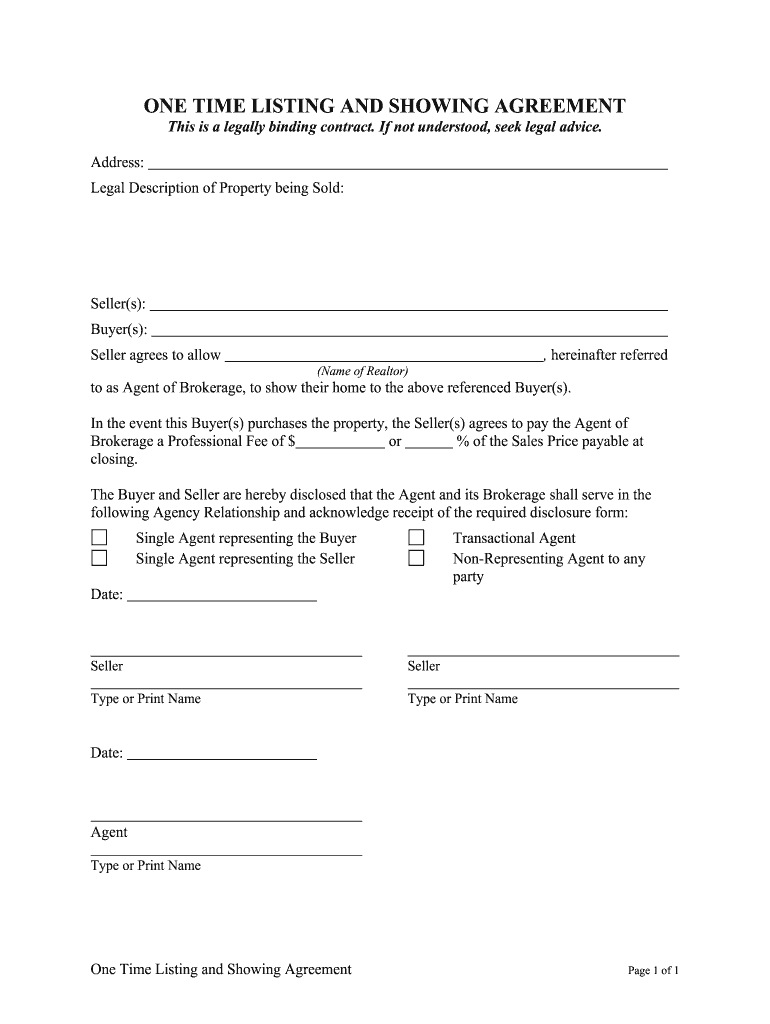
Begin by entering the address and legal description of the property being sold in the designated fields. This information is crucial for identifying the property involved in the transaction.
Next, fill in the names of the Seller(s) and Buyer(s) in their respective sections. Ensure that all parties are accurately represented to avoid any legal complications.
In the section where it states 'Seller agrees to allow', input the name of the Realtor who will act as Agent of Brokerage. This identifies who will represent you during this process.
Specify the Professional Fee that will be paid to the Agent upon closing, either as a fixed amount or a percentage of the sales price. This is an important financial detail that must be clearly stated.
Select and acknowledge your Agency Relationship by checking one of the options provided (e.g., Single Agent representing Buyer/Seller). This clarifies how your agent will operate within this agreement.
Finally, ensure all parties sign and date where indicated, including typing or printing their names for clarity. This finalizes your agreement legally.
Start using our platform today to streamline your listing agreement process for free!
N.J. Admin. Code 11:5-6.2 - Contracts of sale, leases and
Licensees shall provide their clients with a fully executed copy of any sale or exclusive sale or rental listing contract at the time of execution thereof.Read more
Cookie consent notice
This site uses cookies to enhance site navigation and personalize your experience.
By using this site you agree to our use of cookies as described in our Privacy Notice.
You can modify your selections by visiting our Cookie and Advertising Notice.