






Overview of the FMS Score Sheet in Excel
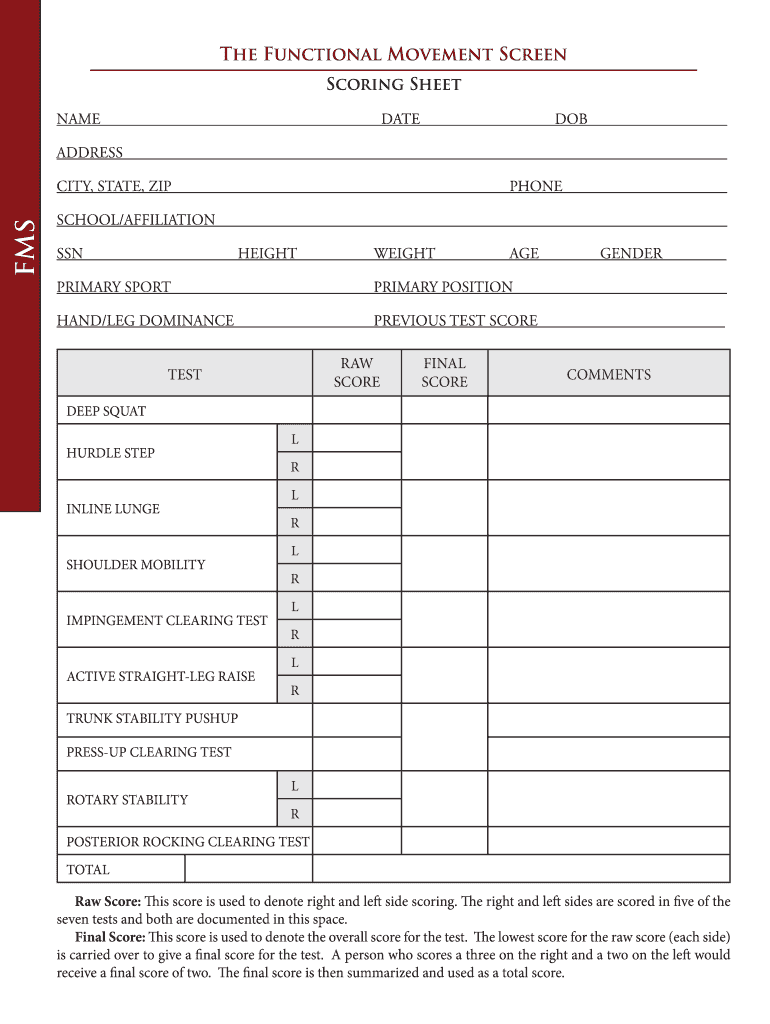
The FMS score sheet excel is specifically designed for the Functional Movement Screen (FMS), which evaluates individual movement patterns through a series of physical tests. The score sheet serves as a critical tool for trainers, therapists, and health professionals assessing client mobility and stability. It captures personal details, individual test scores, and performance comments related to movement assessments such as the deep squat, hurdle step, and trunk stability pushup.
Structure of the FMS Score Sheet
The FMS score sheet typically includes various sections to comprehensively gather data during assessments. These sections facilitate precise tracking of progress over time:
- Personal Information: Includes fields for the participant's name, age, gender, and assessment date.
- Test Scores: Each movement test is scored, allowing for differentiation between right and left side scores and highlighting the lowest scores for composite assessments.
- Performance Comments: A section dedicated to noting observations regarding the participant's form, technique, and any areas of concern.
Scoring System and Interpretation
Understanding the scoring system of the FMS score sheet is vital for accurate assessment interpretation:
-
Raw Scores: Each test gets a score, typically ranging from zero to three, depending on the quality of the movement.
- Score of three: Indicates optimal movement without compensations.
- Score of two: Suggests acceptable movement with compensations.
- Score of one: Reflects a significant movement dysfunction, while a score of zero indicates pain during the assessment.
-
Composite Score Calculation: The final score represents the lowest score across all tests, providing a holistic view of the participant's functional movement capacity. This composite score is essential for developing targeted exercise programs.
Utilizing the FMS Score Sheet in Excel
Implementing the FMS score sheet in Excel offers several advantages for data management and analysis:
- Data Entry and Automation: Users can easily input scores, with the Excel functionalities allowing for automated calculations of composite scores. Formulas can be integrated to facilitate quick scoring and reduce potential errors.
- Data Analysis: The Excel sheet allows for the creation of charts and graphs, enabling easy visualization of progression patterns over multiple assessments. This feature is crucial for tracking improvements over time and tailoring rehabilitation or training programs accordingly.
Practical Examples of Using FMS Score Sheets
The FMS score sheet excel can be utilized in various settings:
- Sports Teams: Coaches can assess athletes at the beginning of the season to help plan individualized training programs that target specific weaknesses noted in the assessments.
- Rehabilitation Clinics: Physical therapists may use the score sheet to evaluate patients recovering from injuries, helping them to design rehabilitation programs based on functional movement deficits.
- Fitness Assessment Classes: Fitness professionals can incorporate the FMS score sheet into their initial evaluations to establish a baseline for new clients and monitor their improvement during personal training sessions.
Common Challenges with FMS Score Sheets
Despite its utility, several challenges may arise in using the FMS score sheet excel effectively:
- Subjectivity in Scoring: Because the assessments rely on the professional's judgment, inconsistencies in scoring may occur. Regular team training on assessment protocols can help mitigate this issue.
- Record Keeping: Over time, managing multiple assessments for various clients can become cumbersome. Maintaining an organized file structure in Excel can assist in tracking client progress methodically.
Conclusion
In summary, the FMS score sheet excel is a fundamental resource in evaluating functional movement within various populations. By meticulously documenting assessments, professionals can analyze functional capacity and create tailored interventions that address movement deficiencies effectively. The integration of Excel into the scoring process enhances accuracy, efficiency, and the overall effectiveness of the FMS assessment within varied professional domains.