Jersey form 2026

Get Form
jersey tax form Preview on Page 1

Here's how it works

01. Edit your jersey tax form online
Type text, add images, blackout confidential details, add comments, highlights and more.

02. Sign it in a few clicks
Draw your signature, type it, upload its image, or use your mobile device as a signature pad.

03. Share your form with others
Send it via email, link, or fax. You can also download it, export it or print it out.

How to use or fill out jersey form with our platform

Form edit decoration
9.5
Ease of Setup
DocHub User Ratings on G2
9.0
Ease of Use
DocHub User Ratings on G2
  1. Click ‘Get Form’ to open the jersey form in the editor.
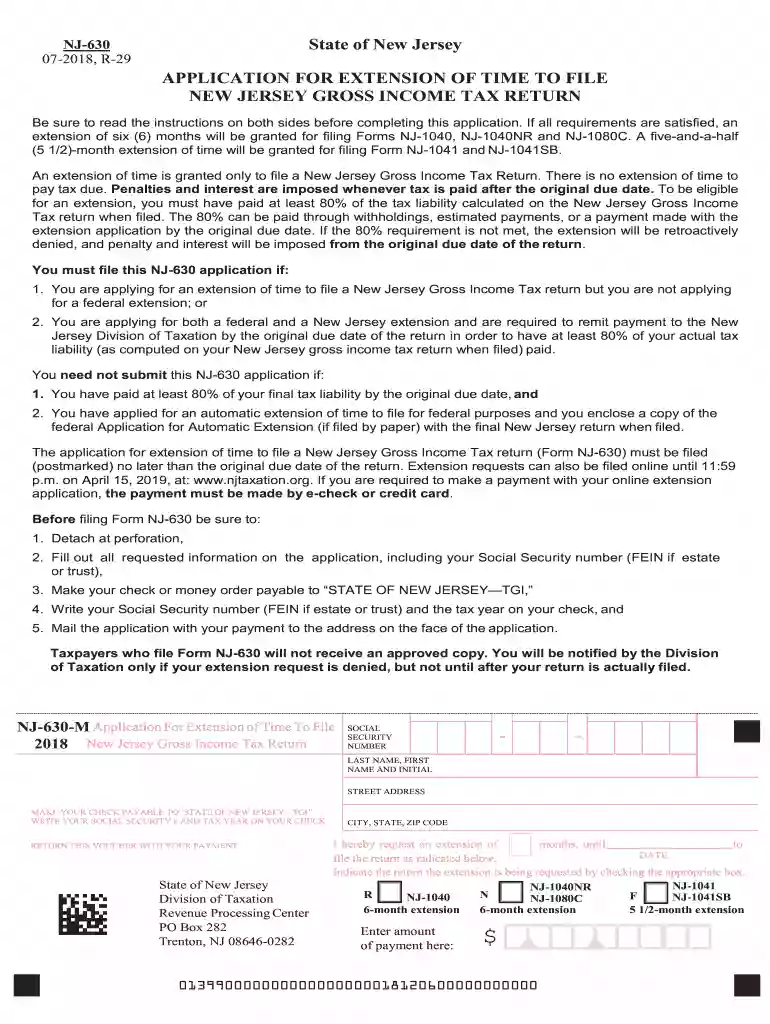
  2. Begin by entering your Social Security number in the designated field. Ensure accuracy as this is crucial for processing your application.
  3. Fill in your last name, first name, and initial in the appropriate fields. This personal information is essential for identification purposes.
  4. Provide your complete street address, including city, state, and ZIP code. This ensures that any correspondence regarding your extension reaches you promptly.
  5. Indicate the number of months for which you are requesting an extension by checking the appropriate box. Choose between a 6-month or 5.5-month extension based on your needs.
  6. Enter the amount of payment if applicable. Make sure to follow the instructions regarding payment methods and ensure it aligns with your tax liability.
  7. Finally, review all entered information for accuracy before submitting. Once confirmed, detach at the perforation and send it to the specified address along with any required payment.

Start using our platform today to fill out your jersey form easily and efficiently!

See more jersey form versions

We've got more versions of the jersey form form. Select the right jersey form version from the list and start editing it straight away!
Versions Form popularity Fillable & printable
2023 4.9 Satisfied (39 Votes)
2022 4.8 Satisfied (51 Votes)
2021 4.8 Satisfied (85 Votes)
2020 4.4 Satisfied (158 Votes)
2019 4.3 Satisfied (53 Votes)
2018 4.4 Satisfied (97 Votes)
2017 4.2 Satisfied (58 Votes)
2016 4.4 Satisfied (31 Votes)
2015 4.4 Satisfied (510 Votes)
2014 3.9 Satisfied (28 Votes)
2013 4 Satisfied (50 Votes)
2012 4.4 Satisfied (279 Votes)
be ready to get more

Complete this form in 5 minutes or less

Get form

Got questions?

We have answers to the most popular questions from our customers. If you can't find an answer to your question, please contact us.
Contact us
Electronic forms (e-forms) provide a user interface to data and services, typically through a browser-based interface. E-forms enable users to interact with enterprise applications and the back-end systems linked to them.
If you import goods from outside the Customs Union, you or your agent must complete a customs declaration. This customs declaration must be made electronically using the Customs and Excise System for the Administration of Revenue (CAESAR).
be ready to get more

Complete this form in 5 minutes or less

Get form