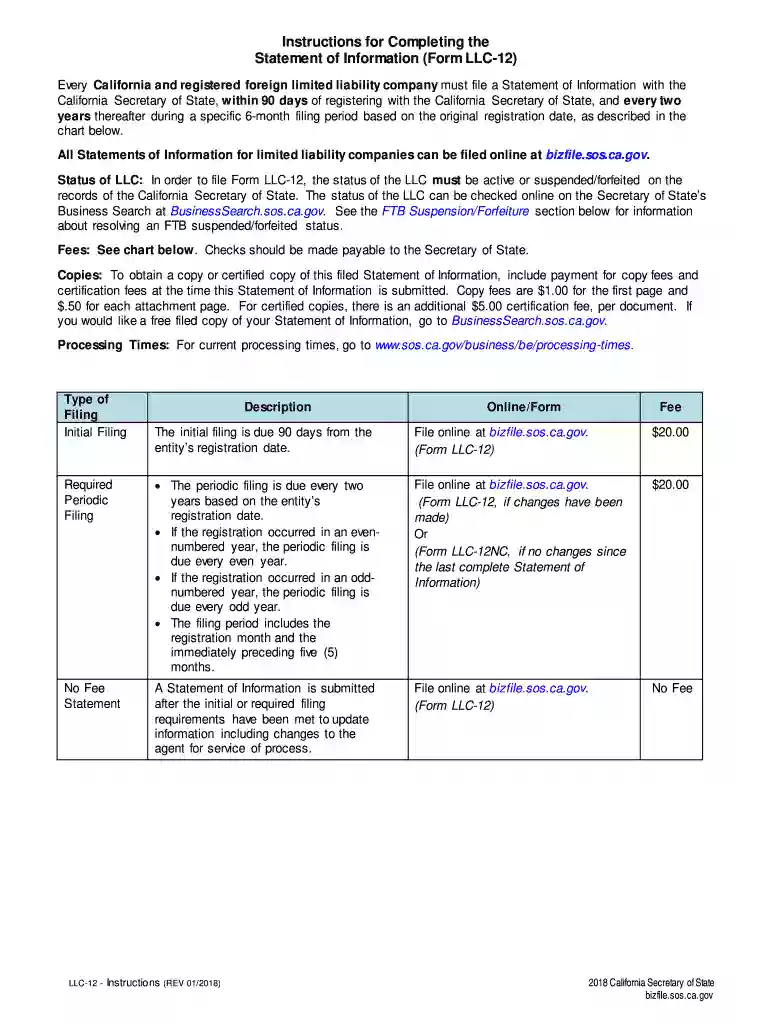
Llc 12 form online 2026

Get Form
llc 12 form online Preview on Page 1

Here's how it works

01. Edit your form online
Type text, add images, blackout confidential details, add comments, highlights and more.

02. Sign it in a few clicks
Draw your signature, type it, upload its image, or use your mobile device as a signature pad.

03. Share your form with others
Send it via email, link, or fax. You can also download it, export it or print it out.

How to use or fill out LLC 12 form online with our platform

Form edit decoration
9.5
Ease of Setup
DocHub User Ratings on G2
9.0
Ease of Use
DocHub User Ratings on G2
  1. Click ‘Get Form’ to open the LLC 12 form in the editor.
  2. Enter the exact name of your limited liability company as it appears on file, including the entity ending (e.g., 'Jones & Company, LLC').
  3. Input the 12-digit Entity (File) Number issued by the California Secretary of State at registration.
  4. If applicable, specify the state or foreign country where your LLC is organized. Leave this blank if formed in California.
  5. Provide the complete street address of your principal office, ensuring it includes city, state, and zip code without abbreviations.
  6. If different from your principal office address, enter a mailing address that may include a P.O. Box.
  7. List any manager(s) or member(s) along with their complete addresses. Ensure all names are spelled out fully without abbreviations.
  8. Designate an Agent for Service of Process by providing either an individual’s name and address or a registered corporate agent's name.
  9. Describe the general type of business activity your LLC engages in and provide details for any chief executive officer if appointed.
  10. Finally, type or print your name, title, and date before signing where indicated to complete the form.

Start filling out your LLC 12 form online for free today using our platform!

See more llc 12 form online versions

We've got more versions of the llc 12 form online form. Select the right llc 12 form online version from the list and start editing it straight away!
Versions Form popularity Fillable & printable
2022 4.6 Satisfied (43 Votes)
2020 4.8 Satisfied (132 Votes)
2019 4.2 Satisfied (108 Votes)
2018 4.3 Satisfied (179 Votes)
2017 4.4 Satisfied (37 Votes)
2014 4.4 Satisfied (224 Votes)
2013 4.9 Satisfied (44 Votes)
2012 4.4 Satisfied (313 Votes)
2007 4.3 Satisfied (35 Votes)
2006 4.1 Satisfied (47 Votes)
be ready to get more

Complete this form in 5 minutes or less

Get form

Got questions?

We have answers to the most popular questions from our customers. If you can't find an answer to your question, please contact us.
Contact us
How to fill out the Instructions for Completing Official Form 12? Identify the plan proponent and fill in their name and filing date. Fill in the hearing location, address, date, and time. Enter the date for filing objections in the appropriate field. Specify the number of days allowed for mailing the documents.
Filing Costs and Additional Fees A $20 fee is required to file Form LLC-12, along with certified copy fees of $1 for the first page and 50 cents for each additional page. Submit an exact copy of the form to be endorsed and filed by the Secretary of State, which carries an $8 fee per copy.
All Statements of Information for limited liability companies can be filed online at bizfile.sos.ca.gov. Status of LLC: In order to file Form LLC-12, the status of the LLC must be active or suspended/forfeited on the records of the California Secretary of State.

Security and compliance

At DocHub, your data security is our priority. We follow HIPAA, SOC2, GDPR, and other standards, so you can work on your documents with confidence.

Learn more
ccpa2
pci-dss
gdpr-compliance
hipaa
soc-compliance
be ready to get more

Complete this form in 5 minutes or less

Get form