alberta tracs Preview on Page 1

At4930 2026

Here's how it works

  • 01. Edit your alberta tracs online

    Type text, add images, blackout confidential details, add comments, highlights and more.

  • 02. Sign it in a few clicks

    Draw your signature, type it, upload its image, or use your mobile device as a signature pad.

  • 03. Share your form with others

    Send tracs alberta via email, link, or fax. You can also download it, export it or print it out.

How to use or fill out at4930 with our platform

Form edit decoration
9.5
Ease of Setup
DocHub User Ratings on G2
9.0
Ease of Use
DocHub User Ratings on G2
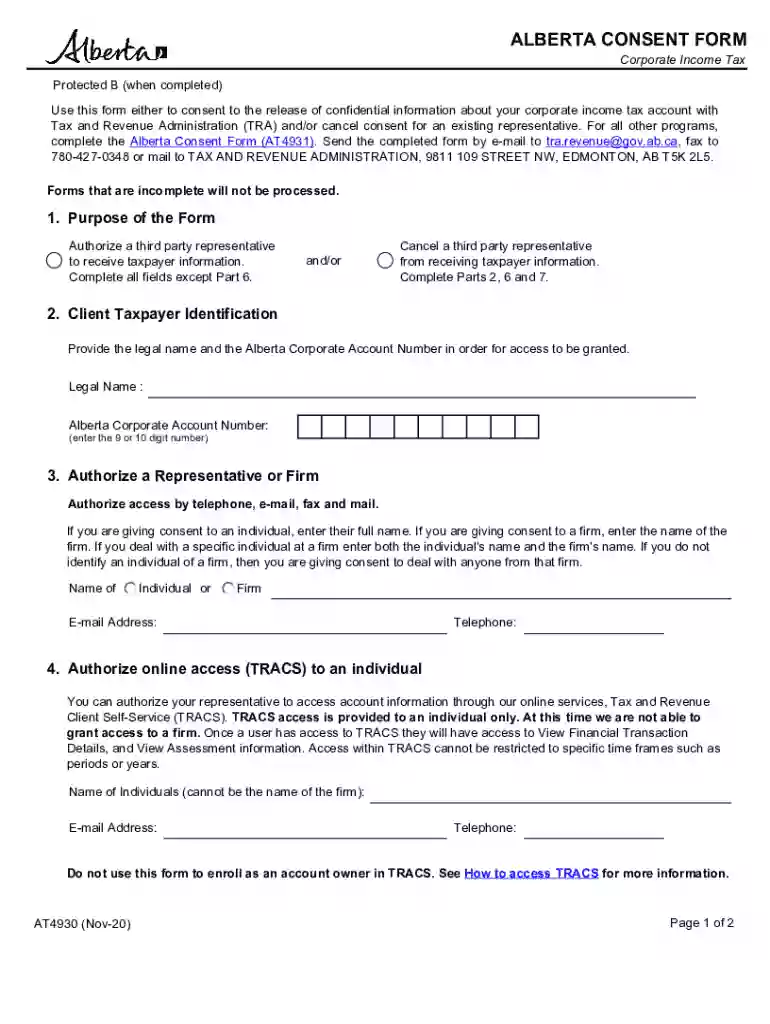
  1. Click ‘Get Form’ to open the at4930 in the editor.
  2. Begin by filling out the Client Taxpayer Identification section. Enter your legal name and Alberta Corporate Account Number, ensuring accuracy for proper access.
  3. In the Authorize a Representative or Firm section, provide the full name of the individual or firm you wish to authorize. Include their email address and telephone number for communication purposes.
  4. If granting online access through TRACS, specify the individual's name (not a firm) along with their email and telephone number.
  5. Select the fiscal years for which access is authorized in the Details of New Authorization section. Choose either 'All years' or specify particular years.
  6. To cancel a representative, complete Part 6 by selecting either to cancel all representatives or specify an individual/firm to cancel.
  7. Finally, ensure that the Certification section is signed and dated by an authorized individual from your business, providing their contact information as required.

Start using our platform today to streamline your form completion process for free!

See more alberta tracs versions

We've got more versions of the alberta tracs form. Select the right alberta tracs version from the list and start editing it straight away!

VersionsForm popularityFillable & printable
20214.8 Satisfied (262 Votes)
20204.4 Satisfied (308 Votes)
20204.4 Satisfied (131 Votes)
20124.4 Satisfied (186 Votes)
20124.3 Satisfied (47 Votes)

be ready to get more

Complete this form in 5 minutes or less

Got questions?

We have answers to the most popular questions from our customers. If you can't find an answer to your question, please contact us.

Failure to file penalties If you file your return late, a penalty applies. The penalty is 5% of the unpaid tax that is due on the filing deadline, plus 1% of this unpaid tax for each complete month that the return is late, up to a maximum of 12 months.
The account number is the nine- or ten-digit corporate account number (CAN) found on the correspondence issued by TRA. It is also noted on your notice of assessment/reassessment and statement of account. correspondence issued by TRA. If you are a first-time filer, the BIN is mentioned in your registration letter.
Go to Pay Your Taxes Online. Click on your financial institution and follow the instructions provided. Select Alberta Finance and the program that you are making a payment for. For example, Alberta Finance Corporate Income Tax located under Provincial Alberta.

Security and compliance

At DocHub, your data security is our priority. We follow HIPAA, SOC2, GDPR, and other standards, so you can work on your documents with confidence.

tracs login alberta

AT 4930 - Independent Study -

AT 4930 - Independent Study. Independent study related to the science and practice of athletic training. Credit Hours: 1 - 3. Repeat/Retake Information: MayRead more

Learn more
CARECENs Office Opening in Bladensburg

Located at 4930-A Annapolis Rd., Bladensburg, MD, CARECEN has been providing critical services to immigrants for over 40 years.Read more

Learn more
If you believe that this page should be taken down, please follow our DMCA take down process here