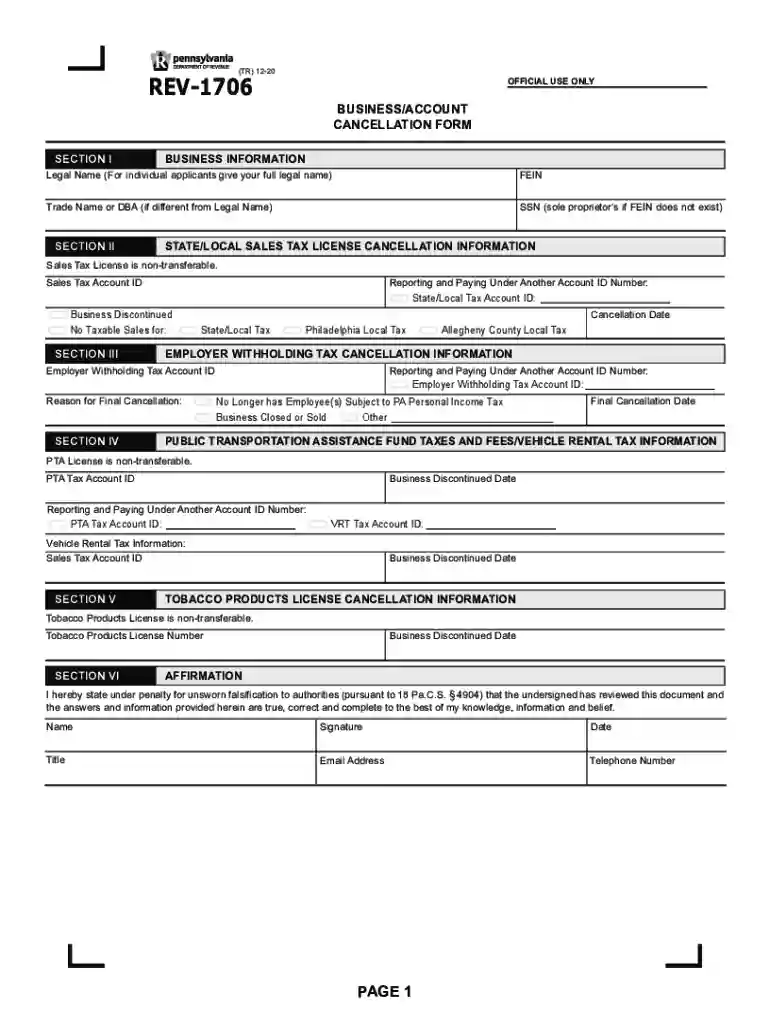
pa rev 1706 Preview on Page 1

Rev 1706-2026

Here's how it works

  • 01. Edit your pa rev 1706 online

    Type text, add images, blackout confidential details, add comments, highlights and more.

  • 02. Sign it in a few clicks

    Draw your signature, type it, upload its image, or use your mobile device as a signature pad.

  • 03. Share your form with others

    Send rev 1706 pa via email, link, or fax. You can also download it, export it or print it out.

How to use or fill out rev 1706 with our platform

Form edit decoration
9.5
Ease of Setup
DocHub User Ratings on G2
9.0
Ease of Use
DocHub User Ratings on G2
  1. Click ‘Get Form’ to open the rev 1706 in the editor.
  2. Begin with SECTION I by entering your Legal Name and FEIN. If you are a sole proprietor without a FEIN, provide your SSN.
  3. In SECTION II, fill out the Sales Tax License Cancellation Information. Include your Sales Tax Account ID and indicate if you are reporting under another Account ID.
  4. Proceed to SECTION III for Employer Withholding Tax Cancellation Information. Provide the necessary Account IDs and reason for cancellation.
  5. Complete SECTION IV regarding Public Transportation Assistance Fund Taxes, ensuring to include any relevant Account IDs.
  6. In SECTION V, if applicable, provide details for Tobacco Products License Cancellation, including the cessation date.
  7. Finally, sign and date the form in SECTION VI. Make sure to include your contact information before submitting.

Start using our platform today to easily complete your rev 1706 form online for free!

See more pa rev 1706 versions

We've got more versions of the pa rev 1706 form. Select the right pa rev 1706 version from the list and start editing it straight away!

VersionsForm popularityFillable & printable
20224.5 Satisfied (47 Votes)
20204.8 Satisfied (105 Votes)
20174.4 Satisfied (57 Votes)
20104.4 Satisfied (59 Votes)
19994.4 Satisfied (386 Votes)

be ready to get more

Complete this form in 5 minutes or less

Got questions?

We have answers to the most popular questions from our customers. If you can't find an answer to your question, please contact us.

California: Internal Revenue Service, PO Box 802501, Cincinnati, OH 45280-2501.
Include a daytime telephone number and title. Mail the com- pleted form to the PA Department of Revenue, Dept. 280901, Harrisburg, PA 1 7 1 2 8 - 0 9 0 1.
Cancel any business tax accounts you may have with the Department of Revenue by logging into your myPATH account, OR by completing the REV-1706. Additionally, if you had employees, you should close your unemployment compensation account through the Department of Labor and Industry by logging into your UCMS account.
Where do I mail the extension Form 276? PO BOX 280504, HARRISBURG PA 17128-0504.
Where do I mail my personal income tax (PA-40) forms? For RefundsPA DEPT OF REVENUE REFUND OR CREDIT REQUESTED 3 REVENUE PLACE HARRISBURG PA 17129-0003 Extensions of Time to File Individual Taxes PA DEPARTMENT OF REVENUE BUREAU OF INDIVIDUAL TAXES PO BOX 280504 HARRISBURG PA 17128-05042 more rows Apr 2, 2025

Security and compliance

At DocHub, your data security is our priority. We follow HIPAA, SOC2, GDPR, and other standards, so you can work on your documents with confidence.

People also ask

Where to mail your income tax return Pennsylvania PA-40, Individual Income Tax Return Receiving a Refund Making a Payment PA Dept of Revenue Refund/Credit requested 3 Revenue Place Harrisburg PA 17129-0003 PA Dept of Revenue Refund/Credit requested 1 Revenue Place Harrisburg PA 17129-00011 more row

tax date return

Part Rev 1706 | State Regulations | US Law

Part Rev 1706 - CLASSIFICATION OF BALANCE SHEET ACCOUNTS FOR REPORTING ON REPORTMS-535, FINANCIAL REPORT OF THE BUDGET Rev 1706.01 - Classification of AssetsRead more

Learn more
Nucor Steel Gallatin plant - Global Energy Monitor

Jun 24, 2025 A steel plant in Ghent, Kentucky, United States that operates electric arc furnace (EAF) technology.Read more

Learn more
Business/Account Cancellation Form (REV-1706)

This form must be completed if the business was discontinued, sold or ceased operations in Pennsylvania. For immediate updates, users may make changes.Read more

Learn more
If you believe that this page should be taken down, please follow our DMCA take down process here