Type text, add images, blackout confidential details, add comments, highlights and more.
02. Sign it in a few clicks
Draw your signature, type it, upload its image, or use your mobile device as a signature pad.
03. Share your form with others
Send https wholechild lausd net the student parent pin via email, link, or fax. You can also download it, export it or print it out.
How to use or fill out school pin request with our platform
Ease of Setup
DocHub User Ratings on G2
Ease of Use
DocHub User Ratings on G2
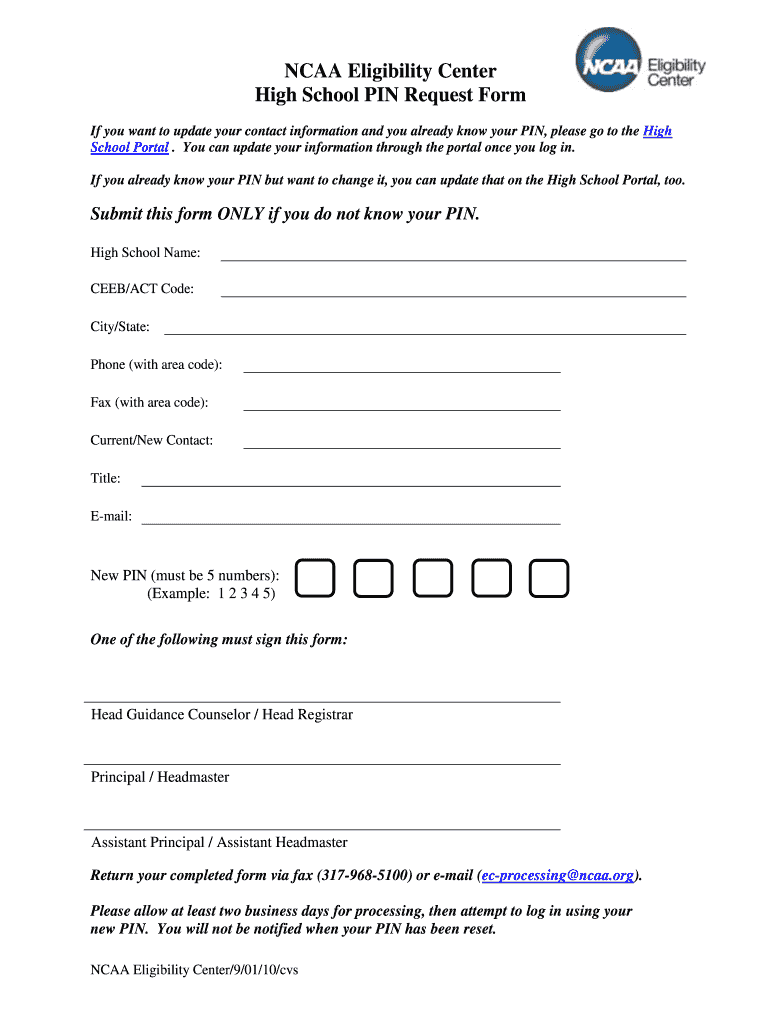
Click ‘Get Form’ to open the High School PIN Request Form in the editor.
Begin by entering your High School Name and CEEB/ACT Code in the designated fields. This information is essential for identifying your institution.
Fill in the City/State where your school is located, along with a contact Phone number (including area code) and Fax number (if applicable).
Provide your Current/New Contact details, including Title and E-mail address. This ensures that communication regarding your PIN request is directed appropriately.
Enter a New PIN consisting of 5 numbers. Ensure it’s memorable yet secure, following the example format provided (e.g., 1 2 3 4 5).
Select one of the authorized signatories from Head Guidance Counselor, Principal, or Assistant Principal to sign the form.
Once completed, return your form via fax at (317-968-5100) or e-mail it to ec-processing@ncaa.org. Allow at least two business days for processing before attempting to log in with your new PIN.
Start using our platform today to streamline your school pin request process for free!
To obtain the PIN, parents must provide the school personnel a picture ID for verification. School verifies parental rights or guardianship. Parents fill out and sign the Parent Portal Identification form (FM-7052E 10-06). School files the completed form.
How do I access the parent portal for Miami Dade schools?
Open a web browser and go to dadeschools.net. Click Portal and select Parents from the drop-down. 2. Select to log in using your Apple ID or Google ID.
What is the password for the Miami Dade Schools student portal?
In order to access the portal, you will need your 7-digit MDCPS Student ID number to utilize as a username. The password is a combination of birthdate and first and last name initials in the following format (2-digit month, 2-digit day, 2-digit year, first and last initial example: 070509jd).
How to access osp Miami dade?
Open your web browser and navigate to . Place your mouse over Portals and click on Parents. Login to the Parent Portal using your User Name and Password. After the portal opens, click on the Apps/Services/Sites tab. After the page opens, click on the OSP Parent link.
What if I forgot my Dadeschools password?
Students will be able to reset their password 24/7 by accessing the website at: . Once the personal questions have been created, students can reset their own password.
ncsu pins
School pin request templateSchool pin request onlineSchool pin request formSchool pin request phone numberPalmbeach school pin requestSchool pin request emailSchool Code Request FormSchool code College Board
Related forms
FOREIGN LIMITED LIABILITY COMPANY - CERTIFICATE OF REGISTRATION APPLICATION
School Admission Letter Free 30 Templates and Examples
To, The Principal/Headmaster, [Name of the School], [Address], [Pin Code], [Date]. Subject: Request letter for school admission. Dear Sir/Maam, With due
All students will be required to create a four-digit Personal Identification Number (PIN) in MyPack Portal in order to access student financial and academic
Request PINs for all of the records for all the schools under your destination point. Request PINs individually by Social Security Number (students SSNs
Cookie consent notice
This site uses cookies to enhance site navigation and personalize your experience.
By using this site you agree to our use of cookies as described in our Privacy Notice.
You can modify your selections by visiting our Cookie and Advertising Notice.