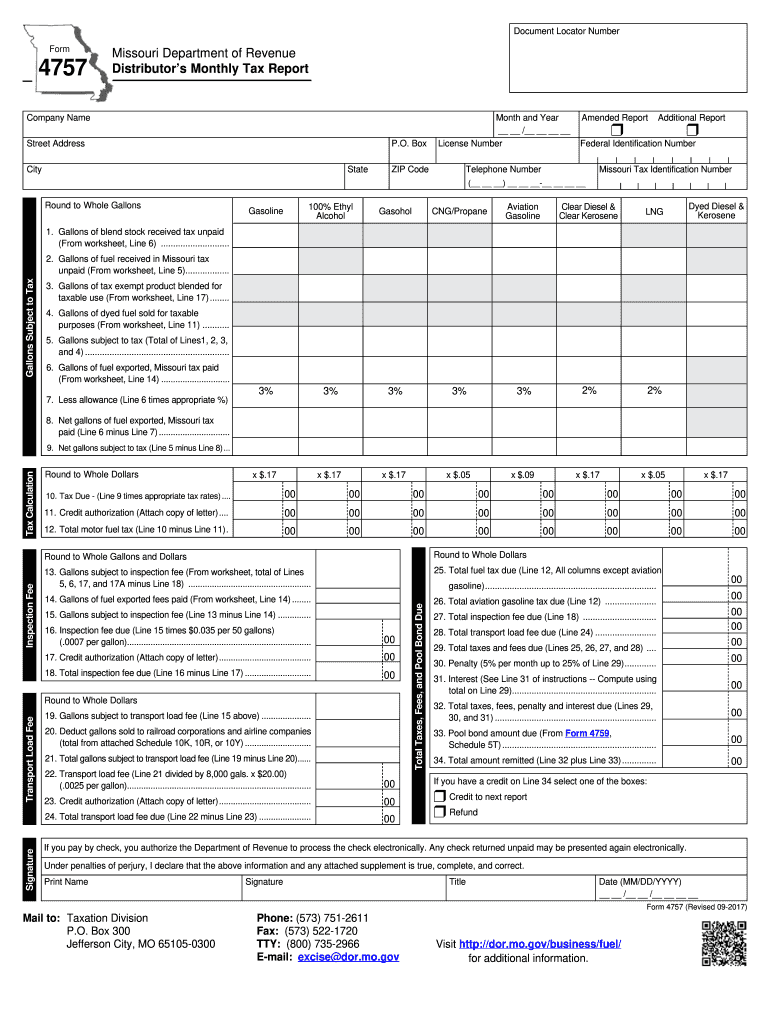
Missouri form 4757-2026

Get Form
4757 Preview on Page 1

Here's how it works

01. Edit your 4757 online
Type text, add images, blackout confidential details, add comments, highlights and more.
02. Sign it in a few clicks
Draw your signature, type it, upload its image, or use your mobile device as a signature pad.
03. Share your form with others
Send form 4757 via email, link, or fax. You can also download it, export it or print it out.

How to use or fill out Missouri Form 4757 with DocHub

Form edit decoration
9.5
Ease of Setup
DocHub User Ratings on G2
9.0
Ease of Use
DocHub User Ratings on G2
  1. Click ‘Get Form’ to open the Missouri Form 4757 in our editor.
  2. Begin by entering your company name, month, and year at the top of the form. If this is an amended report, check the appropriate box.
  3. Fill in your street address, P.O. Box (if applicable), license number, federal ID number, city, state, and ZIP code.
  4. In the 'Gallons Subject to Tax' section, input the relevant data for each fuel type in their respective columns (A through G). Ensure you round to whole gallons as instructed.
  5. Proceed to calculate tax due based on the net gallons subject to tax. Enter this amount in the designated field.
  6. Complete any additional sections such as inspection fees and transport load fees as necessary. Remember to attach any required documentation.
  7. Finally, certify your report by signing it and providing your title and date before submitting it via mail or electronically.

Start using our platform today for free to streamline your form completion process!

be ready to get more

Complete this form in 5 minutes or less

Get form

Got questions?

We have answers to the most popular questions from our customers. If you can't find an answer to your question, please contact us.
Contact us

With DocHub, it’s quite simple. The platform offers users an add-on called DocHub for Gmail, which you can locate in the Google Workspace Marketplace without being charged. Install it and grant it access to your Google account. Open your email with your missouri form 4757 attached and click on the add-on button in the right-side panel. Log in to your DocHub account, and upload the form to our editor, where you can fill it out and sign.

Document editing with DocHub is equally convenient on desktop and mobile devices. You just need an internet browser to modify your missouri form 4757 on Android. Open our site and sign in to access the tools you need. Add your document and introduce your intended changes. After that, you can keep your form in your document storage or send it out instantly.

Security and compliance

At DocHub, your data security is our priority. We follow HIPAA, SOC2, GDPR, and other standards, so you can work on your documents with confidence.

Learn more
ccpa2
pci-dss
gdpr-compliance
hipaa
soc-compliance