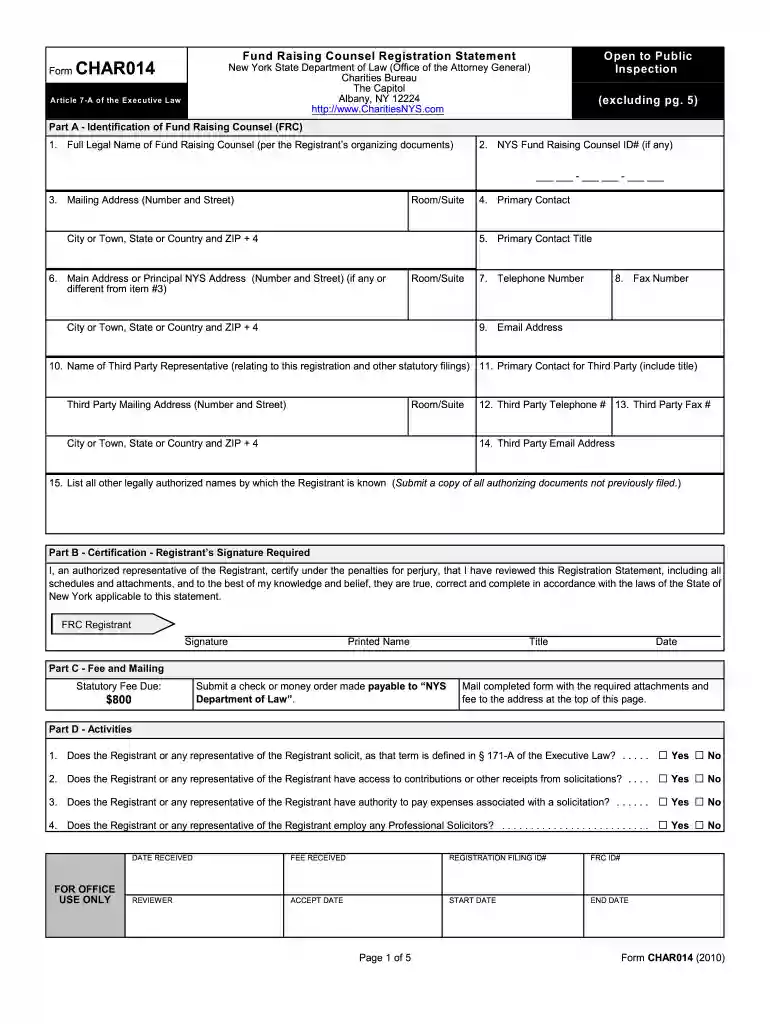
registrant charities Preview on Page 1

Registrant charities 2026

Here's how it works

  • 01. Edit your form online

    Type text, add images, blackout confidential details, add comments, highlights and more.

  • 02. Sign it in a few clicks

    Draw your signature, type it, upload its image, or use your mobile device as a signature pad.

  • 03. Share your form with others

    Send it via email, link, or fax. You can also download it, export it or print it out.

How to use or fill out registrant charities with our platform

Form edit decoration
9.5
Ease of Setup
DocHub User Ratings on G2
9.0
Ease of Use
DocHub User Ratings on G2
  1. Click ‘Get Form’ to open the registrant charities document in the editor.
  2. Begin with Part A, where you will enter the Full Legal Name of the Fund Raising Counsel as per your organizing documents. Ensure accuracy for compliance.
  3. Fill in the NYS Fund Raising Counsel ID# if applicable, followed by your complete mailing address including room/suite and ZIP code.
  4. Provide contact details such as telephone number, fax number, and email address. This information is crucial for communication with regulatory bodies.
  5. In Part B, ensure that an authorized representative certifies the registration statement by signing and dating it. This step is essential for legal validation.
  6. Complete Part C by noting the statutory fee due and prepare a check or money order made payable to 'NYS Department of Law'.
  7. Proceed through Parts D to I, answering all questions accurately. Use 'NA' for non-applicable items to maintain clarity.

Start using our platform today to streamline your form completion process effortlessly!

See more registrant charities versions

We've got more versions of the registrant charities form. Select the right registrant charities version from the list and start editing it straight away!

VersionsForm popularityFillable & printable
20144.8 Satisfied (106 Votes)
20104.4 Satisfied (510 Votes)

be ready to get more

Complete this form in 5 minutes or less

Security and compliance

At DocHub, your data security is our priority. We follow HIPAA, SOC2, GDPR, and other standards, so you can work on your documents with confidence.

Related links

Kan. Admin. Regs. 7-42-1 - Charitable organizations

(a) Any charitable organization required to register with the secretary of state may use the unified registration statement (URS) prescribed by theRead more

Learn more
Search Public Charities Filings

The AGOs Public Charities Filing Search website allows you to search for and access the annual reports of public charities filed with the AGO.Read more

Learn more
Collaborators Sponsors - ALSense

Introduction. As the very first iGEM team from our university, we faced the challenge of opening many doors while building ALSense.Read more

Learn more
If you believe that this page should be taken down, please follow our DMCA take down process here