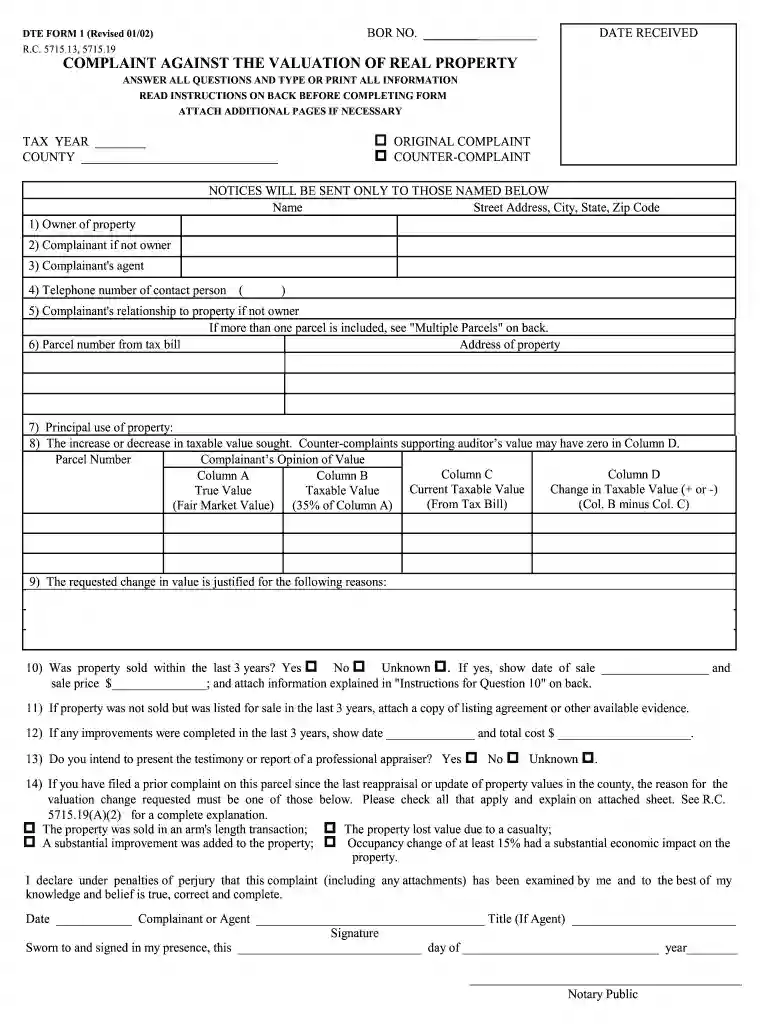
Dte complaint form 1 lake county ohio 2026

Get Form
dte complaints Preview on Page 1

Here's how it works

01. Edit your dte complaints online
Type text, add images, blackout confidential details, add comments, highlights and more.

02. Sign it in a few clicks
Draw your signature, type it, upload its image, or use your mobile device as a signature pad.

03. Share your form with others
Send it via email, link, or fax. You can also download it, export it or print it out.

How to use or fill out dte complaint form 1 lake county ohio with our platform

Form edit decoration
9.5
Ease of Setup
DocHub User Ratings on G2
9.0
Ease of Use
DocHub User Ratings on G2
  1. Click ‘Get Form’ to open the dte complaint form 1 in the editor.
  2. Begin by filling in the 'Tax Year' and 'County' fields at the top of the form. Ensure that you provide accurate information as this will be crucial for processing your complaint.
  3. In section 6, enter the 'Parcel number from tax bill' and the 'Address of property'. This identifies the specific property you are disputing.
  4. Complete sections 7 and 8 by detailing the principal use of the property and stating your opinion on any changes in taxable value. Use our platform's text tools to clearly articulate your reasoning.
  5. If applicable, answer questions regarding recent sales or improvements made to the property in sections 10 through 12. Attach any necessary documentation directly within our editor for easy submission.
  6. Finally, review all entries for accuracy before signing and dating at the bottom of the form. Utilize our platform’s features to ensure everything is complete and correct.

Start using our platform today to easily fill out your dte complaint form for free!

be ready to get more

Complete this form in 5 minutes or less

Get form

Got questions?

We have answers to the most popular questions from our customers. If you can't find an answer to your question, please contact us.
Contact us
A HOMEOWNER MUST: Own and occupy the home as their primary place of residence as of January 1st of the year for which they apply; and. ​Be 65 years of age, or turn 65, by December 31st of the year for which they apply; or.
Eligible homeowners receive an exemption on the first $25,000 of appraised value from taxation for a single family home. Eligible military veterans and surviving spouses of first responders receive an exemption on the first $50,000 of appraised value from taxation for a single family home.
The HB 920 reduction factor, mandated by Ohio law, is designed to keep tax revenues stable when property values increase or decrease. This reduction factor will keep the revenue to our schools, cities, libraries, etc.
You may qualify for a lower tax on your home if you: Are at least 65 years old OR. Own and occupy your home as your primary residence as of January 1st of the year in which the exemption is being sought. Meet the income guidelines certified by the Ohio Department of Taxation Commissioner:
If you disagree with the decision of the Board of Revision, you may file an appeal with the Ohio Board of Tax Appeals using Form DTE 4 (available online or at the Auditors Office) within 30 days after the Board of Revisions decision notice is mailed.

Security and compliance

At DocHub, your data security is our priority. We follow HIPAA, SOC2, GDPR, and other standards, so you can work on your documents with confidence.

Learn more
ccpa2
pci-dss
gdpr-compliance
hipaa
soc-compliance
be ready to get more

Complete this form in 5 minutes or less

Get form

People also ask

The easiest way to win an appeal is to find out the county has the wrong square footage for your property. An appeal triggers a review of your file. The discrepancy must be docHub. Bring evidence bearing on the market value of your property.
The best type of documents is usually estimates for repairs from contractors and photographs of physical problems. All documentation should be signed and attested. This means you must furnish documented evidence of your propertys needs.
The Ohio Constitution prohibits governmental units from levying property taxes which in total exceed 1.0% of true value unless approved by the voters.

Related links