Type text, add images, blackout confidential details, add comments, highlights and more.
02. Sign it in a few clicks
Draw your signature, type it, upload its image, or use your mobile device as a signature pad.
03. Share your form with others
Send form 8853 instructions via email, link, or fax. You can also download it, export it or print it out.
How to use or fill out 2011 IRS Form 8853 with DocHub
Ease of Setup
DocHub User Ratings on G2
Ease of Use
DocHub User Ratings on G2
Click ‘Get Form’ to open the 2011 IRS Form 8853 in our editor.
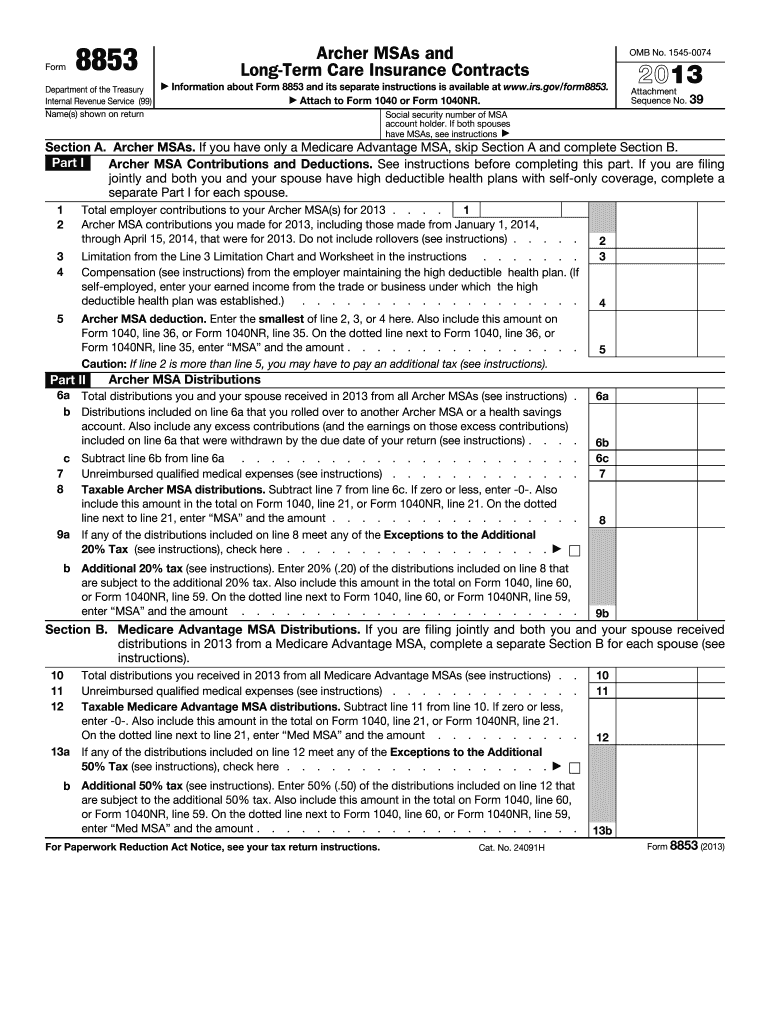
Begin by entering your name and social security number at the top of the form. If filing jointly, ensure both names are included.
In Section A, provide details about Archer MSA contributions. Fill in total employer contributions and your personal contributions for the year.
Complete Part I by calculating your Archer MSA deduction based on the smallest value from lines 2, 3, or 4. This amount should also be reported on your main tax form.
Proceed to Part II for Archer MSA distributions. Report total distributions received and any unreimbursed qualified medical expenses.
If applicable, complete Section B for Medicare Advantage MSA distributions, following similar steps as above.
Finally, review all entries for accuracy before saving or exporting your completed form directly from our platform.
Start using our editor today to fill out your IRS Form 8853 online for free!
Form 8853 PDF2011 irs form 8853 pdf2011 irs form 8853 instructionsForm 8853 instructionsForm 8853 or 8889Form 8853 instructions pdfIRS Form 8853 for 2025Form 8853 Section C
Security and compliance
At DocHub, your data security is our priority. We follow HIPAA, SOC2, GDPR, and other standards, so you can work on your documents with confidence.
by FLT CARE Cited by 3 For per diem-based payments, the amount in box 1 of Form 1099-LTC is reported on line 17 of Form 8853. For reimbursement-based payments, it is reported on lineRead more
Feb 6, 2020 Commission File Number. Registrant; State of Incorporation;. Address; and Telephone Number. IRS Employer Identification. No. 1-9513. CMS ENERGYRead more
Cookie consent notice
This site uses cookies to enhance site navigation and personalize your experience.
By using this site you agree to our use of cookies as described in our Privacy Notice.
You can modify your selections by visiting our Cookie and Advertising Notice.