Type text, add images, blackout confidential details, add comments, highlights and more.
02. Sign it in a few clicks
Draw your signature, type it, upload its image, or use your mobile device as a signature pad.
03. Share your form with others
Send how to fill out alabama a 4 form via email, link, or fax. You can also download it, export it or print it out.
How to use or fill out Alabama A4 with our platform
Ease of Setup
DocHub User Ratings on G2
Ease of Use
DocHub User Ratings on G2
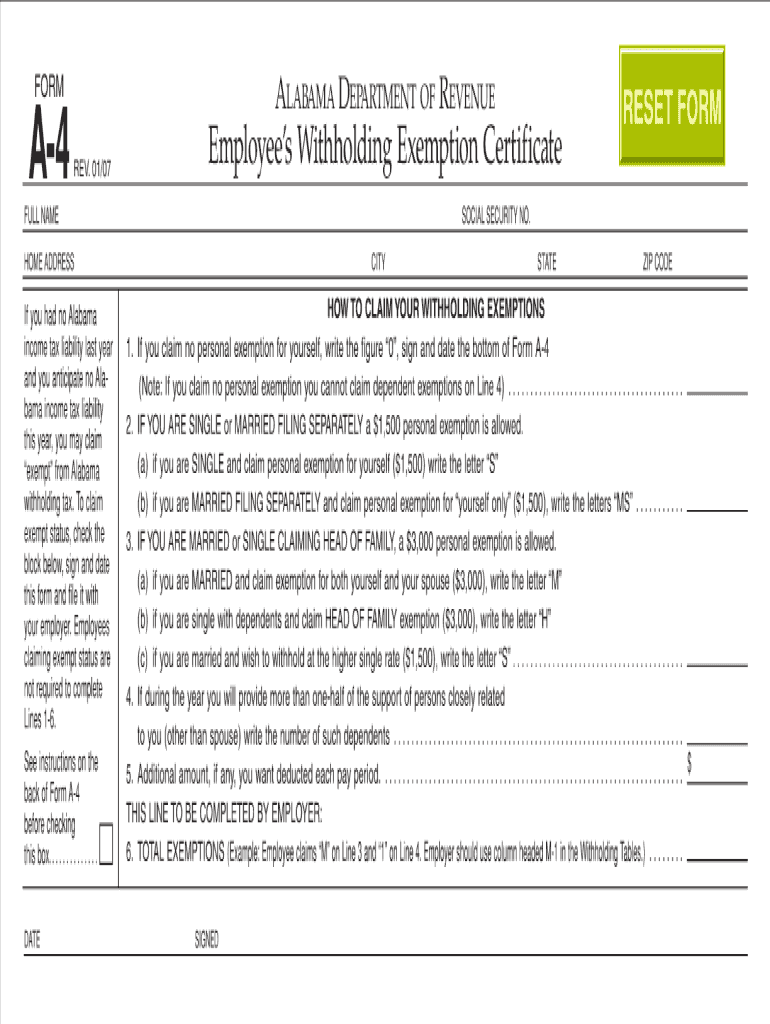
Click ‘Get Form’ to open the Alabama A4 in the editor.
Begin by entering your personal information in the designated fields, including your name, address, and contact details. Ensure accuracy for seamless processing.
Next, navigate to the section requiring your employment details. Fill in your job title, employer's name, and duration of employment as specified.
Proceed to the financial information section. Input your income details carefully, as this will be crucial for assessment purposes.
Finally, review all entered information for completeness and accuracy. Use our platform’s editing tools to make any necessary adjustments before submission.
Start using our platform today to fill out your Alabama A4 form online for free!
Alabama a 4 Form pdfAlabama a4 calculatorForma A4 withholdingAlabama withholding FormAlabama a4 form in spanishAz a 4 Form 2026Alabama A4 2026How to fill out Alabama a 4 Form
Security and compliance
At DocHub, your data security is our priority. We follow HIPAA, SOC2, GDPR, and other standards, so you can work on your documents with confidence.
HOW TO CLAIM YOUR WITHHOLDING EXEMPTIONS. 1. If you claim no personal exemption for yourself, write the figure 0, sign and date the bottom of Form A-4.Read more
Every employee, on or before the date of commencement of employment, shall furnish his or her employer with a signed Alabama with- holding exemption certificateRead more
Cookie consent notice
This site uses cookies to enhance site navigation and personalize your experience.
By using this site you agree to our use of cookies as described in our Privacy Notice.
You can modify your selections by visiting our Cookie and Advertising Notice.