Type text, add images, blackout confidential details, add comments, highlights and more.
02. Sign it in a few clicks
Draw your signature, type it, upload its image, or use your mobile device as a signature pad.
03. Share your form with others
Send it via email, link, or fax. You can also download it, export it or print it out.
How to use or fill out form 8594DocHubcom 1993 with our platform
Ease of Setup
DocHub User Ratings on G2
Ease of Use
DocHub User Ratings on G2
Click ‘Get Form’ to open it in the editor.
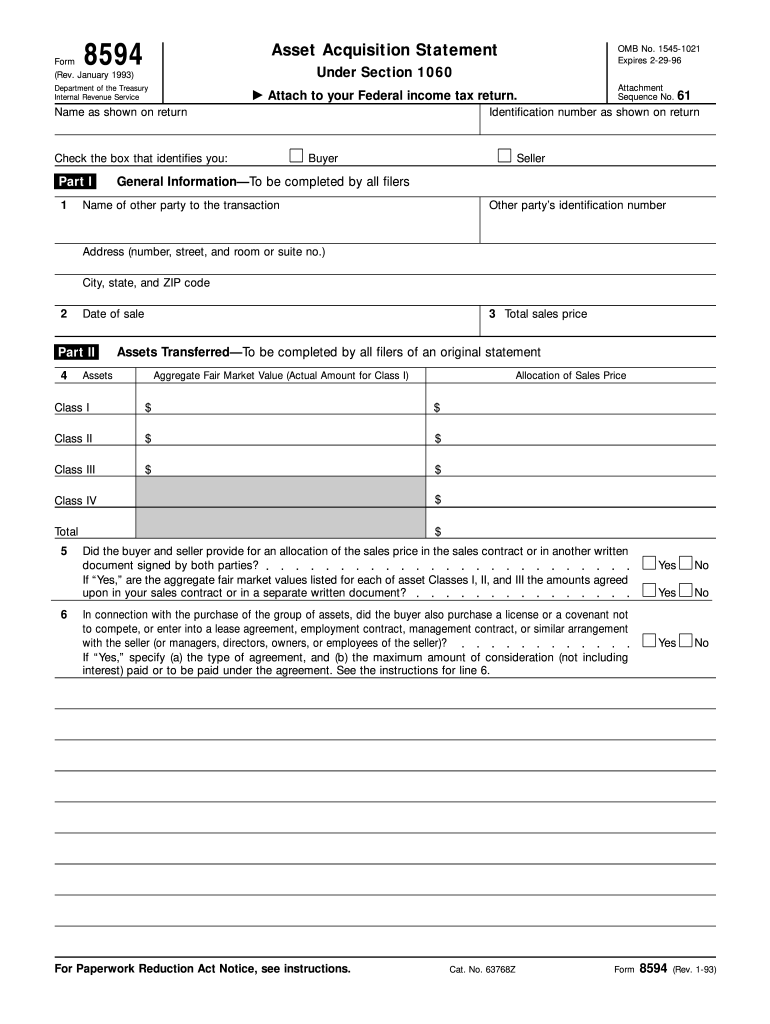
Begin by entering your name and taxpayer identification number (TIN) at the top of the form. Identify yourself as either the buyer or seller by checking the appropriate box.
In Part I, provide the name, address, and TIN of the other party involved in the transaction. Ensure you enter their TIN correctly.
Enter the date of sale in Line 2 and total consideration transferred for the assets in Line 3.
Move to Part II, where you will list each class of assets. Enter their total fair market value and allocation of sales price for each class.
Complete Line 6 by confirming if an allocation of sales price was agreed upon in a written document signed by both parties.
If applicable, fill out Part III for intangible amortizable assets and ensure all Class III assets are included in Part II.
For any amendments, complete Part IV detailing reasons for increases or decreases in consideration and attach it to your tax return.
Start using our platform today to streamline your form completion process for free!
We've got more versions of the form 8594DocHubcom 1993 form. Select the right form 8594DocHubcom 1993 version from the list and start editing it straight away!
Irs form 8594 dochub com 1993Form 8594 dochub com 1993 pdfForm 8594 instructionsForm 8594 PDFForm 8594 dochub com 1993 instructionsForm 8594 exampleForm 8594 instructions pdfIRS Form 8594 classes of assets
Security and compliance
At DocHub, your data security is our priority. We follow HIPAA, SOC2, GDPR, and other standards, so you can work on your documents with confidence.
May 19, 2025 The document serves as a resource allocation plan that meets the requirements of Section 159-11 of the North. Carolina General Statutes by being
Cookie consent notice
This site uses cookies to enhance site navigation and personalize your experience.
By using this site you agree to our use of cookies as described in our Privacy Notice.
You can modify your selections by visiting our Cookie and Advertising Notice.