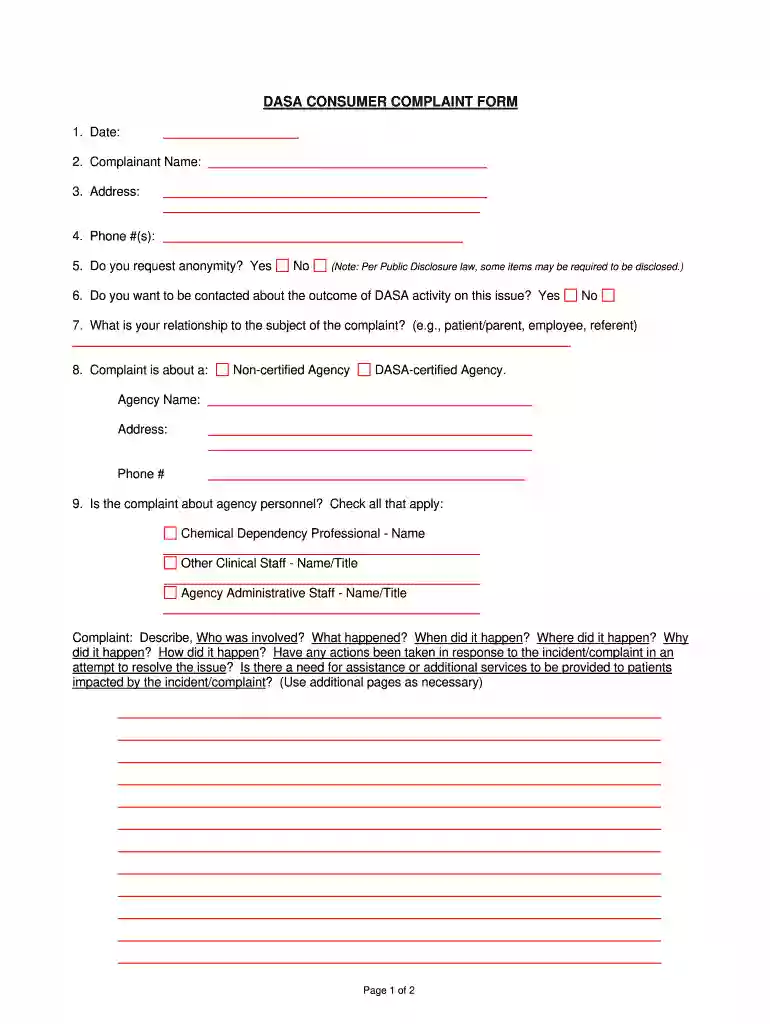
dasa complaint Preview on Page 1

Dasa form 2026

Here's how it works

  • 01. Edit your dasa complaint online

    Type text, add images, blackout confidential details, add comments, highlights and more.

  • 02. Sign it in a few clicks

    Draw your signature, type it, upload its image, or use your mobile device as a signature pad.

  • 03. Share your form with others

    Send dasa form via email, link, or fax. You can also download it, export it or print it out.

How to use or fill out dasa form with our platform

Form edit decoration
9.5
Ease of Setup
DocHub User Ratings on G2
9.0
Ease of Use
DocHub User Ratings on G2
  1. Click ‘Get Form’ to open the DASA Consumer Complaint Form in the editor.
  2. Begin by entering the date at the top of the form. This helps establish a timeline for your complaint.
  3. Fill in your name as the complainant, followed by your address and phone number. Ensure all contact information is accurate for follow-up.
  4. Indicate whether you wish to remain anonymous by selecting 'Yes' or 'No'. Remember that some information may still be disclosed under Public Disclosure law.
  5. Decide if you want to be contacted regarding the outcome of your complaint and mark your choice accordingly.
  6. Specify your relationship to the subject of the complaint, such as patient, parent, or employee.
  7. Identify whether your complaint concerns a non-certified agency or a DASA-certified agency. Provide their name, address, and phone number.
  8. If applicable, check any agency personnel involved in the complaint and provide their names and titles.
  9. In the complaint description section, detail what happened, who was involved, when and where it occurred, and any actions taken in response. Use additional pages if necessary.
  10. Once completed, forward this form to the DASA Certification Section using the provided contact details.

Start filling out your DASA Consumer Complaint Form online for free today!

be ready to get more

Complete this form in 5 minutes or less

Security and compliance

At DocHub, your data security is our priority. We follow HIPAA, SOC2, GDPR, and other standards, so you can work on your documents with confidence.

dasa report

DASA Assessment

Data Request Form Student Success Assessment Pack Assessment Ambassadors DASA Assessment champions data-driven decision-making across the division.Read more

Learn more
DASA incident report form

Incident Reporting Form. (For District/School Files Only). I. To be completed by person reporting the incident (or the person receiving the complaint and/orRead more

Learn more
If you believe that this page should be taken down, please follow our DMCA take down process here