01. Edit your department of workforce services employment information form online
Type text, add images, blackout confidential details, add comments, highlights and more.
02. Sign it in a few clicks
Draw your signature, type it, upload its image, or use your mobile device as a signature pad.
03. Share your form with others
Send it via email, link, or fax. You can also download it, export it or print it out.
How to use or fill out deferment utah department of workforce services 2013 form with DocHub
Ease of Setup
DocHub User Ratings on G2
Ease of Use
DocHub User Ratings on G2
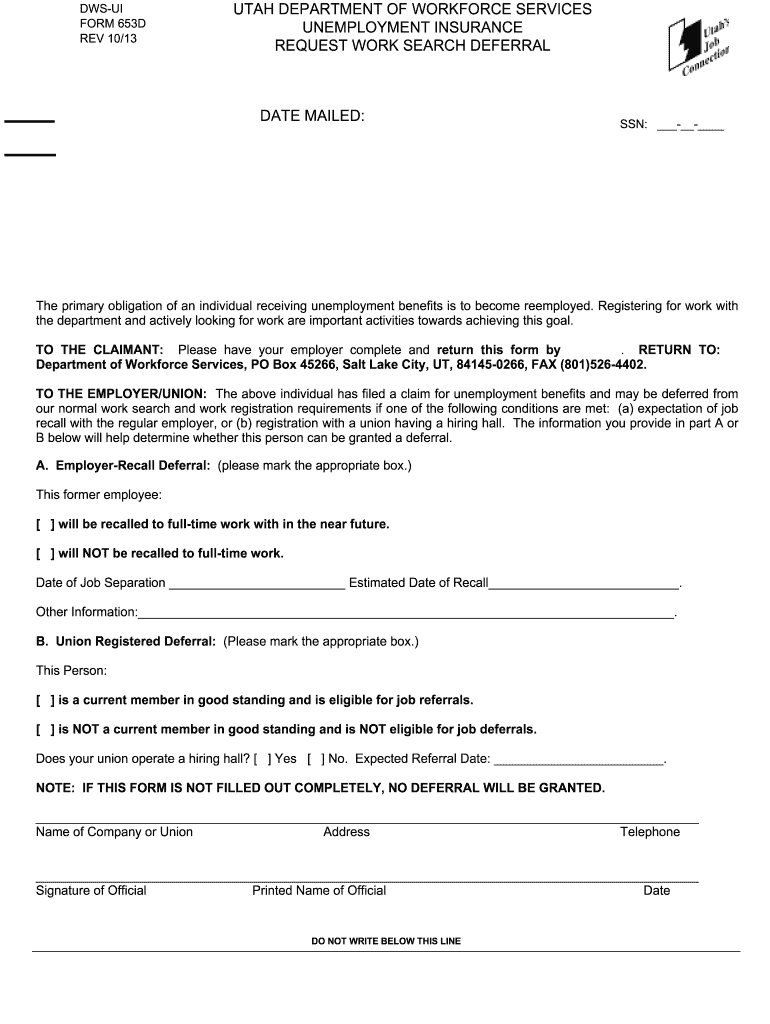
Click ‘Get Form’ to open the deferment Utah Department of Workforce Services 2013 form in our editor.
Begin by entering the date mailed at the top of the form. This is essential for tracking your request.
Fill in your Social Security Number (SSN) in the designated field, ensuring accuracy as this is a critical identifier.
Instruct your employer to complete either Part A or Part B based on your employment situation. They need to mark the appropriate box regarding job recall or union membership.
If applicable, have your employer provide additional information such as the date of job separation and estimated date of recall in Part A, or expected referral date in Part B.
Ensure that all fields are filled out completely, as incomplete forms will not be processed for deferral.
Once completed, save your changes and download the form for submission via mail or fax to the Department of Workforce Services.
Start using our platform today to fill out your deferment form quickly and efficiently!
Fill out deferment utah department of workforce services 2013 form online It's free
See more deferment utah department of workforce services 2013 form versions
We've got more versions of the deferment utah department of workforce services 2013 form form. Select the right deferment utah department of workforce services 2013 form version from the list and start editing it straight away!
DWS form 630Utah dws Form 740Dws Form 126Employment termination form UtahWorkforce Services form 631Department of Workforce Services FormsWorkforce Services 116M formForm 702 Statement of contribution DWS
Security and compliance
At DocHub, your data security is our priority. We follow HIPAA, SOC2, GDPR, and other standards, so you can work on your documents with confidence.
IN SIGNING THIS AGREEMENT, I AM INDICATING MY UNDERSTANDING AND AGREEMENT THAT: Payment must be made in accordance with the Deferred Payment Agreement PlanRead more
paying wages, complete and return this form immediately to the Department of Workforce Services, UI Employer. Accounts Unit, PO Box 45288, Salt Lake City, Utah,Read more
Feb 6, 2020 EnerBank is regulated by the Utah Department of Financial Institutions and the FDIC. 2013 (Form 8-K filed January 29, 2013). 4.1. 2-65973.Read more
Cookie consent notice
This site uses cookies to enhance site navigation and personalize your experience.
By using this site you agree to our use of cookies as described in our Privacy Notice.
You can modify your selections by visiting our Cookie and Advertising Notice.