Ri 1040v 2026

Get Form
1040v Preview on Page 1

Here's how it works

01. Edit your 1040v online
Type text, add images, blackout confidential details, add comments, highlights and more.
02. Sign it in a few clicks
Draw your signature, type it, upload its image, or use your mobile device as a signature pad.
03. Share your form with others
Send ri 1040v via email, link, or fax. You can also download it, export it or print it out.

How to use or fill out ri 1040v with our platform

Form edit decoration
9.5
Ease of Setup
DocHub User Ratings on G2
9.0
Ease of Use
DocHub User Ratings on G2
  1. Click ‘Get Form’ to open it in the editor.
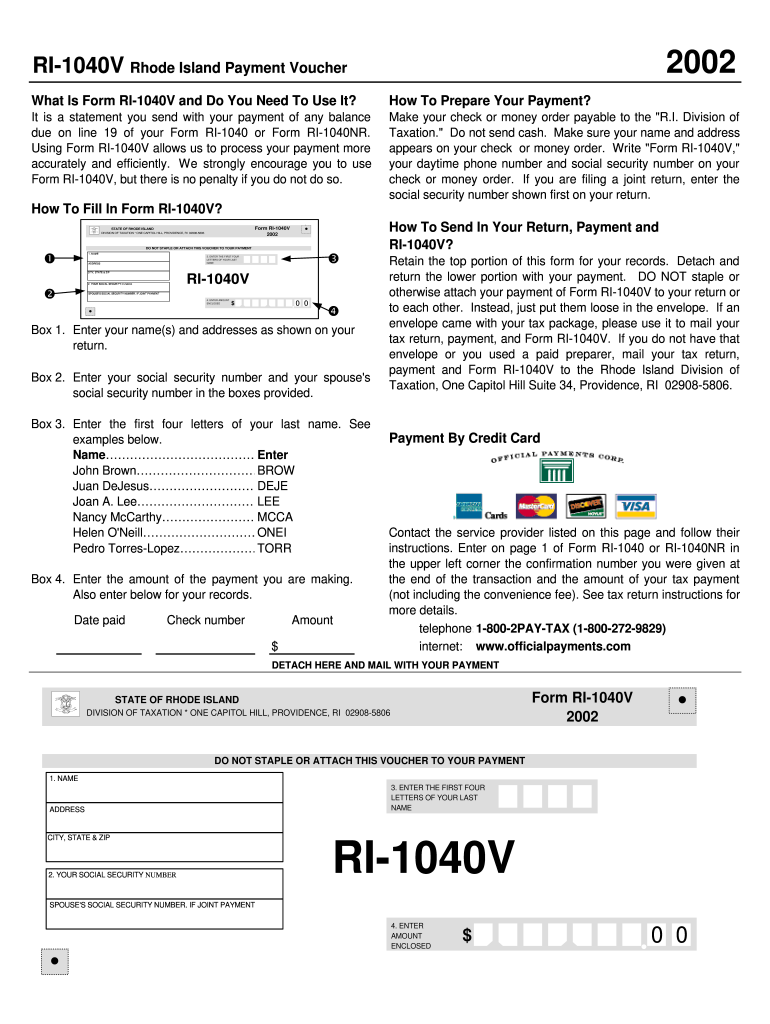
  2. In Box 1, enter your name and address as shown on your tax return. Ensure accuracy for efficient processing.
  3. In Box 2, input your social security number and, if applicable, your spouse's social security number in the designated fields.
  4. For Box 3, enter the first four letters of your last name. Refer to the provided examples for guidance.
  5. In Box 4, specify the amount you are enclosing with this voucher. Double-check this figure for correctness.
  6. Detach the lower portion of the form and retain the top part for your records. Do not staple or attach it to your payment.
  7. Mail your completed form along with your payment to the Rhode Island Division of Taxation using an appropriate envelope.

Start filling out your RI-1040V effortlessly today using our platform!

be ready to get more

Complete this form in 5 minutes or less

Get form

Security and compliance

At DocHub, your data security is our priority. We follow HIPAA, SOC2, GDPR, and other standards, so you can work on your documents with confidence.

Learn more
ccpa2
pci-dss
gdpr-compliance
hipaa
soc-compliance
be ready to get more

Complete this form in 5 minutes or less

Get form