




Here's how it works

01. Edit your form online
Type text, add images, blackout confidential details, add comments, highlights and more.

02. Sign it in a few clicks
Draw your signature, type it, upload its image, or use your mobile device as a signature pad.

03. Share your form with others
Send it via email, link, or fax. You can also download it, export it or print it out.
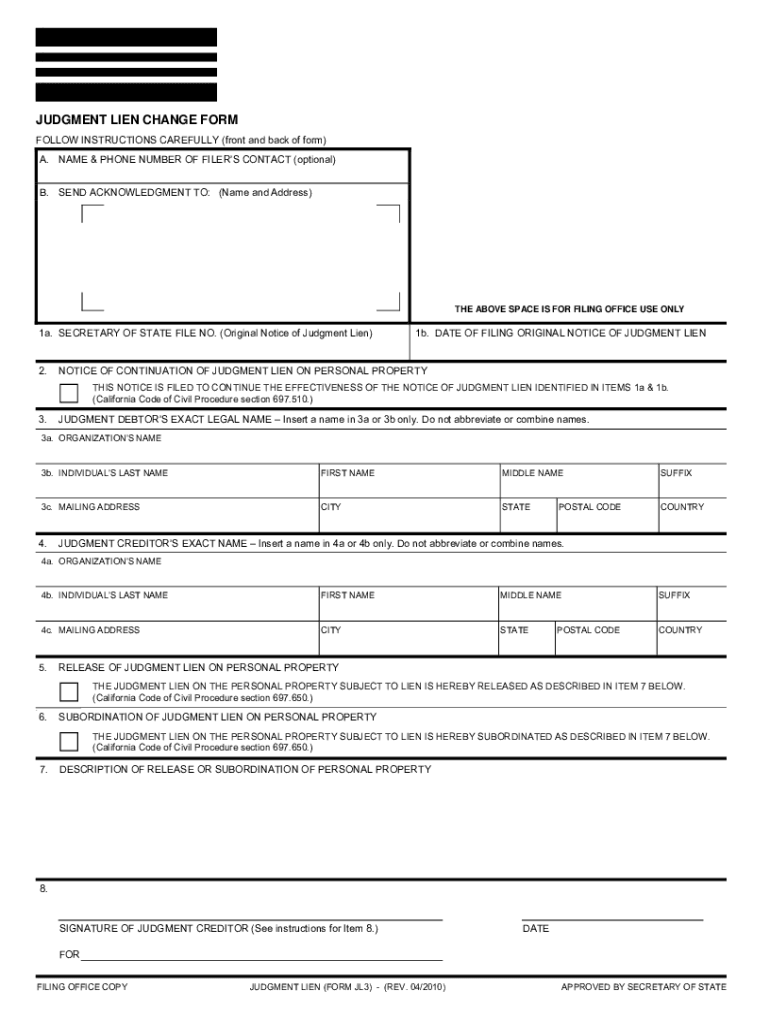
How to use or fill out secretary of state judgment lien change form JL3

- Click ‘Get Form’ to open it in the editor.
- In Section A, optionally provide your name and phone number for contact purposes.
- In Section B, enter the name and mailing address of the filer. This information is required.
- For Item 1a, input the Secretary of State file number from the original Notice of Judgment Lien.
- In Item 1b, enter the filing date of the original Notice of Judgment Lien.
- If applicable, check the box in Item 2 if this form is a Continuation Statement and complete Item 8.
- Complete either Item 3a or 3b with the judgment debtor's name as it appears on the original notice.
- Provide the current address of the judgment debtor in Item 3c, including city and state.
- Fill out either Item 4a or 4b with the judgment creditor's name as per the original notice.
- Enter the current address of the judgment creditor in Item 4c, ensuring it includes city and state.
- If releasing a lien on personal property, check Item 5 and describe it in Item 7.
- If subordinating to another security interest, check Item 6 and describe in Item 7 accordingly.
- In Item 8, ensure that either you or your attorney signs this form. Include your entity's name beneath your signature if applicable.
Start using our platform today to easily complete your Judgment Lien Change Form for free!
Fill out secretary of state judgment lien change fomr jl3 online
It's free
It's free
See more secretary of state judgment lien change fomr jl3 versions
We've got more versions of the secretary of state judgment lien change fomr jl3 form. Select the right secretary of state judgment lien change fomr jl3 version from the list and start editing it straight away!
| Versions | Form popularity | Fillable & printable |
|---|---|---|
| 2022 | 4.8 Satisfied (88 Votes) | |
| 2022 | 4.8 Satisfied (191 Votes) | |
| 2021 | 4.8 Satisfied (121 Votes) | |
| 2020 | 4.7 Satisfied (53 Votes) | |
| 2020 | 4.9 Satisfied (47 Votes) | |
| 2020 | 4.4 Satisfied (41 Votes) | |
| 2020 | 4.2 Satisfied (57 Votes) | |
| 2019 | 4.9 Satisfied (29 Votes) | |
| 2018 | 4.2 Satisfied (65 Votes) | |
| 2017 | 4.2 Satisfied (26 Votes) | |
| 2016 | 4.8 Satisfied (212 Votes) | |
| 2016 | 4.6 Satisfied (53 Votes) | |
| 2016 | 4.8 Satisfied (236 Votes) | |
| 2016 | 4 Satisfied (40 Votes) | |
| 2016 | 5 Satisfied (46 Votes) |
Security and compliance
At DocHub, your data security is our priority. We follow HIPAA, SOC2, GDPR, and other standards, so you can work on your documents with confidence.
Learn more


