Type text, add images, blackout confidential details, add comments, highlights and more.
02. Sign it in a few clicks
Draw your signature, type it, upload its image, or use your mobile device as a signature pad.
03. Share your form with others
Send st556x via email, link, or fax. You can also download it, export it or print it out.
How to use or fill out printable st 556 form with our platform
Ease of Setup
DocHub User Ratings on G2
Ease of Use
DocHub User Ratings on G2
Click ‘Get Form’ to open the printable ST-556 form in the editor.
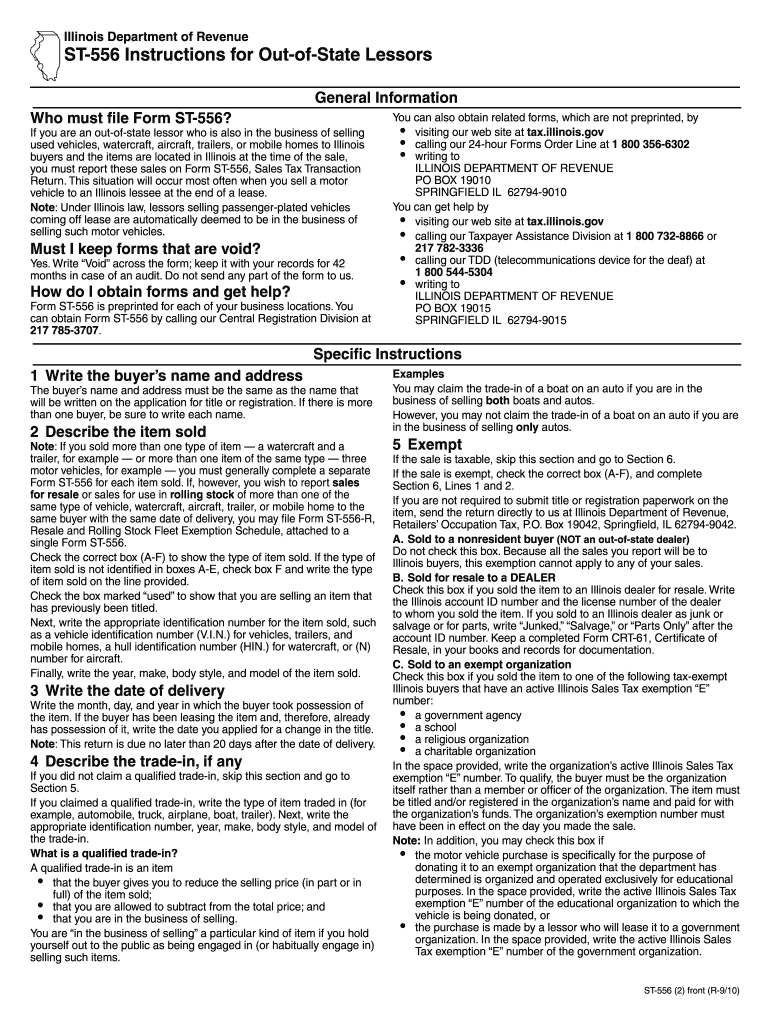
Begin by entering the buyer’s name and address. Ensure it matches the title application details. If there are multiple buyers, list each name.
Describe the item sold by checking the appropriate box (A-F) for the type of item. If selling multiple items, complete a separate form for each unless using Form ST-556-R.
Write the date of delivery, indicating when possession was transferred to the buyer. This must be done within 20 days of delivery.
If applicable, describe any trade-in items by providing their identification numbers and details as required.
Complete Section 5 if the sale is exempt; otherwise, proceed to write down the total price and calculate tax based on your buyer's tax rate.
Finally, ensure all parties sign the return before submission to validate the transaction.
Start filling out your printable ST-556 form today for free using our platform!
ST-556 form downloadST-556 InstructionsPrintable st 556 form illinoisRUT-75 tax form PDFTax form st556 numberRUT-25 Form PDFSt556 amended formIL ST-556
Security and compliance
At DocHub, your data security is our priority. We follow HIPAA, SOC2, GDPR, and other standards, so you can work on your documents with confidence.
Alternatively, you can obtain ST-556 forms preprinted for each of your business locations by calling our Central Registration Division at 217 785-3707.Read more
Web the form st‑556 instructions for leasing companies selling at retail (st‑556[2]) to assist you in completing the return properly. Click here to download theRead more
Cookie consent notice
This site uses cookies to enhance site navigation and personalize your experience.
By using this site you agree to our use of cookies as described in our Privacy Notice.
You can modify your selections by visiting our Cookie and Advertising Notice.