Type text, add images, blackout confidential details, add comments, highlights and more.
02. Sign it in a few clicks
Draw your signature, type it, upload its image, or use your mobile device as a signature pad.
03. Share your form with others
Send wv dmv bill of sale via email, link, or fax. You can also download it, export it or print it out.
How to use or fill out DMV 7 TR 2010 form with our platform
Ease of Setup
DocHub User Ratings on G2
Ease of Use
DocHub User Ratings on G2
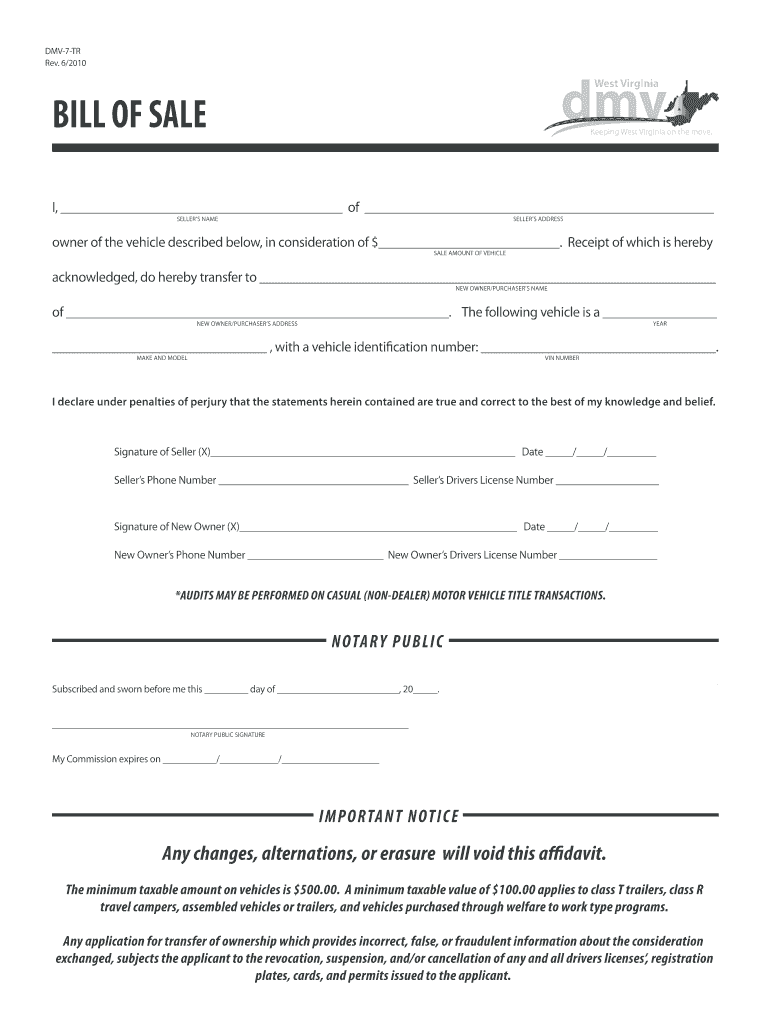
Click ‘Get Form’ to open the DMV 7 TR 2010 form in the editor.
Begin by entering the seller's name and address in the designated fields at the top of the form. Ensure accuracy as this information is crucial for ownership transfer.
In the 'Sale Amount of Vehicle' section, input the agreed sale price. This amount should reflect what was paid for the vehicle.
Next, fill in the new owner's name and address. This identifies who will be taking ownership of the vehicle.
Provide details about the vehicle including its year, make, model, and VIN number. Double-check these entries to avoid any discrepancies.
Both seller and new owner must sign and date their respective sections. Include phone numbers and driver's license numbers for verification purposes.
If required, have a notary public witness your signatures and complete their section to finalize the document.
Start using our platform today to easily fill out your DMV forms online for free!
Can you just write a bill of sale on a piece of paper?
Can a bill of sale be handwritten? While it is common to present a bill of sale in a digital format, you can also create a handwritten bill of sale. Whats most important is to include all of the pertinent details in the bill of sale in order to protect both parties.
Can I get a title with a bill of sale in WV?
Q: What do I need to title my vehicle? A: If you purchase your vehicle from a West Virginia dealer WV Dealer must process for you. If you have a sale between individuals Title signed over, docHubd bill of sale (if less than half of low book value was paid for vehicle).
Is a bill of sale valid without a notary?
Is Notarization Required in California? California does not require a docHubd bill of sale for most private vehicle or boat transactions. However, its often recommendedespecially in the following situations: Selling or buying a high-value boat or vehicle.
How to write a bill of sale in WV?
What information do I need for a bill of sale? Date of purchase. Buyer and sellers contact information. Purchase price. Description of the sold item. Guarantee that the asset is cleared of any liens or claims. Ongoing terms, such as warranties. Signatures of buyer and seller. Signature of a notary public.
Does a bill of sale need to be docHubd in WV?
What Do You Need To Transfer A Car Title In WV? The completed signed original title. If the car is less than 10 years old, the odometer reading must be noted and both parties must sign. Your drivers license. Completed Application for Certificate of Title. Payment for title transfer fees and taxes.
Related Searches
Form DMV 1-TRWV DMV formsApplication for Certificate of Title form DMV 1 TRAffidavit of Transfer of Ownership Without Consideration DMV-5-TRWV DMV Sold vehicle formWV DMV Odometer StatementWV DMV title transfer formDMV-4-TR form
Security and compliance
At DocHub, your data security is our priority. We follow HIPAA, SOC2, GDPR, and other standards, so you can work on your documents with confidence.
Suspended Drivers Licenses and the Problem of Notice
by BL Garrett 2020 Cited by 14 The Department of Motor Vehicles (DMV) sends notices regarding court dates by mail to the address on a persons drivers license, as well as subsequent noticesRead more
Be sure you have the most recent title. DocHubd Bill of Sale Form VR-181 with the signatures of all sellers and buyers should be provided for vehicles 7 orRead more
Cookie consent notice
This site uses cookies to enhance site navigation and personalize your experience.
By using this site you agree to our use of cookies as described in our Privacy Notice.
You can modify your selections by visiting our Cookie and Advertising Notice.