Type text, add images, blackout confidential details, add comments, highlights and more.

02. Sign it in a few clicks
Draw your signature, type it, upload its image, or use your mobile device as a signature pad.

03. Share your form with others
Send uspto forms 2021 via email, link, or fax. You can also download it, export it or print it out.

How to use or fill out uspto new sb0021 form with DocHub
Ease of Setup
DocHub User Ratings on G2
Ease of Use
DocHub User Ratings on G2
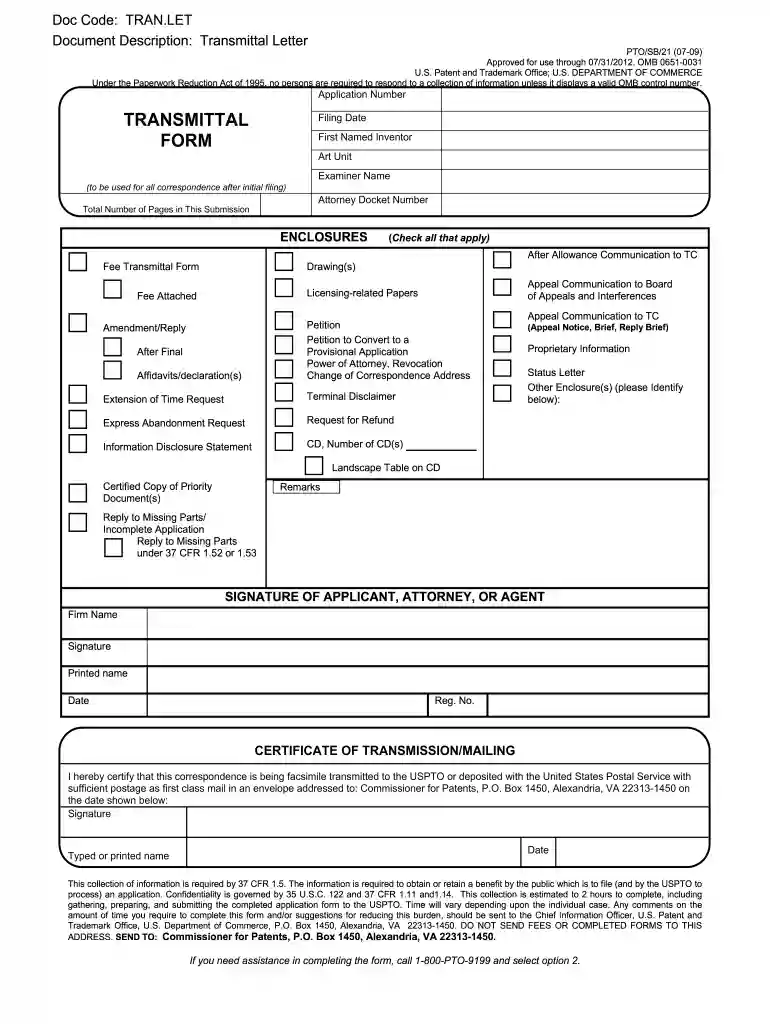
Click ‘Get Form’ to open the uspto new sb0021 form in our platform's editor.
Begin by entering the Application Number and Filing Date at the top of the form. This information is crucial for tracking your submission.
Fill in the First Named Inventor, Art Unit, and Examiner Name fields. These details help identify the primary inventor and facilitate communication with the USPTO.
In the Enclosures section, check all applicable boxes to indicate what documents you are submitting alongside your application. This may include drawings, fee transmittal forms, or other relevant papers.
Sign and date the form in the Signature of Applicant, Attorney, or Agent section. Ensure that you provide your printed name and registration number if applicable.
Finally, complete the Certificate of Transmission/Mailing section to certify that your correspondence is being sent correctly. Include your signature and date here as well.
Start using our platform today to fill out your uspto new sb0021 form online for free!
Commissioner for Patents, P.O. Box 1450, Alexandria, VA 22313-1450. If you need assistance in completing the form, call 1-800-PTO-9199 and select option 2.Read more
Cookie consent notice
This site uses cookies to enhance site navigation and personalize your experience.
By using this site you agree to our use of cookies as described in our Privacy Notice.
You can modify your selections by visiting our Cookie and Advertising Notice.