State complaint form part b 2026

Get Form
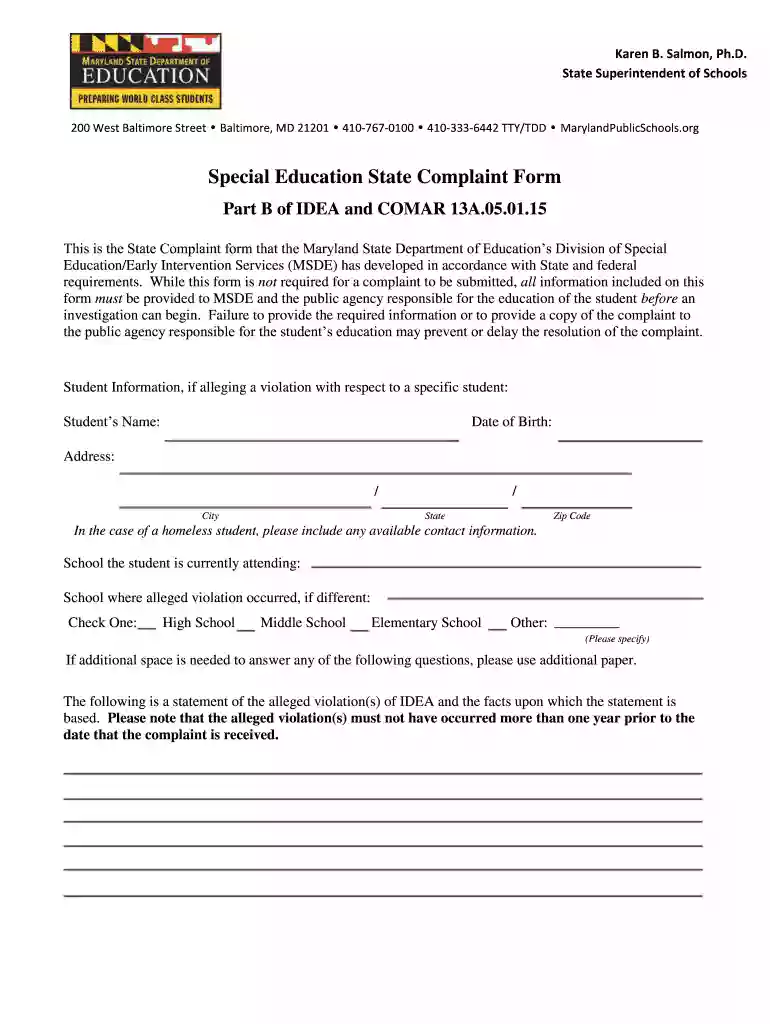
state complaint form part b Preview on Page 1

Here's how it works

01. Edit your form online
Type text, add images, blackout confidential details, add comments, highlights and more.

02. Sign it in a few clicks
Draw your signature, type it, upload its image, or use your mobile device as a signature pad.

03. Share your form with others
Send it via email, link, or fax. You can also download it, export it or print it out.

How to use or fill out state complaint form part b with our platform

Form edit decoration
9.5
Ease of Setup
DocHub User Ratings on G2
9.0
Ease of Use
DocHub User Ratings on G2
  1. Click ‘Get Form’ to open the state complaint form part b in the editor.
  2. Begin by filling in the 'Student Information' section. Enter the student's name, date of birth, address, and school details. If applicable, provide contact information for homeless students.
  3. In the 'Alleged Violations' section, clearly state the nature of the alleged violation(s) of IDEA. Include specific facts and dates related to these violations.
  4. Describe the student's problem in detail, ensuring you include all relevant facts that support your claims.
  5. Provide a proposed resolution or remedy for the issue at hand. This is essential for MSDE to initiate an investigation.
  6. Complete the 'Complainant Information' section with your name, relationship to the student, address, and contact number. Don’t forget to sign and date the form.
  7. Review all entries for accuracy before submitting your completed form to both MSDE and the local school system.

Start using our platform today to fill out your state complaint form part b easily and for free!

See more state complaint form part b versions

We've got more versions of the state complaint form part b form. Select the right state complaint form part b version from the list and start editing it straight away!
Versions Form popularity Fillable & printable
2012 4.8 Satisfied (144 Votes)
2011 4.3 Satisfied (132 Votes)
be ready to get more

Complete this form in 5 minutes or less

Get form

Got questions?

We have answers to the most popular questions from our customers. If you can't find an answer to your question, please contact us.
Contact us
If you have a dispute with a school about your childs special education services, there are a few ways to resolve it. One way is a state complaint. This is basically a letter to your states department of education saying you believe the school broke the law. A state complaint can take a lot of time and effort.
A state complaint is very much what it sounds like-a letter youd write to an official state agency to report an issue, conflict, or problem. Any organization of individual may file a state complaint (including those from another state).
Here are some of the most common types of complaints. Long wait times. Automated phone loops. Unsupportive agents. Inconsistent information. Inconvenient customer service hours. Lack of self-service options. Lack of omnichannel support. Poor product or service quality.
Basic requirements for a state complaint A statement that the school district violated the Individuals with Disabilities Education Act (IDEA) Facts supporting that statement. Your signature and contact information.
More parties are eligible to file a State complaint than a due process complaint. As explained in Question B-3, a State complaint may be filed by an organization or individual, including one from another State. In contrast, only a parent (1) or a public agency (2) may file a due process complaint (3).

Security and compliance

At DocHub, your data security is our priority. We follow HIPAA, SOC2, GDPR, and other standards, so you can work on your documents with confidence.

Learn more
ccpa2
pci-dss
gdpr-compliance
hipaa
soc-compliance
be ready to get more

Complete this form in 5 minutes or less

Get form

People also ask

If you prefer to create a custom complaint form, include these key elements: Customer information fields for name, email, phone number. Complaint details text box for date, time, and location of the incident. Issue description text box for a detailed explanation of the problem.

Related links