Type text, add images, blackout confidential details, add comments, highlights and more.
02. Sign it in a few clicks
Draw your signature, type it, upload its image, or use your mobile device as a signature pad.
03. Share your form with others
Send 20 10206 via email, link, or fax. You can also download it, export it or print it out.
How to use or fill out VA Form 20-10206 with our platform
Ease of Setup
DocHub User Ratings on G2
Ease of Use
DocHub User Ratings on G2
Click ‘Get Form’ to open VA Form 20-10206 in the editor.
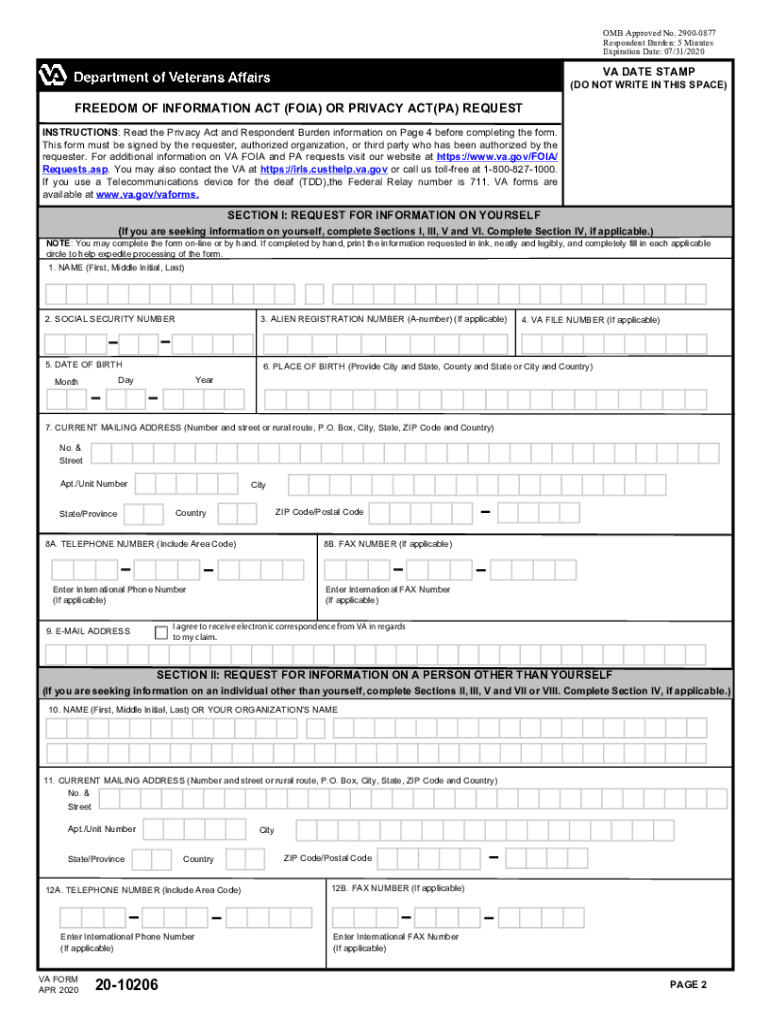
Begin with Section I, where you will provide your full name, Social Security number, and date of birth. Ensure all information is accurate to avoid processing delays.
In Section II, if requesting information on someone else, fill in their details including their name and current mailing address.
Proceed to Section III to specify the type of records you are seeking. Select from options like Claims File or Service Treatment Records.
If applicable, complete Section IV with any remarks that may assist in locating the requested records.
In Section V, indicate your willingness to pay any applicable fees for processing your request.
Finally, sign and date the form in Section VI to certify that all information provided is true and correct.
Start using our platform today for free to streamline your VA Form submission process!
VA form 20-10206 PDFVa form 20 10206 onlineFillable VA Form 20 10206VA FOIA request formPrivacy act request va form 20 10206How to fill out va form 20 10206Request VA C-File onlineVA FOIA request online
Security and compliance
At DocHub, your data security is our priority. We follow HIPAA, SOC2, GDPR, and other standards, so you can work on your documents with confidence.
Freedom of Information Act (FOIA) or Privacy Act (PA) Request (VA Form 20-10206) Use this form to access personal military, compensation, pension, or benefitRead more
Cookie consent notice
This site uses cookies to enhance site navigation and personalize your experience.
By using this site you agree to our use of cookies as described in our Privacy Notice.
You can modify your selections by visiting our Cookie and Advertising Notice.