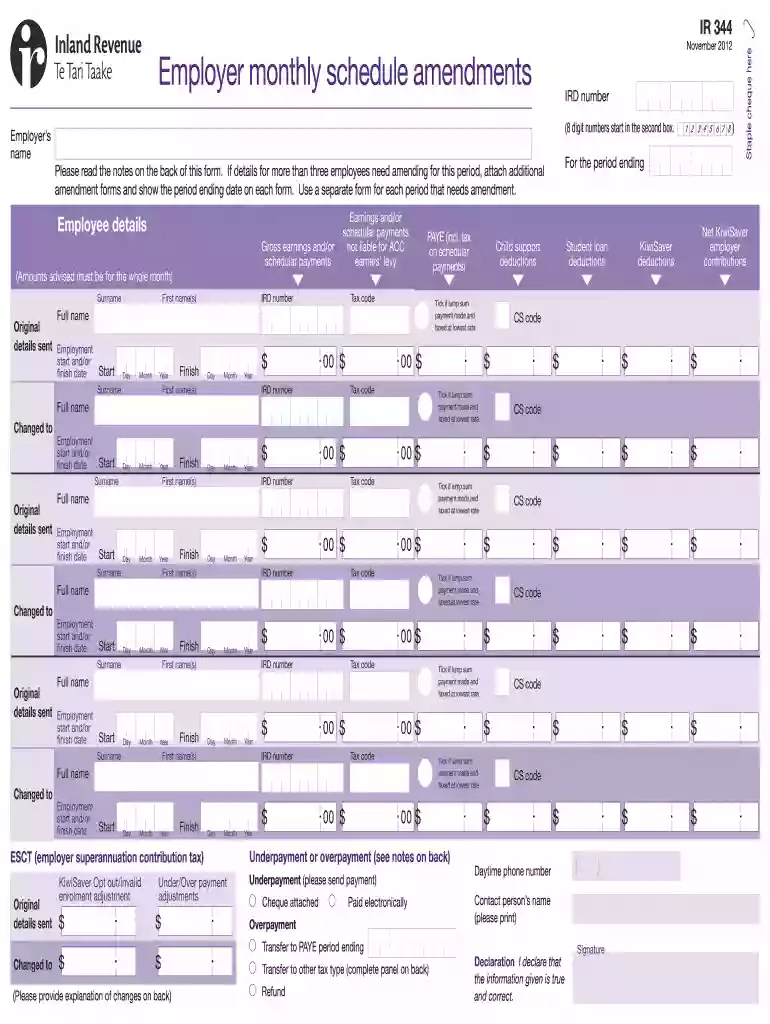
IR 344 Employer monthly schedule amendments - rgmaccountants co 2026

Get Form
IR 344 Employer monthly schedule amendments - rgmaccountants co Preview on Page 1

Here's how it works

01. Edit your form online
Type text, add images, blackout confidential details, add comments, highlights and more.

02. Sign it in a few clicks
Draw your signature, type it, upload its image, or use your mobile device as a signature pad.

03. Share your form with others
Send it via email, link, or fax. You can also download it, export it or print it out.

How to use or fill out IR 344 Employer monthly schedule amendments - rgmaccountants co with our platform

Form edit decoration
9.5
Ease of Setup
DocHub User Ratings on G2
9.0
Ease of Use
DocHub User Ratings on G2
  1. Click ‘Get Form’ to open it in the editor.
  2. Begin by entering the employer’s name and the 8-digit number in the designated fields. Ensure accuracy as this information is crucial for identification.
  3. For each employee needing amendments, fill out their surname, first name(s), IRD number, PAYE tax code, and gross earnings for the month. If applicable, tick the box for lump sum payments taxed at the lowest rate.
  4. If there are changes to employment start or finish dates, provide those details in the respective fields. Use separate forms for multiple periods requiring amendments.
  5. Complete any necessary adjustments for ESCT and KiwiSaver contributions by filling in the relevant sections at the bottom of the form.
  6. Review all entries for accuracy before signing and submitting your form. Attach any additional documentation if required.

Start using our platform today to streamline your document editing and ensure your amendments are processed efficiently!

See more IR 344 Employer monthly schedule amendments - rgmaccountants co versions

We've got more versions of the IR 344 Employer monthly schedule amendments - rgmaccountants co form. Select the right IR 344 Employer monthly schedule amendments - rgmaccountants co version from the list and start editing it straight away!
Versions Form popularity Fillable & printable
2018 4.8 Satisfied (106 Votes)
2012 4.1 Satisfied (26 Votes)
be ready to get more

Complete this form in 5 minutes or less

Get form

Got questions?

We have answers to the most popular questions from our customers. If you can't find an answer to your question, please contact us.
Contact us
Form W2: Wage and Tax Statements are mailed to your home address or routed to your department for distribution. This normally occurs by January 31st of each year. If you do not receive your Form W2 by the end of January, you should contact your Personnel/Payroll Office.
Generally, employers are required to file Forms 941 quarterly. However, some small employers (those whose annual liability for Social Security, Medicare, and withheld federal income taxes is $1,000 or less for the year) may file Form 944 annually instead of Forms 941.
Your employer should send W-2 forms to you no later than Jan. 31 each year, following the W-2 form deadline for federal income tax.
IRS Form W-2, also known as a Wage and Tax Statement, reports an employees income from the prior year and how much tax the employer withheld. Employers send out W-2s to employees in January. A copy goes to the IRS.
Employers are required by the Internal Revenue Service (IRS) to report employees wage and salary information on Form W-2. The amount of federal, state and other income taxes withheld from the employees paycheck during the calendar year is reported on the Form W-2.

Security and compliance

At DocHub, your data security is our priority. We follow HIPAA, SOC2, GDPR, and other standards, so you can work on your documents with confidence.

Learn more
ccpa2
pci-dss
gdpr-compliance
hipaa
soc-compliance
be ready to get more

Complete this form in 5 minutes or less

Get form

People also ask

An amendment is a process for correcting payroll errors that are discovered after payroll processing, including post-payment corrections and payroll tax filing errors.