Type text, add images, blackout confidential details, add comments, highlights and more.
02. Sign it in a few clicks
Draw your signature, type it, upload its image, or use your mobile device as a signature pad.
03. Share your form with others
Send flow application form via email, link, or fax. You can also download it, export it or print it out.
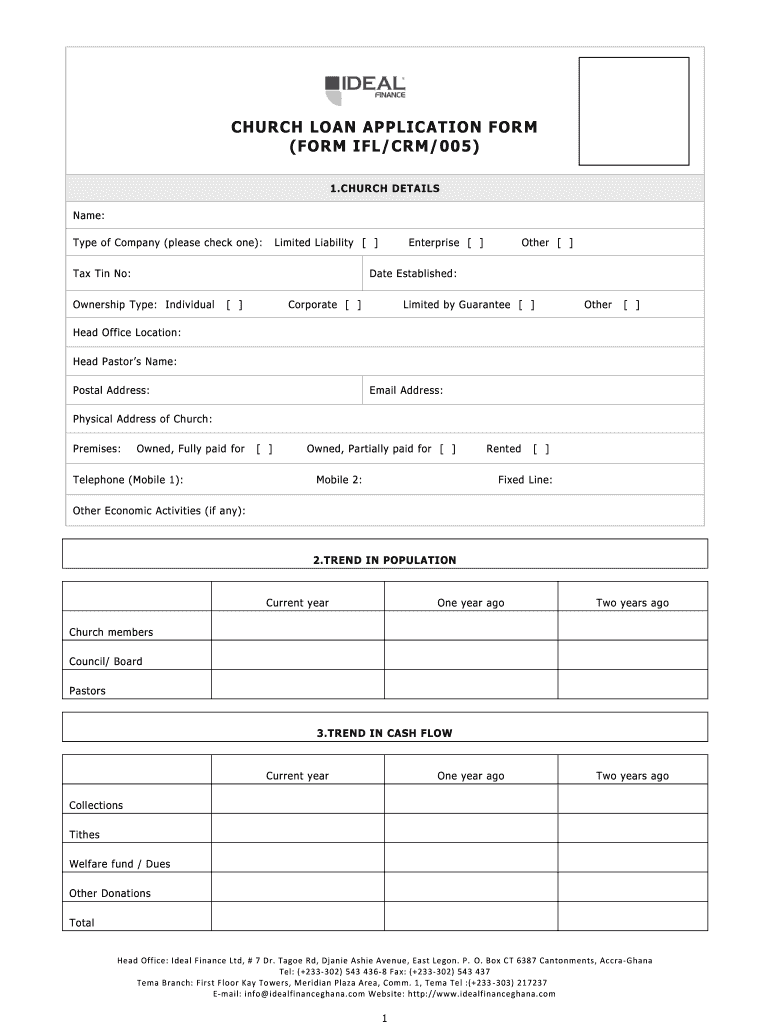
How to use or fill out CHURCH LOAN APPLICATION FORM FORM IFLCRM005
Ease of Setup
DocHub User Ratings on G2
Ease of Use
DocHub User Ratings on G2
Click ‘Get Form’ to open it in the editor.
Begin with the 'CHURCH DETAILS' section. Fill in the church's name, type of company, tax identification number, and date established. Select the ownership type and provide the head office location along with contact details.
Move to the 'TREND IN POPULATION' section. Enter data for current year, one year ago, and two years ago regarding church members, council/board members, and pastors.
In the 'TREND IN CASH FLOW' section, input financial data for collections, tithes, welfare funds, and other donations for the specified years.
Complete the 'CHURCH BOARD OF DIRECTORS' section by providing details about each board member including their responsibilities and contact information.
Fill out 'BANKING RELATIONSHIP DETAILS' with your current bankers' information and authorized signatories.
In 'SOURCES OF FUNDING', list lending institutions from the past two years along with finance nature and status.
'NEW FUNDING REQUIREMENTS' requires you to specify loan amount requested, term in months, proposed installment, purpose of loan, and collateral.
'DIRECTOR’S PERSONAL GUARANTEE' needs personal details of directors including ID type and residential address.
'GUARANTOR' requires similar information as above for any guarantors involved.
'WITNESS' section should be filled out with witness details followed by a declaration confirming all provided information is accurate.
Start filling out your CHURCH LOAN APPLICATION FORM today using our platform for free!
Fill out CHURCH LOAN APPLICATION FORM FORM IFLCRM005 online It's free
Cookie consent notice
This site uses cookies to enhance site navigation and personalize your experience.
By using this site you agree to our use of cookies as described in our Privacy Notice.
You can modify your selections by visiting our Cookie and Advertising Notice.