Definition and Meaning of RIDDOR Form PDF
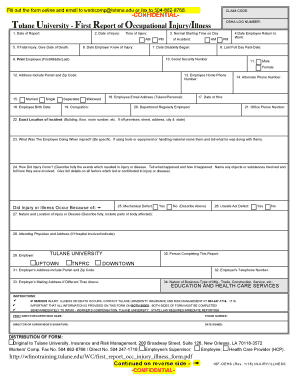
The RIDDOR form, officially known as the Reporting of Injuries, Diseases and Dangerous Occurrences Regulations form, is a legal document used in the United Kingdom to report work-related incidents that result in injury or illness. While this form is crucial for compliance within the UK, it has relevance in organizational health and safety practices for American businesses as well. Understanding the parameters surrounding the RIDDOR form PDF is essential for ensuring workplace safety and adhering to regulatory requirements.
- Purpose of the Form: The primary goal of this form is to provide a standardized method for reporting accidents, injuries, or dangerous occurrences to the relevant health and safety authorities. It serves to document incidents that require investigation and potential remedial actions to prevent future occurrences.
- Legal Framework: The regulations stipulated under the Health and Safety at Work etc. Act of 1974 necessitate that employers report serious workplace injuries, diseases, and any occurrences that pose a risk to personnel safety, thereby enforcing compliance within companies.
- Types of Incidents Covered: The RIDDOR form typically includes reporting for fatal and non-fatal injuries, occupational diseases, and specific dangerous occurrences that could endanger workers or others.
How to Use the RIDDOR Form PDF
Using the RIDDOR form PDF effectively requires a structured approach to ensure all necessary details are accurately captured. The following guidelines outline how to navigate the form:
- Download the Form: Obtain the RIDDOR form PDF from an official source or recognized health and safety agency. Ensure you're accessing the latest version to comply with current regulations.
- Identify the Incident Type: Start by determining the nature of the incident—whether it involves an injury, illness, or dangerous occurrence. Each type may require different sections of the form to be completed.
- Input Detailed Information: Fill in essential details such as:
- Date, time, and location of the incident.
- Description of the incident and the nature of injuries or diseases.
- Individuals involved in the occurrence, including witnesses.
- Submit the Form: Once completed, follow the submission guidelines to send the form to the appropriate health and safety authority, ensuring that it meets any specified deadlines.
Steps to Complete the RIDDOR Form PDF
Completing the RIDDOR form PDF accurately involves several key steps:
- Preparation: Gather all relevant information about the incident before starting the form. This includes witness accounts, medical reports, and the internal reporting policy documentation.
- Access the Form: Open the RIDDOR form PDF file and ensure you are familiar with the layout and sections available for input.
- Section-by-Section Completion:
- Incident Details: Fill out specifics about what occurred, including the environment and conditions leading up to the incident.
- Personal Details: Capture the names, roles, and contact information of those directly affected.
- Outcome: Document the outcomes of the incident, including any medical treatment required and the status of the individuals involved.
- Review and Submit: Once completed, review the entire form for accuracy, ensuring all information is correct and complete, then submit according to the defined submission methods.
Important Terms Related to the RIDDOR Form PDF
Awareness of key terms associated with the RIDDOR form is vital for understanding its implications and requirements:
- Incident: An event that causes harm or could potentially harm individuals within the workplace.
- Reportable Injuries: Injuries that fulfill specific criteria under RIDDOR regulations, such as broken bones, amputations, and serious fractures.
- Dangerous Occurrences: Events that do not necessarily result in injury but pose significant risks, such as equipment failures or releases of hazardous materials.
- Occupational Diseases: Illnesses linked directly to workplace conditions, such as respiratory diseases linked to chemical exposure.
- Compliance: Adhering to legislative requirements established by health and safety authorities relating to workplace safety practices.
Examples of Using the RIDDOR Form PDF
To enhance understanding, let’s explore practical scenarios in which the RIDDOR form PDF would be utilized:
- Workplace Injury: An employee sustains a fracture after slipping on a wet floor in a factory. The employer documents the incident using the RIDDOR form PDF to ensure compliance and facilitate investigations on safety protocols.
- Exposure to Hazardous Materials: A worker develops respiratory issues due to prolonged exposure to toxic fumes. The health and safety manager fills out the RIDDOR report to capture this occupational disease, which aids in reviewing workplace safety measures.
- Equipment Malfunction: If machinery fails, causing a near-miss incident, the employer may still decide to report this as a dangerous occurrence on the RIDDOR form PDF to ensure that risk assessments are reviewed.
Key Elements of the RIDDOR Form PDF
Understanding the essential components of the RIDDOR form PDF can facilitate better completion and compliance:
- Basic Information Sections: These typically include fields for date, time, and location of the incident, allowing for easy tracking and record-keeping.
- Details of Injury or Illness: This section captures comprehensive information regarding the nature and severity of the injury or illness involved.
- Involved Parties: A dedicated area for listing all individuals affected by the incident, including their roles and contact information.
- Witness Accounts: Options to include witness testimony can enhance the clarity of the incident report.
- Recommendations for Future Safety: Spaces may be provided for employers to suggest improvements or changes needed based on the incident's findings.
These comprehensive sections work together to ensure that the RIDDOR form PDF fulfills its purpose of promoting workplace safety and compliance in reporting. Understanding these elements can facilitate better incident management within any organization.