
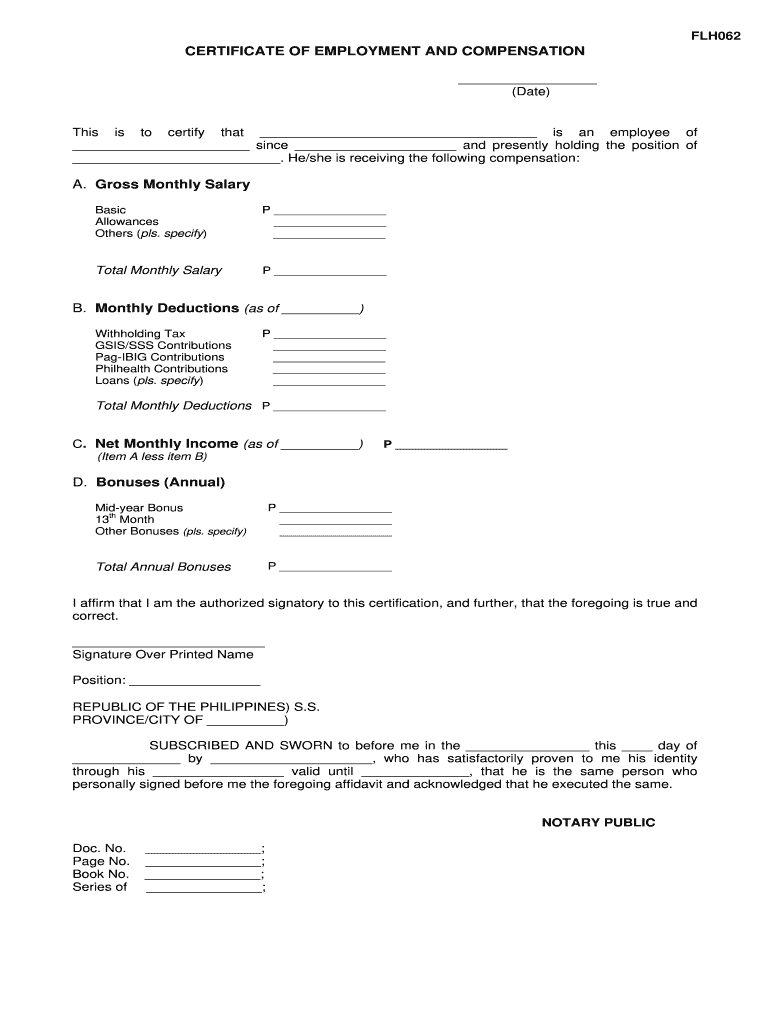




Here's how it works

01. Edit your coe with compensation online
Type text, add images, blackout confidential details, add comments, highlights and more.

02. Sign it in a few clicks
Draw your signature, type it, upload its image, or use your mobile device as a signature pad.

03. Share your form with others
Send certificate of employment with compensation via email, link, or fax. You can also download it, export it or print it out.
How to use or fill out certificate of employment with compensation

- Click ‘Get Form’ to open it in the editor.
- Begin by entering the date at the top of the form. This is essential for record-keeping.
- In the first blank, write the employee's full name. Next, fill in the company name and the date they started working.
- Specify the employee's current position in the designated field.
- For section A, input the gross monthly salary details: Basic salary, allowances, and any other compensation. Sum these amounts for total monthly salary.
- In section B, list all monthly deductions such as withholding tax and contributions. Calculate and enter the total deductions.
- Calculate net monthly income by subtracting total deductions from total monthly salary in section C.
- For section D, detail any annual bonuses like mid-year bonus and 13th month pay. Total these amounts accordingly.
- Finally, ensure that an authorized signatory completes their signature and printed name at the bottom of the form.
Start using our platform today to easily complete your certificate of employment with compensation for free!
Fill out certificate of employment with compensation online
It's free
Security and compliance
At DocHub, your data security is our priority. We follow HIPAA, SOC2, GDPR, and other standards, so you can work on your documents with confidence.
Learn more


Related forms
GRAND PRAIRIE ISD Exit Inventory Checklist - gpisd
The document is an Exit Inventory Checklist for employees of Grand Prairie ISD, outlining the process for returning equi ...
Alarm Application docx
The document is an application form for alarm monitoring services provided by the Dalworthington Gardens Department of P ...

Puc texas WaterSearchUtilityWater Utility Detail - Public Utility Commission of Texas
The document is a water service application from AquaTech Utilities, LLC, detailing the process for applying for water s ...

English-Spanish GlossarySSA - Social Security Administration
The document is an Enrollment Application for the Palm Springs Unified School District (PSUSD) for the 2022/2023 school ...

California condominium planning
The document is an application form for submitting a proposed new condominium or a condominium conversion in Berkeley, C ...

Individual Life Insurance Application for Reinstatement with Evidence of Insurability Virgin Islands
Individual Life Insurance Application for Reinstatement with Evidence of Insurability Virgin Islands
The document is an application for reinstatement of life insurance with evidence of insurability, specifically for resid ...

Alleged pick-axe attackerin jail, bond is $1 million
The Willard Band Booster Club is a volunteer organization that supports the band programs at Willard Public Schools by f ...
Individual distance record form
The document is an Individual Vehicle Distance Record (I.V.D.R.) form used by the State of Connecticut's Department of M ...