Cans massachusetts 2026

Get Form
cans virtual gateway Preview on Page 1

Here's how it works

01. Edit your cans virtual gateway online
Type text, add images, blackout confidential details, add comments, highlights and more.
02. Sign it in a few clicks
Draw your signature, type it, upload its image, or use your mobile device as a signature pad.
03. Share your form with others
Send cans virtual gateway login via email, link, or fax. You can also download it, export it or print it out.

How to use or fill out cans massachusetts with our platform

Form edit decoration
9.5
Ease of Setup
DocHub User Ratings on G2
9.0
Ease of Use
DocHub User Ratings on G2
  1. Click ‘Get Form’ to open the CANS Massachusetts document in the editor.
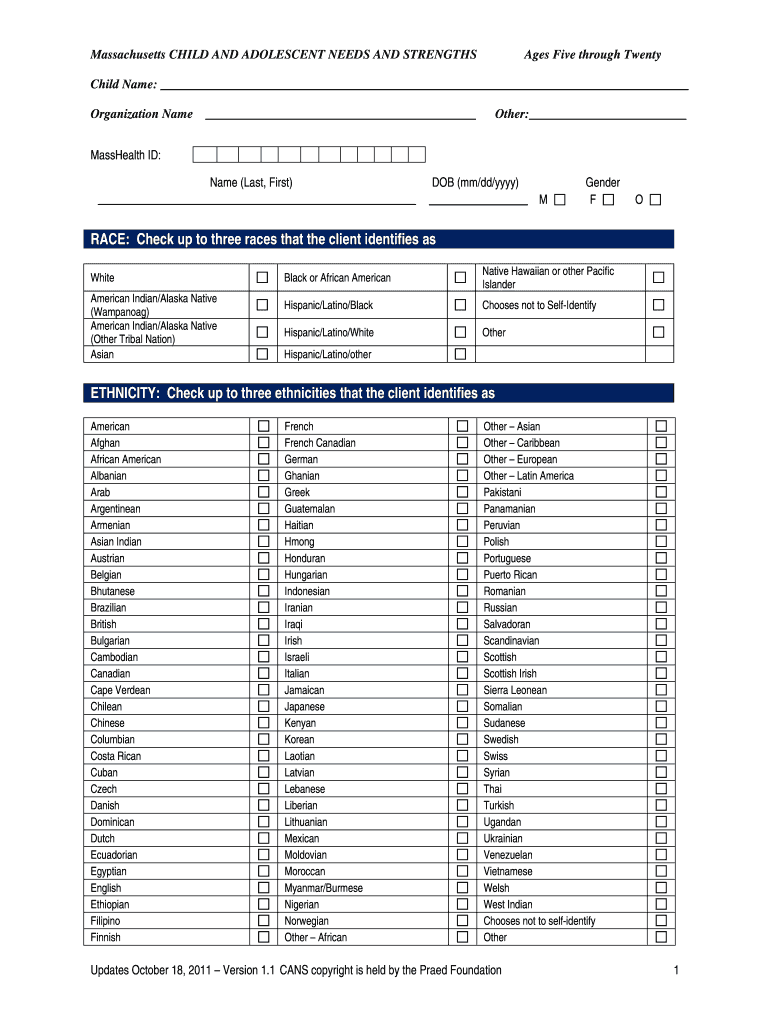
  2. Begin by entering the child's name and organization name in the designated fields at the top of the form.
  3. Fill in the MassHealth ID, date of birth, and gender. Ensure accuracy as this information is crucial for identification.
  4. In the RACE and ETHNICITY sections, check up to three options that best represent the child’s identity. This helps in understanding cultural context.
  5. Identify the primary language and language spoken at home from the provided list. This information is essential for effective communication.
  6. For referrals, select one option from the list that indicates how the child was referred for assessment.
  7. Proceed to assess needs by answering questions regarding serious emotional disturbances (SED) based on your knowledge of the child.
  8. Rate various life domain functioning areas and behavioral/emotional needs using the provided scale. Be honest to ensure accurate support planning.
  9. Finally, review all entries for completeness before saving or sharing your document directly through our platform.

Start filling out your CANS Massachusetts form today for free and streamline your documentation process!

be ready to get more

Complete this form in 5 minutes or less

Get form

Security and compliance

At DocHub, your data security is our priority. We follow HIPAA, SOC2, GDPR, and other standards, so you can work on your documents with confidence.

Learn more
ccpa2
pci-dss
gdpr-compliance
hipaa
soc-compliance