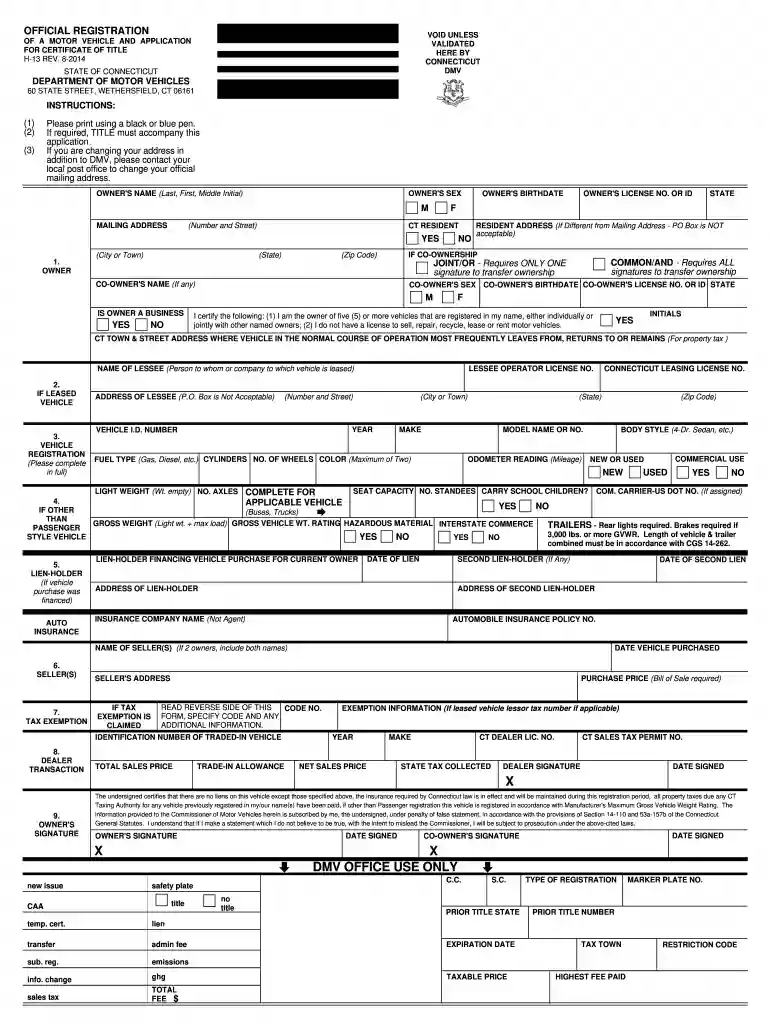
Ct registration form 2026

Get Form
ct dmv registration form online Preview on Page 1

Here's how it works

01. Edit your ct dmv registration form online online
Type text, add images, blackout confidential details, add comments, highlights and more.

02. Sign it in a few clicks
Draw your signature, type it, upload its image, or use your mobile device as a signature pad.

03. Share your form with others
Send ct registration form via email, link, or fax. You can also download it, export it or print it out.

Understanding the CT Registration Form and Its Requirements

The CT registration form is essential for vehicle registration in Connecticut, specifically for cars, motorcycles, and other motor vehicles. This form is crucial for individuals seeking to legally register their vehicles, ensuring compliance with state laws. It is recommended to fill out the CT DMV registration form accurately to avoid delays and complications during the registration process. Individuals can complete this form online, download it as a PDF, or obtain a printed version for submission.

Requirements for Vehicle Ownership

When completing the CT registration form, specific documentation is required to establish ownership and eligibility for registration. Key documents include:

  • Proof of identity: A valid driver's license or state identification is necessary for identification purposes.
  • Vehicle title: If the vehicle is purchased from a dealership, the title signed over to the new owner is required. Additionally, for used vehicles, the previous owner's signature must be present.
  • Bill of Sale: This document outlines the purchase details, including the sale price and date of transaction. It serves as proof of ownership transfer.
  • Emission certificate: Most vehicles require an emissions test in Connecticut, especially if registered for the first time. Ensure the vehicle has passed inspection and the certificate is attached.
  • Insurance documentation: Valid insurance coverage is mandatory before registering the vehicle; you'll need to provide the insurance card or policy number.

Step-by-Step Instructions to Complete the CT DMV Registration Form

Filling out the CT registration form involves several steps. Each one is critical to ensuring that all required information is accurately reported. Here’s a detailed overview:

  1. Access the form: Visit the Connecticut DMV website to access the registration form, either as an online fillable document or download the PDF version.
  2. Input vehicle information:
    • Enter the Vehicle Identification Number (VIN).
    • Provide details such as the make, model, year of manufacture, and odometer reading.
  3. Owner information:
    • Fill in the name and address of the vehicle owner(s).
    • If the vehicle is owned jointly, include details for all co-owners.
  4. Title information:
    • Input the existing title number and check the appropriate box regarding previous ownership status (e.g., purchased, inherited).
  5. Payment details:
    • Include payment information for registration fees and any necessary taxes. Payment methods can vary based on how you submit your form.
  6. Signature:
    • Sign the completed form to verify that the information provided is accurate and complete.

Key Elements and Considerations for Registration

To ensure a smooth registration process, consider the following key elements:

  • Deadlines: There are specific deadlines related to vehicle registration; understanding these timelines ensures compliance and helps avoid potential penalties.
  • Fees: Registration fees vary based on the vehicle type, weight, and registration duration. It's important to verify the applicable fees on the DMV’s website.
  • Transfer Registration: If you are transferring a vehicle registration, ensure you have the necessary documents from the previous registration, such as the old registration certificate and title.

Information on Electronic Signatures and Submission

Connecticut allows for electronic signatures for certain forms related to vehicle registration. Understanding this feature enhances convenience:

  • Legally binding: Digital signatures used in compliance with the ESIGN Act ensure that transactions done online are legally recognized.
  • Submission methods: Vehicles can be registered either online or by mailing the completed form to the DMV. For online submissions, the process can be expedited significantly.

Checking Registration Status Online

Once you have submitted the CT registration form, tracking the status can be helpful:

  • Online portal: Use the Connecticut DMV online services to check the status of your registration. You will often enter your identification details and VIN for updates.
  • Updates and notifications: If there are any issues or requirements after submission, the DMV may notify you via email or postal mail.

Completing the CT registration form accurately and on time is crucial to ensuring that your vehicle is legally compliant to drive on Connecticut roads. Following the outlined steps and understanding the requirements can help streamline the registration process.

be ready to get more

Complete this form in 5 minutes or less

Get form

Security and compliance

At DocHub, your data security is our priority. We follow HIPAA, SOC2, GDPR, and other standards, so you can work on your documents with confidence.

Learn more
ccpa2
pci-dss
gdpr-compliance
hipaa
soc-compliance