




Here's how it works



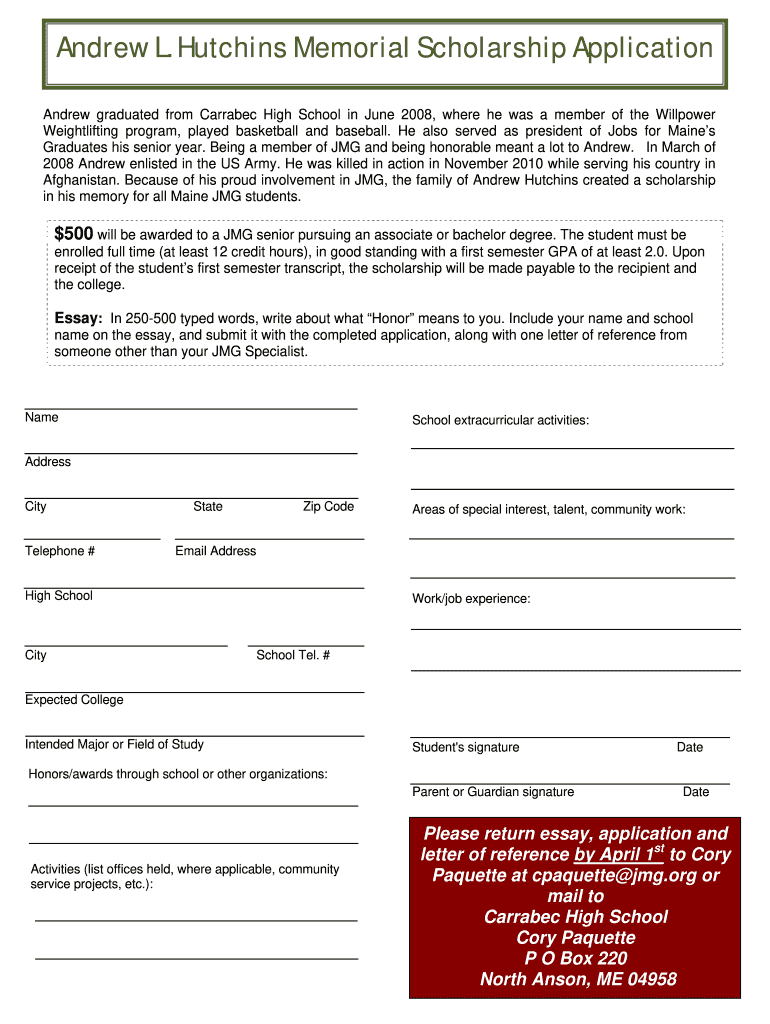
How to use or fill out the Andrew Hutchins Scholarship Application Form

- Click ‘Get Form’ to open it in the editor.
- Begin by entering your personal information, including your name, address, and contact details. Ensure accuracy as this information is crucial for communication.
- In the 'School extracurricular activities' section, list any relevant activities you have participated in. This helps showcase your involvement and commitment.
- Next, provide details about your work experience and any honors or awards you have received. This section highlights your achievements and dedication.
- Compose your essay on what 'Honor' means to you in 250-500 words. Remember to include your name and school name at the top of the essay.
- Finally, gather a letter of reference from someone other than your JMG Specialist and ensure all documents are ready for submission by April 1st.
Start filling out the Andrew Hutchins Scholarship Application today using our platform for free!
It's free
Got questions?
What is the best way to send my andrew hutchins scholarship application form for eSignature?
Upload your andrew hutchins scholarship application form to DocHub (once you’ve set up an account for this). If you need to complete fields in it, use proper tools from the top pane. For instance, drop Signature Fields, assign each to a particular party, and click on Sign → Request signatures from others. Customize your message for your recipients and click Send Request. You can also send your form by fax or as a Signing link instead of using email (you’ll find these options by navigating to the Menu → Send)
Do I need to install software to modify my andrew hutchins scholarship application form?
If you edit your andrew hutchins scholarship application form with DocHub, you only need a stable internet connection and virtually any browser installed on your device. No need to install any third-party applications or research guides. Simply open a tab with DocHub, drag and drop your file, and edit it on the spot.
Security and compliance
At DocHub, your data security is our priority. We follow HIPAA, SOC2, GDPR, and other standards, so you can work on your documents with confidence.
Learn more


